
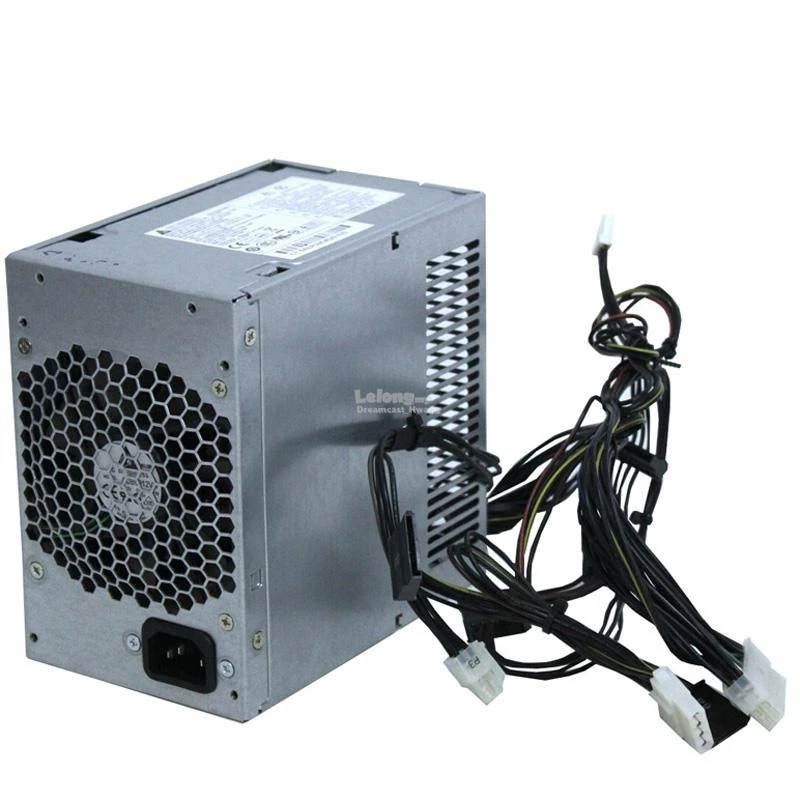
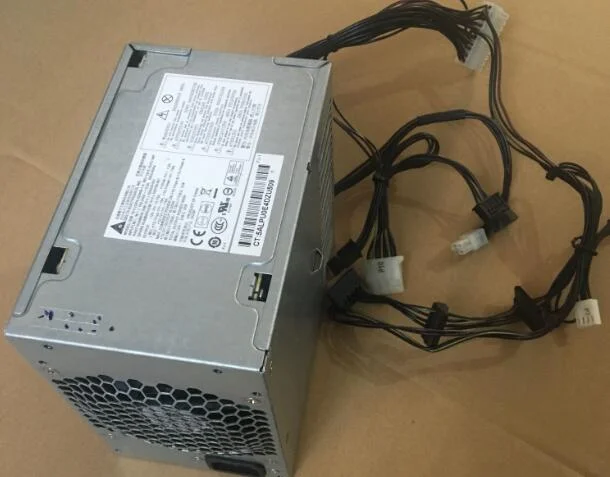
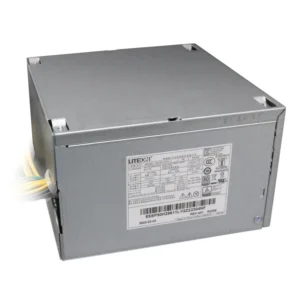
hp z200 workstation power supply
Part Number : 502629-001
Max Output power:320W
Brand:HP
Compatible Model: 535799-001
Package : 1 X Power Supply
Condition: New Or Refurbished
Warranty :1 Year
HP Z200 Z400 Workstations Workstation Power Supply, Delta 320W, DPS 320KB SN: 502629-001, 535799-001
Original HP HP Z200 Workstations workstation power supply, Delta 320W, DPS 320KB SN: 502629-001, 535799-001, power supply with a 20 PIN, a 4PIN, only used in the original HP Z200 original compartment, ordinary motherboard can not be used.
KSh7,000.00
HP Z200 Power Supply Wattage
The HP Z200 Workstation was available in different configurations, so the exact PSU specification should be confirmed against the individual workstation and its original power supply.
Some HP Z200 configurations are associated with a 320W power supply, while other specifications and replacement listings may reference different PSU configurations. For this reason, we do not recommend selecting a replacement based solely on the Z200 model name.
Instead, check the label on the existing power supply and match the replacement to the original unit.
This is particularly important if the workstation has been upgraded with additional storage, expansion cards, or a different graphics card.
HP Z200 320W Power Supply
The 320W HP Z200 power supply is a commonly encountered specification when searching for an original or replacement PSU for the Z200 workstation.
A 320W power supply provides the electrical capacity required by compatible workstation configurations. However, a replacement PSU must also match the physical and electrical requirements of the computer.
When searching for an HP Z200 320W PSU, we recommend checking:
- HP Z200 workstation model
- Original PSU wattage
- HP spare or part number
- PSU manufacturer and model
- Motherboard connectors
- Peripheral power connectors
- Physical dimensions
- Mounting arrangement
A replacement that matches all of these requirements is more appropriate than one selected by wattage alone.
HP Z200 Workstation PSU Compatibility
Compatibility is one of the most important considerations when purchasing an HP Z200 Workstation power supply.
Although a replacement PSU may have the same wattage as the original, it may still be unsuitable if the connectors, dimensions, mounting points, or electrical characteristics differ.
We recommend comparing the original power supply with the replacement before ordering.
The PSU label is especially useful because it provides information that can distinguish one replacement from another. If the original unit is still available, record its model number and HP spare number.
How to Identify an HP Z200 Power Supply
Identifying the correct PSU is straightforward when the original unit is available.
Check the PSU Label
Locate the label attached to the power supply. Look for:
- Manufacturer
- Model number
- HP spare number
- Wattage
- Input voltage
- Output information
- Regulatory information
Confirm the Workstation Model
Make sure the computer is actually an HP Z200 Workstation. HP produced several workstation generations with similar designs, but their power supplies are not necessarily interchangeable.
Compare the Connectors
Check the motherboard and peripheral power connectors. The connector arrangement should correspond to the original PSU and workstation.
Check the Physical Size
The replacement must fit correctly inside the Z200 chassis.
HP Z200 Power Supply for Workstation Repair
A failed power supply does not necessarily mean that an HP Z200 workstation needs to be discarded.
If the processor, motherboard, memory, storage, and other components remain functional, replacing the PSU can be a practical repair solution.
This can be particularly useful for businesses, schools, technicians, computer refurbishers, and users who continue to operate older professional workstations.
A compatible HP Z200 replacement PSU can help restore the system while allowing the remaining hardware to continue serving its intended purpose.
Common Symptoms of a Faulty HP Z200 PSU
Power supply problems can produce different symptoms. These may include:
- The workstation does not power on.
- The computer shuts down unexpectedly.
- The system loses power intermittently.
- Fans or internal components do not operate correctly.
- The workstation becomes unstable during operation.
These symptoms do not automatically prove that the PSU is defective. Faults involving the motherboard, memory, processor, cables, or other components can cause similar problems.
For this reason, appropriate troubleshooting should be completed before purchasing a replacement power supply.
Why the Correct HP Z200 PSU Matters
The HP Z200 is a professional workstation designed to support demanding business and professional applications.
Depending on the configuration, the workstation may contain multiple storage devices, dedicated graphics, expansion cards, and other hardware.
The power supply therefore needs to provide sufficient power for the complete system.
A correctly matched HP Z200 Workstation power supply helps ensure that the workstation receives the power required by its installed hardware.
However, the replacement should not be oversized or selected solely because it has a higher wattage. Compatibility with the workstation’s electrical and physical design remains essential.
HP Z200 PSU for Graphics Card Upgrades
Graphics hardware can affect the power requirements of a workstation.
If an HP Z200 has been upgraded with a dedicated graphics card, we recommend considering the complete configuration when selecting a replacement PSU.
A power supply that was appropriate for the original factory configuration may not necessarily be suitable after a significant hardware upgrade.
Before installing an upgraded graphics card, check its power requirements and confirm that the workstation’s PSU can support the complete system.
HP Z200 Workstation Power Supply Replacement Guide
Replacing an internal power supply requires care.
Before beginning work, shut down the workstation completely and disconnect it from the electrical supply.
We recommend taking a photograph of the existing cable connections before removing the original PSU. This provides a useful reference when installing the replacement.
After removing the original power supply, install the replacement securely using the appropriate mounting points. Reconnect the required power cables and make sure each connection is properly seated.
Do not force any connector into a socket. If the connector does not match, verify compatibility before continuing.
Can You Use a Standard ATX PSU in an HP Z200?
We recommend checking compatibility carefully before installing a standard ATX power supply in an HP Z200.
Some HP workstations use proprietary power connections, wiring arrangements, or physical designs that differ from conventional ATX systems.
Consequently, a standard ATX PSU with the same wattage should not automatically be considered compatible.
The safest approach is to identify the original PSU and match the part number, connectors, dimensions, and electrical specifications.
HP Z200 Workstation Power Supply for Business Use
The HP Z200 can still be useful for organizations maintaining older workstations for compatible applications, testing, education, administration, and other computing tasks.
A replacement PSU can help businesses and technicians keep these systems operational when the original power supply fails.
Replacing an individual failed component can also be more practical than replacing an entire workstation when the remaining hardware is still functional and appropriate for the user’s requirements.
What to Check Before Buying an HP Z200 Power Supply
Before purchasing an HP Z200 Workstation Power Supply, check the following:
1. Confirm the Model
Verify that the computer is an HP Z200 Workstation.
2. Check the Original Wattage
Read the wattage printed on the original PSU.
3. Record the Part Number
Write down the HP spare number and PSU model number.
4. Check the Connectors
Compare all important power connectors with the replacement.
5. Check Physical Dimensions
Make sure the PSU fits the Z200 chassis and mounting points.
6. Check the Hardware Configuration
Consider the installed processor, graphics card, storage devices, memory, and expansion cards.
Buy HP Z200 Workstation Power Supply
The HP Z200 Workstation Power Supply is an essential replacement component for maintaining compatible HP Z200 systems.
When choosing a replacement, we recommend focusing on complete compatibility rather than wattage alone. The correct PSU should match the original power supply’s specifications, connectors, physical design, and the workstation’s hardware configuration.
For customers replacing an original PSU, the information printed on the existing unit provides the most useful starting point. Matching the original HP part number and PSU model can significantly reduce the risk of selecting an incompatible replacement.
At Compvate, we provide computer hardware and replacement components for customers maintaining, repairing, and refurbishing desktop and workstation systems. Visit Compvate to explore available computer hardware and replacement components.
This internal 320-watt power supply unit is engineered as an original equipment manufacturer replacement module for the HP Z200 Workstation tower. It features a unique server-grade multi-rail configuration with wide-ranging active power factor correction, providing stable, heavy-duty electrical current designed specifically to handle enterprise-level architectural applications, dedicated rendering workloads, and mid-range graphic expansions.
- Product Type: Internal Desktop Workstation Power Supply Unit (PSU)
- Form Factor: Custom HP Proprietary ATX / Workstation Tower Fit
- Max Output Power: 320 Watts Continuous Delivery
- Efficiency Rating: 89% Highly Efficient (Active PFC Autosensing)
- AC Input Range: 100V–240V AC ~ 6A (Auto-Switching)
- Input Frequency Range: 50Hz–60Hz
- DC Output Ratings:
-
- +12V_CPU === 16.0A
- +12V_S === 16.0A
- +12V_B === 16.0A
- +12V_G === 12.5A
- -12V === 0.15A
- +11Vsb === 1.74A
-
- Motherboard Connectors:
-
- 1 x Custom HP 20-Pin Main Power Connector
- 1 x 4-Pin ATX +12V CPU Power Connector
-
- Peripheral Connectors:
-
- 4 x Straight SATA Power Connectors
-
- Cooling System: 1 x Integrated Internal Thermally-Controlled Exhaust Fan
- Dimensions: 155mm x 150mm x 95mm
- Compatible HP Spare / Part Numbers: 502629-001, 535799-001
- Compatible Manufacturer Model Numbers: DPS-320KB-1 A, DPS-320KB-1A, DPS-320KB
- System Compatibility: HP Z200 Workstation Convertible Minitower (CMT)
Based on 0 reviews
Be the first to review “hp z200 workstation power supply”
Related products
-
Computer Accessories, Power Supplies
Lenovo Power Supply FRU-54Y8874 For ThinkCentre M92P 3209 SFF
Product Name: Lenovo Power Supply FRU-54Y8874 for ThinkCentre M92P 3209 SFF
Brand: Lenovo
FRU Number: 54Y8874
Power Rating: 240W
Input Voltage: 100-240V AC
Form Factor: TFX
Product Type: Internal desktop power supply / replacement PSU
Compatible System: Lenovo ThinkCentre M92P SFF, including compatible 3209 configurations
Application: Desktop repair, PSU replacement, system maintenance, and workstation restoration
Efficiency: The FRU 54Y8874 is listed as an 85% single-output PSU; individual replacement units should be checked against their own label/specification.
SKU: n/a -
Computer Accessories, Power Supplies
Lenovo ThinkStation P340 (30DJ) Power Supply
- Model Compatibility: Lenovo ThinkStation P340 (30DJ)
- Power Output: 260W / 400W / 500W (varies by SKU)
-
Input Voltage: 100-240V AC
-
Connector Types: 24-pin, 8-pin CPU, SATA, PCIe
-
Cooling: Ultra-quiet internal fan
-
Certifications: 80 PLUS Bronze or higher
SKU: n/a -
Computer Accessories, Power Supplies
Lenovo ThinkCentre M78 M730 M93 M93P SFF Power Supply 240W PS-4241
 Computer Accessories, Power Supplies
Lenovo ThinkCentre M78 M730 M93 M93P SFF Power Supply 240W PS-4241
-
Model: PS-4241-02, PS-4241-01, or equivalent
-
Wattage: 240W output
-
Form Factor: SFF (Small Form Factor)
-
Input Voltage: 100V – 240V AC
-
Connectors: 24-pin main, 4-pin CPU, SATA power
-
Cooling System: Quiet built-in fan
-
Certifications: 80 PLUS Certified
Compatible Lenovo Models
This PSU supports multiple SFF models including:
-
Lenovo ThinkCentre M78 SFF
-
Lenovo ThinkCentre M730 SFF
-
Lenovo ThinkCentre M93 SFF
-
Lenovo ThinkCentre M93P SFF
-
SKU: n/a -












There are no reviews yet.