
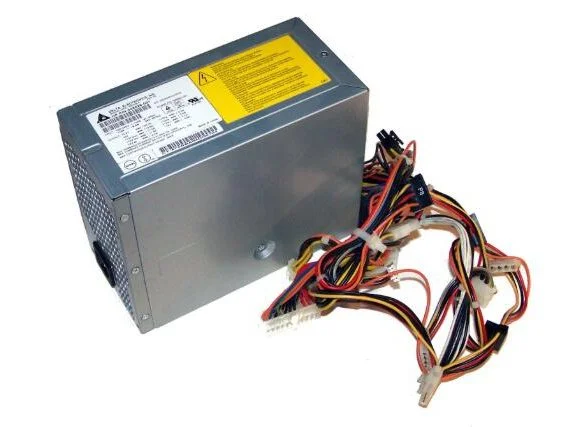
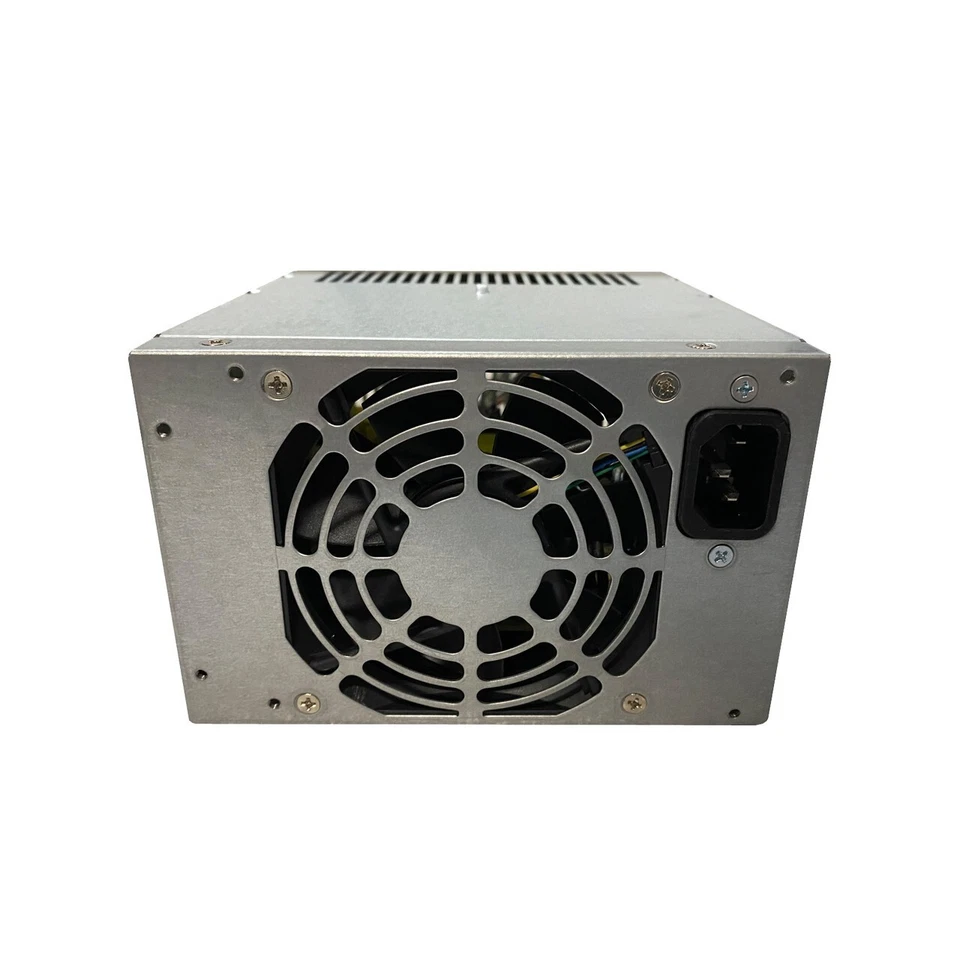
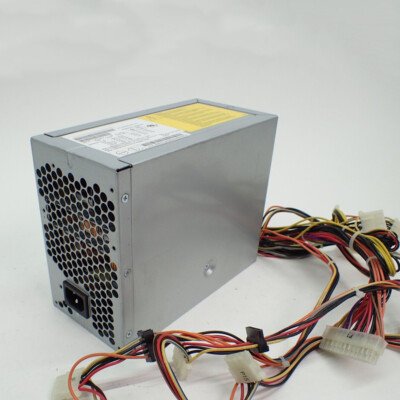
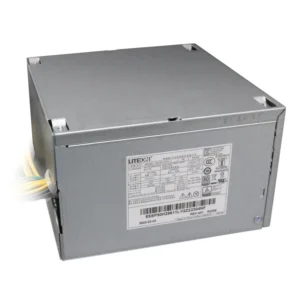
hp xw8200 power supply
- Product Type: Internal Server/Workstation Power Supply Unit (PSU)
- Form Factor: Custom HP Proprietary Workstation EPS Large Block
- Max Output Power: 600 Watts Continuous
- Efficiency Feature: Active Power Factor Correction (APFC)
- AC Input Range: 100V–240V AC (Auto-Switching)
- Input Frequency Range: 50Hz–60Hz
- DC Output Combined Rails:
-
- Max 135W on +5V and +3.3V lines combined
- Max 516W (43A) on +12V lines combined
-
- Motherboard Connectors:
-
- 1 x 24-Pin Primary ATX Main Power Connector
- 1 x 8-Pin EPS CPU Power Connector
- 1 x 4-Pin CPU Supplemental Power Connector
-
- Peripheral & Storage Connectors:
-
- 4 x Straight SATA Power Connectors
- 6 x 4-Pin Large Molex IDE Connectors
- 2 x Floppy Drive Connectors
-
- Cooling System: 1 x Integrated High-Velocity Internal Fan
- Dimensions: 210mm x 150mm x 86mm
KSh6,000.00
HP xw8200 600W Power Supply
The HP xw8200 power supply is rated for up to 600W according to HP’s published specifications. The workstation’s electrical specifications also list a rated AC frequency range of 50–60 Hz/400 Hz and an input current range of 10A/8.6A.
The 600W capacity is particularly relevant because the xw8200 is a workstation platform rather than a basic office desktop. Its supported configurations can include multiple processors, professional graphics hardware, several storage devices, and expansion cards.
When replacing the PSU, however, we recommend checking the original power supply label rather than relying on wattage alone.
HP xw8200 Workstation PSU Replacement
A replacement HP xw8200 PSU can be a practical solution when an existing power supply has failed. Replacing the PSU may allow the rest of the workstation hardware to remain in service.
This can be useful for businesses, technicians, schools, computer refurbishers, and users maintaining older professional workstations.
Before ordering a replacement, compare the original PSU’s:
- Power rating
- Part number
- Model number
- Connectors
- Physical dimensions
- Mounting arrangement
- Electrical specifications
A PSU with the correct wattage but incompatible connectors or dimensions may not be suitable.
HP xw8200 Power Supply Specifications
The HP xw8200’s published specifications provide several useful technical details.
| Specification | Details |
|---|---|
| Workstation | HP xw8200 |
| Maximum Rated Power | 600W |
| AC Frequency | 50–60 Hz / 400 Hz |
| Rated Input Current | 10A / 8.6A |
| Processor Platform | Intel Xeon |
| Memory Type | Registered ECC DDR2 |
| Workstation Type | Professional Workstation |
HP lists the xw8200 as supporting Intel Xeon processors, with configurations including 2.8GHz, 3.2GHz, 3.4GHz, and 3.6GHz processors, as well as up to 16GB of registered ECC DDR2 memory.
These specifications help explain why the xw8200 requires a substantially more capable power supply than many conventional desktop computers.
HP xw8200 PSU Compatibility
Compatibility is one of the most important considerations when selecting an HP xw8200 Workstation power supply.
The xw8200 is an older workstation platform with hardware requirements that should be matched carefully. A generic desktop PSU should not automatically be considered compatible simply because it offers 600W of power.
We recommend comparing the replacement against the original unit before installation.
The safest identification method is to check the label on the existing PSU and record the HP spare number, manufacturer model, wattage, and electrical specifications.
How to Identify an HP xw8200 Power Supply
If the original power supply is still available, identifying the replacement is easier.
Check the PSU Label
Look for the information printed on the power supply label. This can include the manufacturer’s model number, HP spare number, power rating, input requirements, and output specifications.
Confirm the Workstation
Make sure the computer is an HP xw8200 Workstation. HP maintains an official support page for the xw8200 with product specifications and support information.
Check the Connectors
Compare the connectors on the original PSU with the replacement. This is particularly important when considering a non-original replacement.
Check the Physical Design
The replacement needs to fit securely inside the xw8200 chassis and align with the original mounting arrangement.
Why the 600W HP xw8200 PSU Matters
The 600W HP xw8200 power supply provides the capacity required by supported workstation configurations.
The xw8200 was designed for professional workloads and could be configured with dual Xeon processors and workstation-class expansion hardware. HP’s specifications list registered ECC DDR2 memory support up to 16GB.
Consequently, the PSU needs to be considered as part of the complete workstation configuration.
If the workstation has been modified with additional storage, graphics hardware, or expansion cards, its power requirements should be checked before selecting a replacement.
HP xw8200 Power Supply for Workstation Repair
A failed PSU can prevent an otherwise functional workstation from operating.
Symptoms associated with a suspected power-supply problem can include:
- The workstation does not start.
- The system loses power unexpectedly.
- The computer shuts down during operation.
- Internal components do not receive power.
- The workstation becomes unreliable.
These symptoms can have other causes, so they should not automatically be attributed to the PSU.
Once the PSU has been properly identified as the faulty component, replacing it with a compatible unit can restore the workstation.
HP xw8200 Power Supply for Professional Workstations
The xw8200 was designed for professional applications requiring workstation-class hardware. HP’s specifications identify the system as supporting Intel Xeon processors and registered ECC memory.
For customers maintaining older workstation hardware, a replacement power supply can therefore be an important component for continued operation.
A PSU replacement may be useful for:
- Workstation repair
- Computer refurbishment
- Business hardware maintenance
- Educational workstation maintenance
- Legacy application systems
- Hardware testing environments
HP xw8200 PSU and Graphics Hardware
The installed graphics hardware should be considered when selecting a replacement power supply.
Professional workstations can be configured with dedicated graphics cards and other expansion hardware. These components can increase the overall power requirements of the system.
If an xw8200 has been upgraded from its original configuration, check the complete hardware setup before selecting a replacement PSU.
The 600W rating should therefore be considered together with the workstation’s actual configuration rather than as an isolated specification.
Can You Use a Standard ATX PSU in an HP xw8200?
We recommend caution when considering a standard ATX PSU as an xw8200 replacement.
The important question is not simply whether the replacement provides 600W. The PSU must also provide the correct connections and fit the workstation’s physical and electrical requirements.
Before using a non-original replacement, compare the motherboard power connections, auxiliary power connections, physical dimensions, mounting points, and electrical specifications with the original PSU.
If the connectors do not match, the replacement should not be installed without confirming compatibility.
HP xw8200 Power Supply Replacement Guide
Before replacing the internal power supply, shut down the workstation completely and disconnect it from the electrical supply.
Document the existing cable connections before removing the original PSU. A photograph can provide a useful reference during reassembly.
Remove the original unit according to the workstation’s hardware design and install the replacement securely.
Before powering the workstation again, check that all required connections are properly seated.
If any connector differs from the original, stop and verify compatibility rather than forcing the connection.
What to Check Before Buying an HP xw8200 PSU
Before purchasing an HP xw8200 Workstation Power Supply, check these important details:
1. Workstation Model
Confirm that the computer is an HP xw8200 Workstation.
2. Original PSU Wattage
HP’s published xw8200 specification identifies a maximum rated power of 600W.
3. PSU Part Number
Record the HP spare number or manufacturer model number from the existing PSU.
4. Connectors
Compare the motherboard, processor, storage, and expansion-card power connections.
5. Physical Dimensions
Make sure the replacement fits the xw8200 chassis and mounting arrangement.
6. Installed Hardware
Consider the processors, graphics cards, drives, memory, and expansion cards installed in the workstation.
Buy HP xw8200 Workstation Power Supply
The HP xw8200 Workstation Power Supply is an essential replacement component for maintaining compatible HP professional workstations.
HP’s published specifications identify the xw8200 with a maximum rated power of 600W, while the workstation itself supports dual Intel Xeon processor configurations and registered ECC DDR2 memory.
When choosing a replacement, we recommend matching the original PSU’s wattage, part number, connectors, physical design, and electrical specifications.
This approach helps reduce compatibility problems and provides a better basis for selecting the correct replacement power supply.
At Compvate, we provide computer hardware and replacement components for customers maintaining and repairing desktop and workstation systems. Visit Compvate to explore available computer hardware and replacement components.
This internal 600-watt power supply unit is engineered as an original equipment manufacturer replacement module for the high-performance dual-processor HP xw8200 Workstation. It utilizes heavy-duty server-grade engineering with multi-rail active power factor correction to safely handle dual Intel Xeon configurations and enterprise-grade storage array architectures.
- Product Type: Internal Server/Workstation Power Supply Unit (PSU)
- Form Factor: Custom HP Proprietary Workstation EPS Large Block
- Max Output Power: 600 Watts Continuous
- Efficiency Feature: Active Power Factor Correction (APFC)
- AC Input Range: 100V–240V AC (Auto-Switching)
- Input Frequency Range: 50Hz–60Hz
- DC Output Combined Rails:
-
- Max 135W on +5V and +3.3V lines combined
- Max 516W (43A) on +12V lines combined
-
- Motherboard Connectors:
-
- 1 x 24-Pin Primary ATX Main Power Connector
- 1 x 8-Pin EPS CPU Power Connector
- 1 x 4-Pin CPU Supplemental Power Connector
-
- Peripheral & Storage Connectors:
-
- 4 x Straight SATA Power Connectors
- 6 x 4-Pin Large Molex IDE Connectors
- 2 x Floppy Drive Connectors
-
- Cooling System: 1 x Integrated High-Velocity Internal Fan
- Dimensions: 210mm x 150mm x 86mm
-
- Compatible HP Spare / Part Numbers: 345526-001, 345526-002, 345526-003, 345643-001
- Compatible Manufacturer Model Numbers: DPS-600NB, DPS-600NB A
- System Compatibility: HP xw8200 Workstation Tower
Based on 0 reviews
Be the first to review “hp xw8200 power supply”
Related products
-
Computer Accessories, Power Supplies
Lenovo ThinkStation P340 (30DJ) Power Supply
- Model Compatibility: Lenovo ThinkStation P340 (30DJ)
- Power Output: 260W / 400W / 500W (varies by SKU)
-
Input Voltage: 100-240V AC
-
Connector Types: 24-pin, 8-pin CPU, SATA, PCIe
-
Cooling: Ultra-quiet internal fan
-
Certifications: 80 PLUS Bronze or higher
SKU: n/a -
Apple Mackbook Chargers, Computer Accessories, Laptop Chargers
Macbook pro 2016 charger 61W USB-C Power Adapter
 Apple Mackbook Chargers, Computer Accessories, Laptop Chargers
Macbook pro 2016 charger 61W USB-C Power Adapter
-
Product Type: Power Adapter
-
Output Power: 61W
-
Connector Type: USB-C
-
Input Voltage: 100–240V AC
-
Power Delivery: USB-C PD
-
Compatibility: MacBook Pro 13-inch (2016)
-
Condition: Authentic, tested, and verified
This charger meets Apple’s standards for safe, efficient, and reliable charging.
SKU: n/a -
-
Apple Mackbook Chargers, Computer Accessories, Laptop Chargers
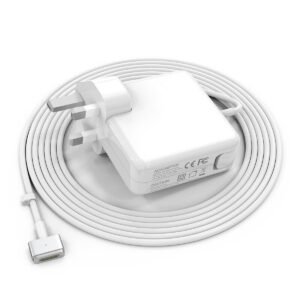
Apple 45w magsafe 2 power adapter for macbook air
 Apple Mackbook Chargers, Computer Accessories, Laptop Chargers
Apple 45w magsafe 2 power adapter for macbook air
-
Product Type: Power Adapter
-
Output Power: 60W
-
Connector Type: MagSafe T-Tip
-
Input Voltage: 100–240V AC
-
Output Voltage: 16.5V
-
LED Indicator: Yes
-
Compatibility: MacBook Pro models using MagSafe T-Tip
-
Condition: Tested and verified
This charger is engineered for safe charging and long-term reliability.
SKU: n/a -












There are no reviews yet.