
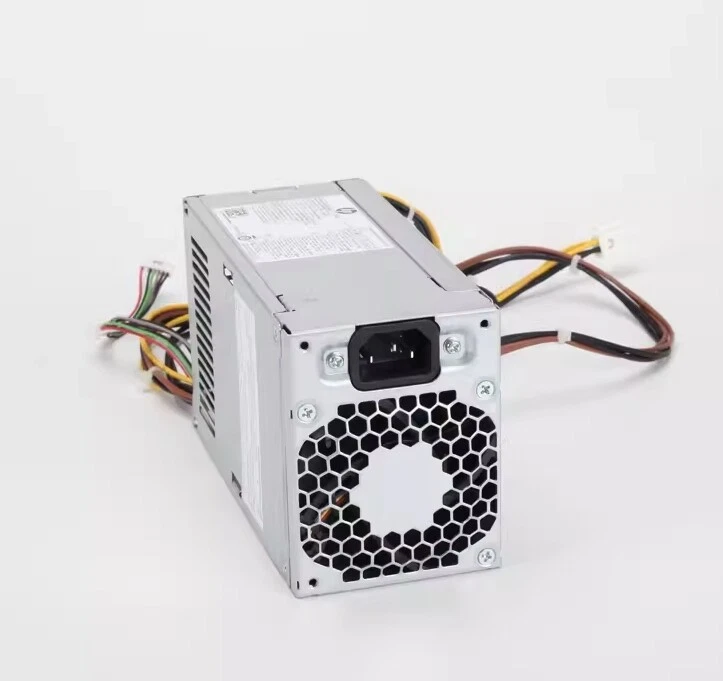
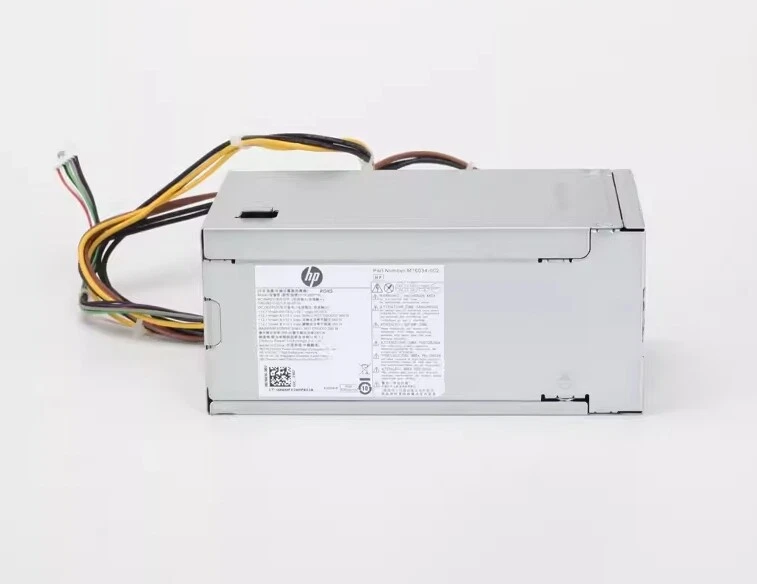
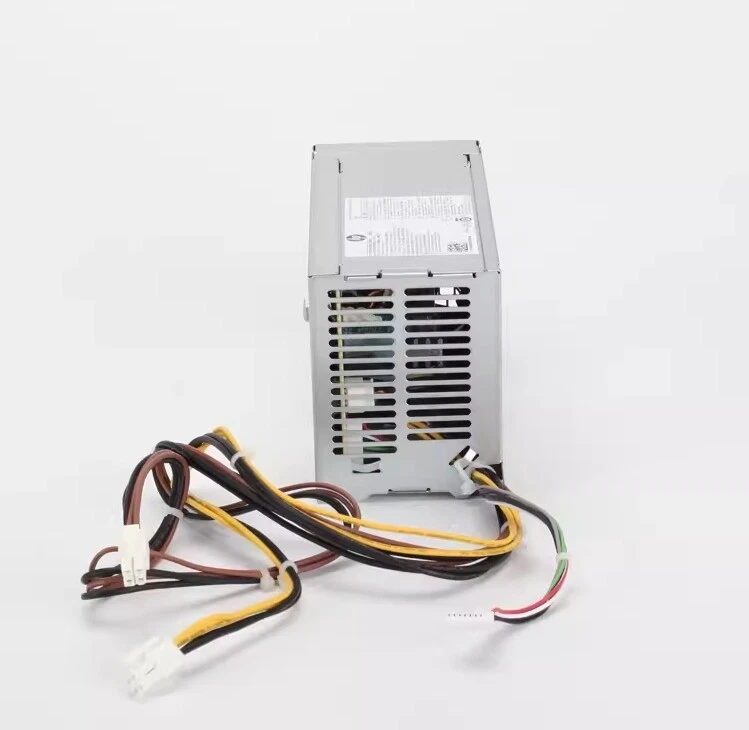
HP ProDesk 600G8 480G9 MT Power Supply D19-260P1B 260W M76034-002
- Manufacturer: HP / Hewlett Packard Enterprise (Manufactured by Lite-On / Delta)
- Model Number: D19-260P1B
- Alternate Model Number: DPS-260AB-46 A, PA-2261-2A
- HP Spare Part Number: M76034-002
- HP Part Number: M75253-001
- Device Type: Internal Business Desktop Power Supply
- Form Factor: Proprietary HP Microtower Layout
- Maximum Output Power: 260 Watts continuous
- Input Voltage Range: 100V – 240V AC (Auto-Ranging)
- Input Frequency: 50Hz – 60Hz
- Efficiency Certification: 80 PLUS Gold or Platinum Certified (Depending on individual batch configuration)
- Cooling System: Integrated 1 x dedicated active cooling fan with dynamic thermal speed management
KSh5,000.00
HP ProDesk 600 G8 480 G9 MT Power Supply D19-260P1B 260W M76034-002
The HP ProDesk 600 G8 480 G9 MT Power Supply D19-260P1B 260W M76034-002 is a replacement desktop power supply designed for compatible HP ProDesk and HP business desktop configurations.
This PSU is identified by the D19-260P1B model and HP part number M76034-002, with a rated output of 260W. These identification details are particularly useful when replacing an original HP power supply and looking for a matching OEM or compatible unit.
For the best results, we recommend checking the computer model, chassis type, PSU model, HP part number, wattage, connectors, physical dimensions, and electrical specifications before purchasing.
HP ProDesk 600 G8 MT Power Supply
The HP ProDesk 600 G8 MT is a business desktop platform designed for professional and office environments.
When replacing its power supply, it is important to identify the correct MT or Microtower configuration. HP produces desktop computers in several different form factors, and power supplies can differ considerably between them.
The D19-260P1B 260W PSU should therefore be matched against the original unit before installation.
Key identification details include:
- PSU Model: D19-260P1B
- Power Rating: 260W
- HP Part Number: M76034-002
- Form Factor: MT / Microtower configuration
- Application: HP desktop power supply replacement
HP ProDesk 480 G9 MT Power Supply
The HP ProDesk 480 G9 MT is another compatible system reference associated with this power supply listing.
When searching for an HP ProDesk 480 G9 MT power supply, using the PSU model and HP part number together with the computer model can provide a more precise product search.
Useful search terms include:
- HP ProDesk 480 G9 MT power supply
- HP 480 G9 260W PSU
- D19-260P1B power supply
- M76034-002 power supply
- HP M76034-002 PSU
- HP ProDesk 480 G9 power supply 260W
Using the complete identification information can help distinguish the correct PSU from other HP power supplies.
D19-260P1B 260W Power Supply
The D19-260P1B is the PSU model reference.
The 260W rating identifies the nominal power output of the unit.
When replacing a PSU, we recommend checking the original label for the complete electrical specification rather than relying on wattage alone.
Two power supplies with the same wattage may have different connectors, dimensions, cable configurations, or electrical characteristics.
The model number D19-260P1B therefore provides an important additional identification reference.
HP M76034-002 Power Supply
M76034-002 is the HP part number associated with this power supply.
Searching by the HP part number can make it easier to locate the correct replacement because HP uses different PSU part numbers for different desktop systems and configurations.
Customers looking for this PSU may search using:
M76034-002
D19-260P1B
260W HP power supply
HP ProDesk 600 G8 MT PSU
HP ProDesk 480 G9 MT PSU
Using several identifiers together gives a clearer description of the required component.
HP ProDesk 600 G8 480 G9 Power Supply Specifications
| Specification | Details |
|---|---|
| Compatible Systems | HP ProDesk 600 G8 / 480 G9 MT configurations |
| PSU Model | D19-260P1B |
| HP Part Number | M76034-002 |
| Power Rating | 260W |
| Form Factor | MT / Microtower |
| Product Type | Desktop Power Supply |
| Application | Replacement / Repair |
The original PSU label should be checked for the complete input voltage, output ratings, connector configuration, dimensions, and other electrical specifications before ordering.
HP ProDesk 600 G8 260W PSU Compatibility
Compatibility is one of the most important considerations when purchasing an HP ProDesk 600 G8 power supply.
The replacement should be checked against the original PSU for:
- D19-260P1B model number
- M76034-002 HP part number
- 260W power rating
- Motherboard power connector
- CPU power connector
- Storage connectors
- Peripheral connections
- Physical dimensions
- Mounting points
- Electrical specifications
The MT designation is also important because HP ProDesk systems are available in multiple form factors.
HP ProDesk 480 G9 260W Power Supply Replacement
If the original power supply in an HP ProDesk 480 G9 MT has failed, a correctly matched 260W replacement PSU can help restore the computer.
Common symptoms associated with a faulty power supply may include:
- The computer does not start.
- The system loses power unexpectedly.
- The computer shuts down during operation.
- Fans fail to operate.
- Storage devices do not receive power.
- The system becomes unstable.
These symptoms can also be caused by other hardware components. We recommend diagnosing the system properly before replacing the PSU.
How to Identify the HP D19-260P1B Power Supply
The easiest way to confirm the PSU is to inspect its label.
Look for:
Model: D19-260P1B
HP Part Number: M76034-002
Power Rating: 260W
Input: Check the original PSU label
Output: Check the original PSU label
Connector Information: Compare with the existing PSU
A clear photograph of the complete PSU label can also be useful when comparing the original unit with a replacement.
Why the M76034-002 Part Number Matters
The M76034-002 part number provides a specific HP reference for this power supply.
Searching only for an HP 260W PSU may produce several different results.
Those power supplies can differ in:
- Connector configuration
- Physical size
- Cable layout
- Mounting arrangement
- Output specifications
- System compatibility
For this reason, searching for M76034-002 together with D19-260P1B and the appropriate HP computer model is recommended.
Can You Use Any 260W PSU in an HP ProDesk?
No.
A 260W rating alone does not guarantee compatibility.
The replacement must also match the computer’s:
- Power connectors
- Electrical requirements
- Physical dimensions
- Mounting points
- Cable configuration
- Power requirements
For OEM HP systems, matching the original D19-260P1B / M76034-002 identification is a useful way to narrow down the correct replacement.
HP ProDesk MT Power Supply and Hardware Upgrades
Before replacing the power supply, consider the computer’s complete hardware configuration.
The system may contain:
- Multiple storage drives
- SSDs
- Hard drives
- Optical drives
- Expansion cards
- Dedicated graphics hardware
- Additional internal peripherals
If the computer has been upgraded, verify that the 260W PSU is appropriate for the complete configuration.
A replacement PSU should be selected based on the actual system requirements rather than wattage alone.
HP ProDesk 600 G8 MT Power Supply for Business Computers
The HP ProDesk 600 G8 MT power supply is particularly relevant for business desktop maintenance.
A compatible replacement PSU can be useful for:
- Office computer repairs
- Business PC maintenance
- IT department servicing
- Desktop refurbishment
- Computer resale and refurbishment
- Hardware troubleshooting
- Replacement of failed PSUs
Replacing a faulty power supply can allow an otherwise functional computer to remain in service.
HP ProDesk 480 G9 MT PSU for Computer Repair
For technicians and computer refurbishers, having the correct PSU identification information can make replacement easier.
The combination of:
D19-260P1B + M76034-002 + 260W
provides a useful product identification reference.
Before installation, the original PSU should still be compared with the replacement to confirm the connector layout and physical configuration.
Replacing the HP ProDesk 600 G8 Power Supply
Before replacing an internal power supply, shut down the computer completely and disconnect it from the electrical outlet.
We recommend documenting the existing cable connections before removing the original PSU. Taking photographs can make reconnecting the replacement easier.
Remove the original unit carefully and install the replacement securely.
Reconnect the appropriate motherboard, processor, storage, and peripheral power cables.
Before starting the computer, verify that all connectors are properly seated and that the PSU is securely mounted.
If a connector does not match the original configuration, do not force the connection. Confirm compatibility first.
What to Check Before Buying M76034-002
Before purchasing the HP M76034-002 260W power supply, check these details:
1. Confirm the Computer Model
Verify whether the system is an HP ProDesk 600 G8 MT or HP ProDesk 480 G9 MT configuration.
2. Check the PSU Model
Look for D19-260P1B.
3. Check the HP Part Number
Confirm M76034-002.
4. Verify the Wattage
Confirm the original PSU is rated at 260W.
5. Compare the Connectors
Make sure the motherboard, CPU, storage, and other required connectors match.
6. Check the Physical Size
Verify that the replacement fits correctly inside the MT chassis.
7. Check Electrical Specifications
Compare the original PSU’s input and output information with the replacement.
8. Check the Complete Hardware Configuration
Consider any additional graphics, storage, or expansion hardware installed in the computer.
HP D19-260P1B Power Supply Replacement
The D19-260P1B 260W power supply provides an important identification reference for customers searching for a replacement PSU.
For the most accurate product match, we recommend using the complete identification:
HP ProDesk 600 G8 / 480 G9 MT – D19-260P1B – 260W – M76034-002
This makes it easier to distinguish the PSU from other HP power supplies with similar wattage ratings.
Buy HP ProDesk 600 G8 480 G9 MT Power Supply 260W
The HP ProDesk 600 G8 480 G9 MT Power Supply D19-260P1B 260W M76034-002 is a replacement PSU identified by the D19-260P1B model and M76034-002 HP part number.
For reliable compatibility, we recommend checking the original PSU’s model number, HP part number, 260W rating, connectors, dimensions, mounting arrangement, and electrical specifications before purchasing.
Matching the complete PSU information provides the best approach to finding a suitable replacement for a compatible HP ProDesk MT system.
At Compvate, we provide computer hardware and replacement components for customers maintaining, repairing, and refurbishing desktop computer systems. Visit Compvate to explore available computer hardware and replacement components.
- Manufacturer: HP / Hewlett Packard Enterprise (Manufactured by Lite-On / Delta)
- Model Number: D19-260P1B
- Alternate Model Number: DPS-260AB-46 A, PA-2261-2A
- HP Spare Part Number: M76034-002
- HP Part Number: M75253-001
- Device Type: Internal Business Desktop Power Supply
- Form Factor: Proprietary HP Microtower Layout
- Maximum Output Power: 260 Watts continuous
- Input Voltage Range: 100V – 240V AC (Auto-Ranging)
- Input Frequency: 50Hz – 60Hz
- Efficiency Certification: 80 PLUS Gold or Platinum Certified (Depending on individual batch configuration)
- Cooling System: Integrated 1 x dedicated active cooling fan with dynamic thermal speed management
- 1 x 4-Pin Main Motherboard Power Connector
- 1 x 4-Pin CPU P2 Power Connector
- 1 x 7-Pin Inline Auxiliary Power Connector
- Note: This power supply utilizes HP’s proprietary modern 4-pin/7-pin architecture and does not feature standard legacy 24-pin ATX layouts.
- Modern Enterprise Stability: Tailored for heavy-duty daily corporate office workloads, maintaining low thermal output and high MTBF (Mean Time Between Failures).
- Auto-Ranging Input Grid: Automatically adapts to dynamic electrical variations from 100V to 240V AC without needing manual switch toggling.
- Exact Chassis Alignment: Precision-engineered with custom mounting dimensions and exact wiring lengths to fit perfectly inside modern ProDesk G8 and G9 Microtower cases.
- Advanced Multi-Rail Protection: Equipped with precise safety relays guarding against short-circuits, high-voltage line surges, and sudden operational overloads.
- HP ProDesk 600 G8 Microtower (MT) PC
- HP ProDesk 480 G9 Microtower (MT) PC
- HP EliteDesk 800 G8 Tower PC (matching matching 260W proprietary chassis profiles)
Based on 0 reviews
Be the first to review “HP ProDesk 600G8 480G9 MT Power Supply D19-260P1B 260W M76034-002”
Related products
-
Apple Mackbook Chargers, Computer Accessories, Laptop Chargers
Apple macbook pro 61w usb c power adapter
 Apple Mackbook Chargers, Computer Accessories, Laptop Chargers
Apple macbook pro 61w usb c power adapter
Technical Specifications
-
Input Voltage: 100–240V AC
-
Output Voltage: 20.3V / 3A (USB-C)
-
Power Output: 61W
-
Connector Type: USB-C (reversible)
-
Safety Features: Over-voltage, over-current, and short-circuit protection
-
Compatibility: MacBook Pro 13-inch (2016–2020)
These specifications ensure fast, safe, and efficient charging for your MacBook Pro.
SKU: n/a -
-
Apple Mackbook Chargers, Computer Accessories, Laptop Chargers
MacBook Pro 2011 85W MagSafe 1 Power Adapter
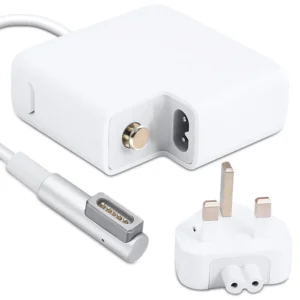 Apple Mackbook Chargers, Computer Accessories, Laptop Chargers
MacBook Pro 2011 85W MagSafe 1 Power Adapter
-
Product Type: Power Adapter
-
Output Power: 85W
-
Connector Type: MagSafe 1 (L-Tip)
-
Input Voltage: 100–240V AC
-
Indicator: LED charging status light
-
Compatibility: MacBook Pro 15-inch & 17-inch (2011)
-
Condition: Tested and verified
This charger meets Apple’s original design standards for safe and consistent charging.
SKU: n/a -
-
Apple Mackbook Chargers, Computer Accessories, Laptop Chargers
Macbook air m2 2022 charger 35W USB-C
-
Product Type: Power Adapter
-
Output Power: 35W
-
Connector Type: USB-C
-
Input Voltage: 100–240V AC
-
Compatibility: MacBook Air M2 (2022)
-
Fast-Charge Support: Yes (Apple-optimized)
-
Condition: Brand New
SKU: n/a -












There are no reviews yet.