
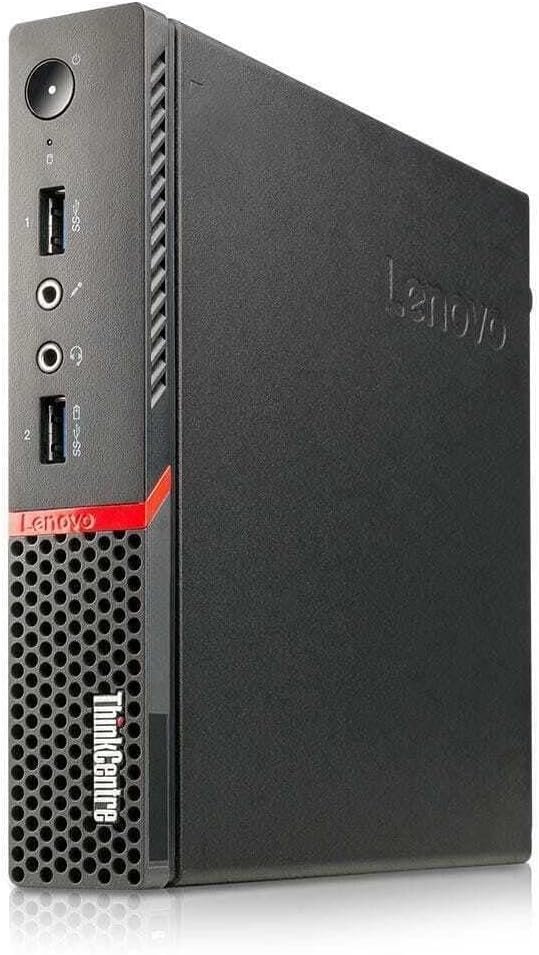
lenovo ThinkCentre M900 Mini Desktop Tiny Desktop PC Intel Core i5-6500, 8GB Ram 256GB SSD
- Processor: Intel Core i5-6500T / i5-6500 (6th Gen, 4 Cores, 4 Threads, 2.50 GHz base clock, up to 3.10 GHz Turbo for the ‘T’ power-efficient variant common in Tiny builds).
- Memory: 8GB DDR4 SO-DIMM RAM (Upgradable up to 32GB via 2x laptop-style SO-DIMM slots).
- Storage: 256GB 2.5″ SATA SSD or PCIe NVMe M.2 SSD (configuration dependent).
- Graphics: Integrated Intel HD Graphics 530.
- Motherboard Chipset: Intel Q170 (Supports Intel vPro enterprise management).
- Power Supply: External 65W or 90W AC adapter (brick style).
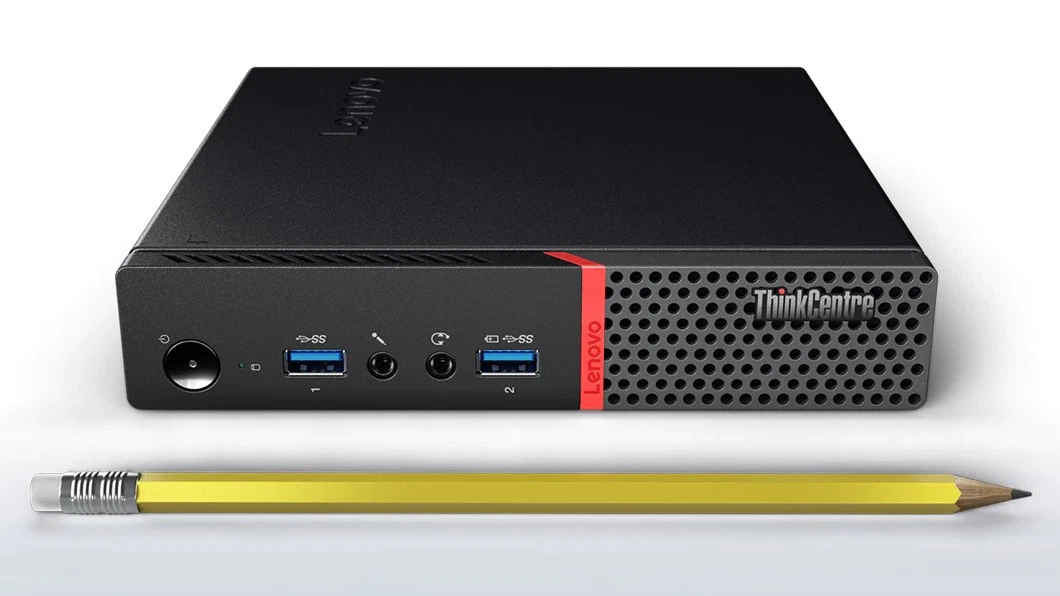
- Dimensions: 179 mm x 182.9 mm x 34.5 mm; Weight: ~0.6 kg.
- Front Ports: 2x USB 3.0 (one featuring Always On fast-charging), 1x microphone jack (3.5mm), and 1x headphone/microphone combo jack (3.5mm).
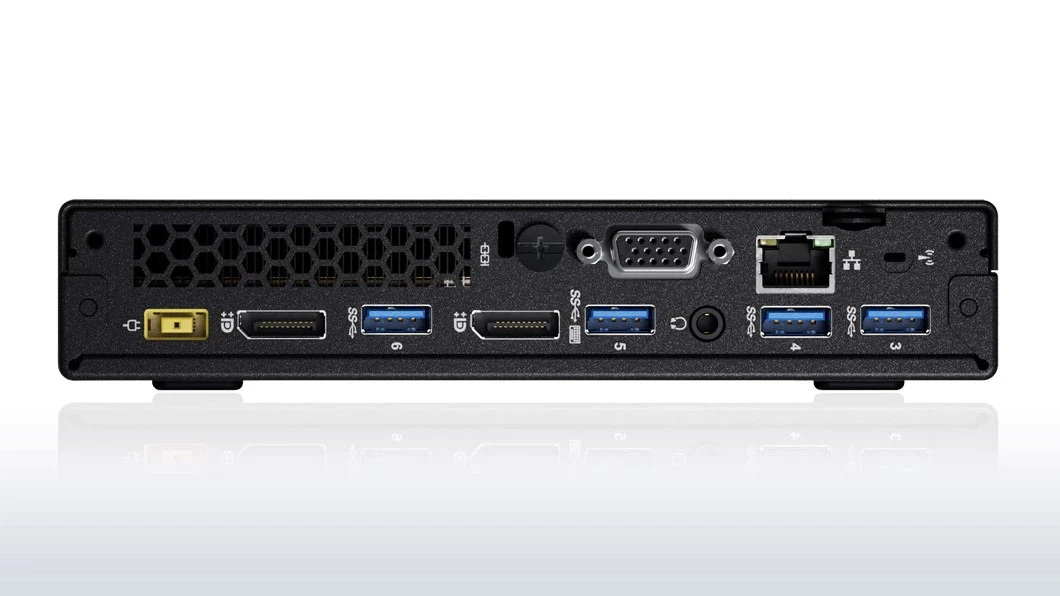
- Rear Ports: 4x USB 3.0, 2x DisplayPort, 1x optional punch-out port (often configured with VGA, HDMI, or a Serial port), Gigabit Ethernet (RJ-45), and an external Wi-Fi antenna jack.
- Internal Expansion: 1x M.2 slot for PCIe NVMe SSDs, 1x M.2 slot for a Wi-Fi/Bluetooth card, and 1x 2.5-inch drive bay
KSh17,000.00
Lenovo ThinkCentre M900 Tiny Desktop PC – Intel Core i5, 8GB RAM, 256GB SSD
Looking for a compact, reliable, and affordable desktop computer for your office, business, school, or home workspace? The Lenovo ThinkCentre M900 Tiny Desktop PC is a practical computing solution that combines a space-saving design with dependable processing performance and solid-state storage. Powered by an Intel Core i5-6500 processor, equipped with 8GB RAM, and featuring a 256GB SSD, this mini desktop computer is designed to handle everyday computing tasks while keeping your workspace neat and organized.
Whether you need a computer for office productivity, internet browsing, email, online research, document creation, or business applications, the Lenovo ThinkCentre M900 Tiny offers a compact alternative to traditional desktop PCs. Its small form factor makes it especially suitable for users who want desktop functionality without dedicating a large amount of desk space to their computer.
Compact Design for Modern Workspaces
The Lenovo ThinkCentre M900 Tiny Desktop PC is designed for environments where space efficiency matters. Unlike conventional tower computers, its tiny form factor helps reduce desktop clutter and allows for flexible placement in offices, reception areas, classrooms, study rooms, and home workstations.
Its compact size makes it a suitable choice for businesses setting up multiple workstations or individuals who prefer a minimalist desk arrangement. Depending on your workspace and available mounting accessories, the system may also be positioned discreetly alongside a monitor or in another suitable location.
Despite its small footprint, this desktop computer provides the core components needed for everyday productivity. You can connect compatible peripherals such as a monitor, keyboard, mouse, and other supported devices to create a functional desktop workstation.
For businesses, the compact design can be particularly useful when equipping reception desks, administrative offices, customer service stations, and other work areas where available space is limited.
Intel Core i5-6500 Processor for Everyday Productivity
At the heart of this Lenovo desktop is the Intel Core i5-6500 processor, a fourth-core-class?
The Intel Core i5-6500 is a four-core, four-thread desktop processor from Intel’s sixth-generation Core family, designed for standard computing and office workloads. It can support a range of common tasks, including working with documents, managing spreadsheets, browsing websites, handling email, and running compatible business software.
For office workers, students, and home users, this processor provides a practical foundation for everyday computing. It is suitable for common productivity applications, administrative work, online learning, and routine multitasking, although performance will depend on the software being used and the computer’s overall configuration.
The processor is also appropriate for many basic business environments where the primary requirements are reliability, responsiveness, and efficient handling of routine workloads rather than intensive computing power.
If you need a computer for advanced video editing, demanding 3D applications, or modern high-end gaming, a newer system with a more powerful processor and graphics capabilities may be a better fit. For everyday office and home use, however, the ThinkCentre M900 Tiny remains a practical option to consider.
8GB RAM for Smooth Everyday Computing
The 8GB RAM configuration gives the Lenovo ThinkCentre M900 Tiny the memory needed for many common desktop activities. It supports everyday multitasking, helping users switch between applications such as web browsers, word processors, spreadsheets, email clients, and business tools.
This memory capacity can be suitable for:
- Creating and editing documents.
- Working with spreadsheets and presentations.
- Browsing the internet and conducting research.
- Sending emails and managing routine office communications.
- Participating in compatible online meetings.
- Running standard administrative and educational software.
Actual performance depends on the number of applications running simultaneously and their memory requirements. Users who regularly work with large datasets, memory-intensive professional applications, or many browser tabs may benefit from additional RAM if the system supports an upgrade.
Before purchasing memory upgrades, check the specific unit’s supported memory type, maximum capacity, and available slots. These details can vary by configuration.
256GB SSD for Faster Storage and Responsiveness
One of the key advantages of this desktop PC is its 256GB solid-state drive (SSD). Compared with traditional mechanical hard drives, SSD storage generally provides faster data access, helping a computer start up, open applications, and load files more quickly.
For everyday users, this can make routine work more convenient. You can access documents, launch frequently used programs, and manage common files without relying on the slower performance typically associated with older mechanical storage.
The 256GB capacity offers room for an operating system, productivity applications, business software, documents, and other essential files. The actual available space will be lower after the operating system and preinstalled software occupy part of the drive.
For users who store extensive video collections, large design projects, or substantial archives of business files, external storage or an additional compatible storage solution may be worth considering.
A Practical Desktop Computer for Business and Office Use
The Lenovo ThinkCentre M900 Tiny can be a useful choice for small businesses, established offices, and organizations that need compact computers for routine work.
Typical business applications include:
Administrative work: Create documents, prepare reports, manage spreadsheets, and organize digital records using compatible office software.
Reception and front-desk operations: Set up a compact workstation for appointments, email, customer records, and general administrative tasks.
Retail and service environments: Use compatible business applications for inventory management, invoicing, customer service, or other routine operations. Confirm that any required peripherals and software are supported before deployment.
Education and training: Provide a desktop for research, document preparation, online learning, and general computer-based activities.
Home office productivity: Handle everyday work tasks, browse the internet, communicate online, and organize personal files.
For multi-computer deployments, the small form factor can also help organizations make more efficient use of available desk space. Businesses should assess the computer’s operating system, software requirements, network compatibility, and support needs before purchasing units for a larger team.
Suitable for Home Computing and Student Use
For students and home users, the ThinkCentre M900 Tiny offers a compact desktop platform for a variety of everyday activities. It can be used for writing assignments, researching information online, preparing presentations, managing email, and accessing educational platforms that support its operating system and hardware.
At home, it can serve as a general-purpose computer for browsing, document management, digital organization, and other routine tasks. Its compact dimensions make it particularly appealing for study desks, shared workspaces, and rooms where a full-size desktop tower would be inconvenient.
The computer may also support video playback and basic multimedia use, depending on the software, display connection, and media requirements. However, it should not be considered a modern gaming PC or a dedicated workstation for demanding graphics applications.
Before buying, confirm the included operating system, available display outputs, wireless connectivity, and supplied accessories to ensure the computer matches your needs.
Connectivity for a Complete Desktop Setup
A desktop computer is most useful when it can connect to the peripherals and accessories required for your workflow. The Lenovo ThinkCentre M900 Tiny family offers connectivity options that vary by configuration, so the exact ports on the unit being sold should be checked before purchase.
Depending on the specific model and configuration, the system may provide connections for compatible monitors, USB peripherals, wired networking, audio devices, and other accessories.
Before purchasing, consider the following:
- Monitor compatibility: Confirm the available video outputs and whether an adapter is required for your monitor.
- Keyboard and mouse: Check whether these accessories are included or need to be purchased separately.
- Network connection: Verify the available Ethernet and wireless options for your intended setup.
- USB accessories: Confirm that the available ports support the peripherals you plan to use.
- Operating system: Check whether Windows or another operating system is installed and activated.
Checking these details helps ensure that your desktop computer can be integrated into your workspace without unexpected accessory costs.
Energy-Conscious, Space-Saving Desktop Computing
The tiny desktop form factor is designed to provide desktop computing in a smaller enclosure than a conventional tower PC. This can be beneficial for offices and homes where efficient use of space is a priority.
A compact system can help reduce desk clutter and make workstation layouts easier to organize. It can be especially useful for organizations that need to install computers in multiple rooms or create several workstations within a limited area.
Actual electricity consumption depends on the system configuration, workload, connected peripherals, and usage patterns. If energy efficiency is an important purchasing factor, compare the complete system’s power requirements with those of the alternatives you are considering.
Important Operating System and Compatibility Considerations
Before purchasing the Lenovo ThinkCentre M900 Tiny, it is important to consider operating system support. The Intel Core i5-6500 is a sixth-generation Intel processor and is not listed among the supported processors for standard Windows 11 installations. Therefore, buyers should not assume that this PC qualifies for an officially supported Windows 11 upgrade.
Windows 10 standard support ended on 14 October 2025. Users planning to run Windows should check Microsoft’s current support options and determine whether an appropriate supported operating system is available for their intended use. Organizations should also review security requirements and software compatibility before deploying older hardware.
If you are buying this computer for a business, school, or organization, confirm that it meets your IT department’s operating system and security policies.
Why Consider the Lenovo ThinkCentre M900 Tiny Desktop PC?
The Lenovo ThinkCentre M900 Tiny offers several practical benefits for users who need a compact desktop computer for standard workloads.
- Compact form factor: Helps save valuable desk space.
- Intel Core i5-6500 processor: Suitable for many everyday office and home computing tasks.
- 8GB RAM: Supports routine productivity and general multitasking.
- 256GB SSD: Provides responsive storage for applications and frequently used files.
- Business-oriented design: Suitable for many administrative and productivity-focused environments.
- Flexible workstation setup: Can be paired with compatible monitors and peripherals.
- Practical for everyday use: Supports common document, browsing, email, and administrative workloads when paired with compatible software.
The most suitable choice depends on your intended applications, operating system requirements, desired connectivity, and budget.
Frequently Asked Questions
Is the Lenovo ThinkCentre M900 Tiny good for office work?
Yes. With its Intel Core i5-6500 processor, 8GB RAM, and 256GB SSD, it can be suitable for routine office tasks such as document creation, spreadsheets, email, web browsing, and compatible business applications.
Is 8GB RAM enough for everyday computing?
For many everyday tasks, 8GB RAM is sufficient. Users running demanding applications or extensive multitasking workloads may need more memory, depending on the system’s upgrade capabilities.
Is a 256GB SSD enough for work and study?
A 256GB SSD can accommodate an operating system, applications, and a useful collection of documents and files. Users with large media libraries or substantial storage requirements may need external or additional compatible storage.
Can this desktop run Windows 11?
The Intel Core i5-6500 is not on Microsoft’s supported processor list for standard Windows 11 installations. Buyers should check current operating system compatibility and support requirements before purchasing.
Does the Lenovo ThinkCentre M900 Tiny include a monitor?
The monitor, keyboard, mouse, power adapter, and other accessories depend on the seller’s package.
Buy the Lenovo ThinkCentre M900 Tiny Desktop PC
If you need a compact computer for everyday productivity, the Lenovo ThinkCentre M900 Tiny Desktop PC with Intel Core i5-6500, 8GB RAM, and 256GB SSD is worth considering for office work, home computing, and educational use.
Its small footprint helps keep workspaces organized, while the combination of an Intel Core i5 processor and solid-state storage provides a practical foundation for routine computing tasks. Before ordering, confirm the operating system, physical condition, connectivity options, and included accessories to make sure the system meets your requirements.
Choose the Lenovo ThinkCentre M900 Tiny when your priorities are compact desktop computing, everyday productivity, and efficient use of workspace.
-
- Full Desktop-Class Core i5 Power: Utilizes a standard-voltage Intel Core i5-6500 processor rather than a low-power variant, delivering sustained clock speeds and superior processing performance for computing tasks.
- Ultra-Compact 1-Liter Footprint: Offers ultimate deployment flexibility, allowing the system to be tucked away out of sight, mounted directly under desks, or attached behind VESA-compliant monitors.
- Responsive Solid-State Speed: Outfitted with a 256GB Solid State Drive (SSD), bringing near-instant software application launches, immediate operating system boot sequences, and increased shock resistance over old mechanical drives.
- DDR4 Memory Efficiency: Features 8GB of DDR4 SDRAM to secure smooth concurrent handling of productivity software, background scripts, and large databases, while offering a clear pathway for hardware expansion.
- MIL-SPEC Ruggedness & Airflow: Tested against military-standard specifications for environmental durability, featuring advanced thermal configurations and an integrated chassis defense system that reduces dust accumulation.
-
- Processor: Intel Core i5-6500 (6th Generation, Quad-Core, 4 Threads, 3.20 GHz Base Clock, up to 3.60 GHz Intel Turbo Boost, 6MB Smart Cache, 65W TDP)
- System Memory: 8GB DDR4 SDRAM (Configured via SO-DIMM sockets, expandable up to 32GB maximum across 2 slots)
- Primary Storage: 256GB M.2 PCIe NVMe or 2.5-inch SATA Solid State Drive (SSD)
- Graphics Hardware: Integrated Intel HD Graphics 530
- Chassis Architecture: Ultra-Small Form Factor (1L Tiny PC)
- Network Controller: Integrated Intel I219-LM Gigabit Ethernet LAN (RJ-45, supports Intel vPro Technology)
- Operating System Compatibility: Windows 10 Pro 64-bit Architecture
- Power Provision: External AC-to-DC power adapter (Typically 65W or 90W configuration dependent)
-
- Front Accessible I/O:
-
- 2 x USB 3.0 Ports (1 Always-On fast charging port)
- 1 x 3.5mm Microphone Input
- 1 x 3.5mm Headphone / Microphone Combo Jack
-
- Rear Panel I/O:
-
- 4 x USB 3.0 Ports
- 2 x DisplayPort Outputs (Supports dual-independent native digital displays)
- 1 x RJ-45 Gigabit Ethernet Port
- 1 x Optional Punch-out I/O Port (VGA / HDMI / Serial / 3rd DisplayPort – configuration dependent)
-
- Front Accessible I/O:
-
- 1 x Lenovo ThinkCentre M900 Tiny Personal Computer
- 1 x External AC Power Adapter with Regional Power Cord
Based on 0 reviews
Be the first to review “lenovo ThinkCentre M900 Mini Desktop Tiny Desktop PC Intel Core i5-6500, 8GB Ram 256GB SSD”
Related products
-
Dell Desktops, Desktops
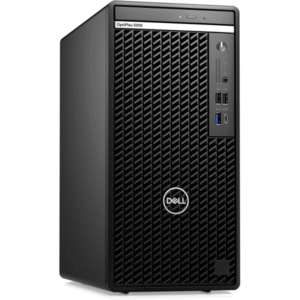
Dell OptiPlex 5000 Tower, Core i5 12500 8GB RAM 512GB SDD
- Processor: Intel Core i5-12500 (12th Gen, 6 Cores).
- Memory: 8GB DDR4 3200MHz RAM.
- Storage: Fast 512GB PCIe NVMe M.2 SSD.
- Graphics: Integrated Intel UHD Graphics 770.
- Operating System: Windows 11.
- Form Factor: Tower (traditional desktop).
- Connectivity: USB-C, USB 3.2, DisplayPort, HDMI, Ethernet.
- Upgradability: Tower design allows for internal expansion.
- Security: TPM 2.0 and business-focused management features.
SKU: n/a -
Desktops, HP Desktops
HP Elite Mini 800 G9i5-1350 16GB 512GB
- Model: HP Elite Mini 800 G9 Desktop PC (G9 generation).
- Processor (CPU): Intel Core i5-13500T (13th Gen, efficient “T” series for lower power/heat).
- Memory (RAM): 16GB DDR5 SDRAM (fast, modern memory).
- Storage: 512GB PCIe NVMe M.2 SSD (very fast storage).
- Graphics: Integrated Intel UHD Graphics.
- Operating System: Windows 11 .
- Connectivity: Wi-Fi 6E, Bluetooth 5.3, Ethernet (RJ-45), USB-C (20Gbps), USB-A (10Gbps), DisplayPort, HDMI.
- Design: Ultra-compact (1-liter), quiet operation, designed for business/enterprise.
SKU: n/a -
Dell Desktops, Desktops
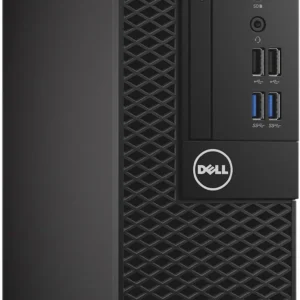
Dell OptiPlex 3050 SSF Intel Core i5 7th Gen 8GB RAM 1TB HDD
- Processor: Intel Core i5-7500 (7th Gen), Quad-Core, 3.8 GHz.
- Memory (RAM): 8GB DDR4.
- Storage: 1TB SATA Hard Drive (HDD).
- Graphics: Integrated Intel HD Graphics 630.
- Form Factor: Small Form Factor (SFF) – compact for limited spaces.
- Operating System: Typically Windows 10 Pro.
- Ports: USB 3.1 Gen 1, USB 2.0, HDMI, DisplayPort, Ethernet, Audio, (optional Serial/VGA).
- Connectivity: Wired Ethernet; optional Wi-Fi via M.2 card.
SKU: n/a -
Desktops, Lenovo Desktops
Lenovo ThinkCentre M70q Gen 4, Intel Core i5-13400T, 16GB DDR4 RAM, 512GB SSD.
 Desktops, Lenovo Desktops
Lenovo ThinkCentre M70q Gen 4, Intel Core i5-13400T, 16GB DDR4 RAM, 512GB SSD.
Feature Detail Processor Intel Core i5-13400T (10 Cores, 16 Threads, up to 4.4 GHz Max Turbo Frequency) Memory 16GB DDR4-3200MHz SO-DIMM RAM (upgradable to 64GB) Storage 512GB PCIe NVMe M.2 SSD Graphics Integrated Intel UHD Graphics 730 Operating System Windows 11 , 11 Pro Form Factor Tiny (1L), dimensions of 179 x 183 x 34.5 mm (7.05 x 7.2 x 1.36 inches) Connectivity Wi-Fi 6 or 6E, Bluetooth, Ethernet (RJ-45) Ports USB-C 3.2 Gen 1, multiple USB-A 3.2 Gen 2 and Gen 1 ports, USB 2.0, HDMI 2.1, DisplayPort 1.4, headphone/microphone combo jack SKU: n/a












There are no reviews yet.