
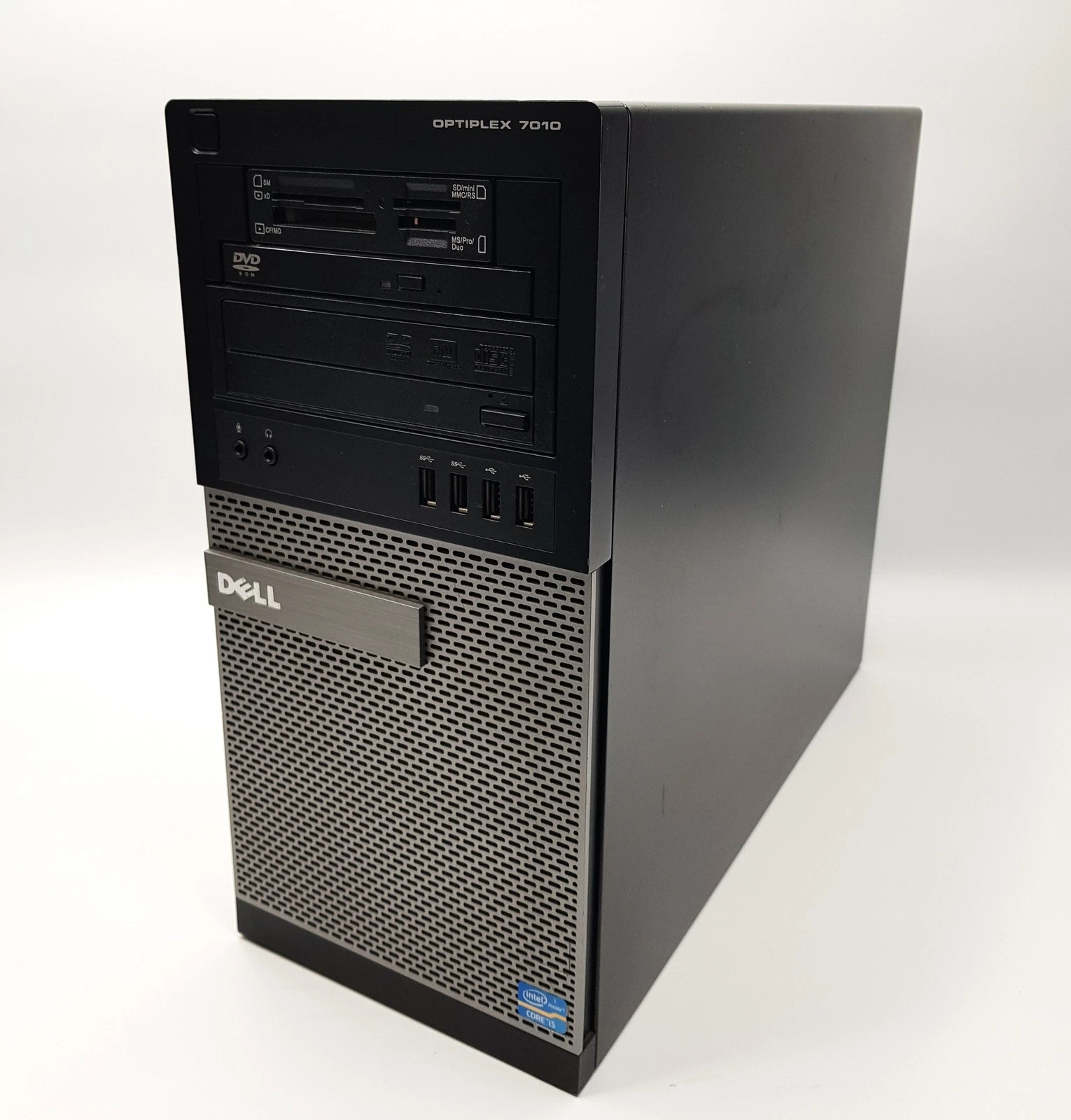
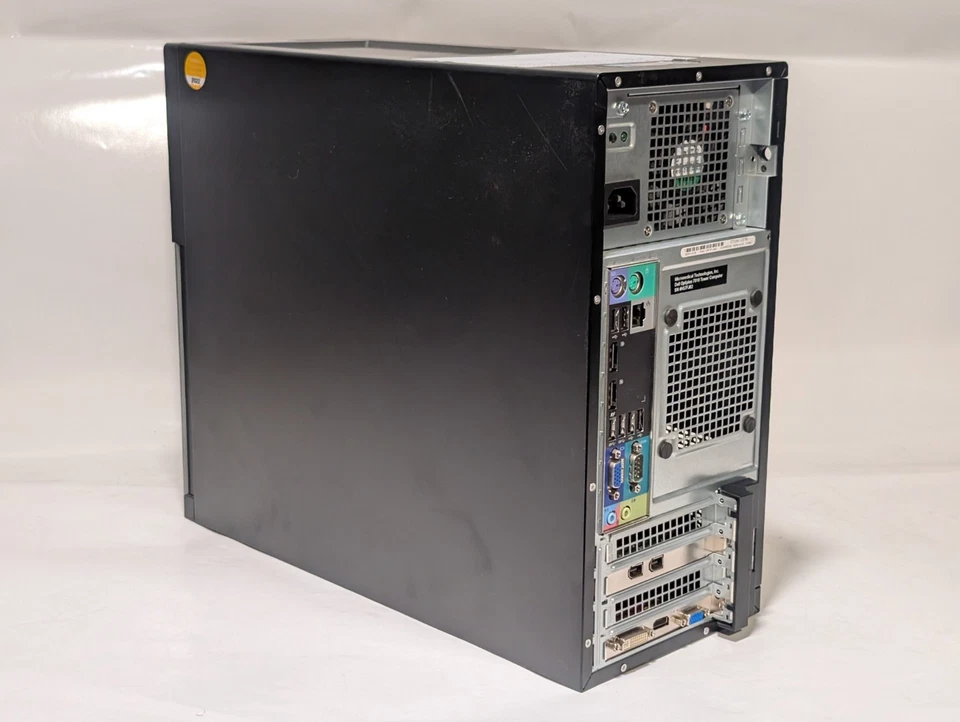
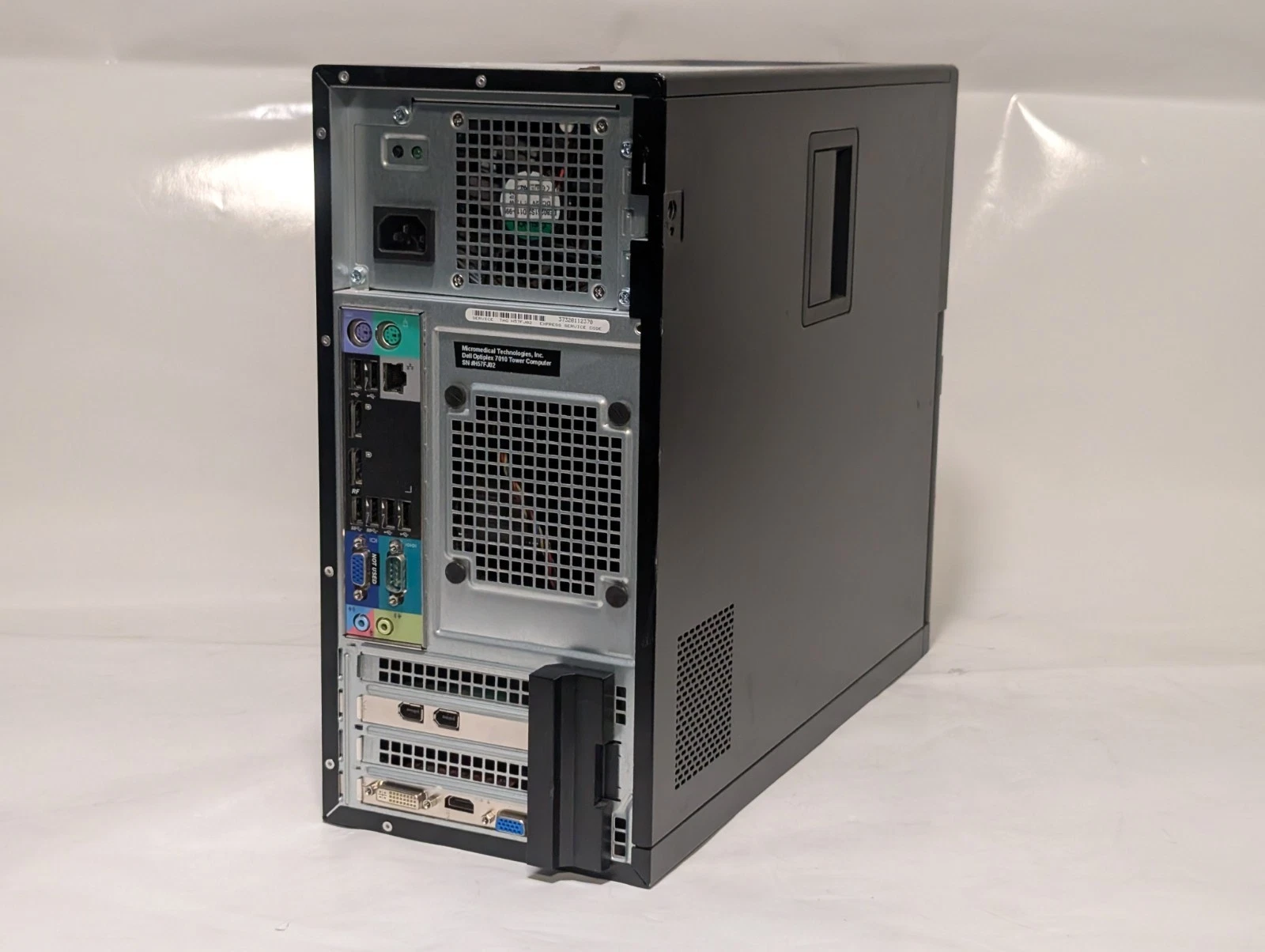
Dell optiplex 7010 tower Intel Core i5-3470 3rd Gen 8GB RAM 250GB HDD
- Processor: Intel Core i5-3470 3rd Generation Quad-Core desktop processor (3.20 GHz base frequency, up to 3.60 GHz max turbo frequency, 6 MB Intel Smart Cache).
- Memory: 8 GB DDR3 SDRAM system memory at 1600 MHz (upgradeable up to 32 GB via 4 x DIMM slots).
- Storage: 250 GB Hard Disk Drive (HDD) SATA (7200 RPM).
- Graphics: Integrated Intel HD Graphics 2500 (supports dual independent monitor outputs).
- Optical Drive: DVD-ROM or DVD-Writer (configuration dependent).
- Front I/O Ports: 2 x USB 3.0, 2 x USB 2.0, 1 x Microphone jack, 1 x Headphone jack.
- Rear I/O Ports: 2 x DisplayPort, 1 x VGA, 2 x USB 3.0, 4 x USB 2.0, 1 x RJ-45 Gigabit Ethernet, 1 x Serial (COM) port, 2 x PS/2 ports (Mouse/Keyboard), 1 x Audio Line-In, 1 x Audio Line-Out.
- Expansion Slots: 1 x Full-height PCI Express x16 Gen 3 slot, 1 x Full-height PCI Express x16 wired as x4 Gen 2 slot, 1 x Full-height PCI Express x1 Gen 2 slot, 1 x Full-height PCI 32-bit slot.
- Form Factor: Minitower / Desktop Tower (MT).
- Package Contents: 1 x Dell OptiPlex 7010 Tower Desktop PC, 1 x Standard AC Power Cable.
KSh13,000.00
Dell OptiPlex 7010 Tower Desktop Computer – Intel Core i5-3470, 8GB RAM, 250GB HDD
The Dell OptiPlex 7010 Tower Desktop Computer is a practical desktop solution for everyday office work, business productivity, and general computing. Powered by a 3rd Generation Intel Core i5-3470 processor, this Dell desktop is suitable for users who need a computer for routine tasks, including document processing, spreadsheets, email, and compatible business applications.
With 8GB RAM and a 250GB HDD, the Dell OptiPlex 7010 provides memory for everyday multitasking and storage for essential documents, software, and work files. Its traditional tower design also offers room for selected hardware upgrades, depending on compatibility.
If you are searching for an affordable Dell desktop computer in Nairobi, Kenya, the OptiPlex 7010 Tower is worth considering for basic office and home computing.
Key Features of the Dell OptiPlex 7010 Tower
-
Brand: Dell
-
Model: OptiPlex 7010 Tower
-
Processor: Intel Core i5-3470
-
Processor Generation: 3rd Generation Intel Core i5
-
Memory: 8GB RAM
-
Storage: 250GB HDD
-
Form Factor: Tower desktop computer
-
Suitable For: Office productivity, business applications, document processing, and everyday computing
Intel Core i5-3470 Processor for Everyday Computing
The Dell OptiPlex 7010 features an Intel Core i5-3470 processor with a base clock speed of 3.2GHz. Its four cores support routine computing tasks and everyday productivity workloads.
This processor is suitable for word processing, spreadsheet management, presentations, email, web browsing, and compatible business software. Consequently, it can serve as a practical desktop for users who need a computer for standard office activities.
Although it remains useful for basic tasks, the i5-3470 is an older processor. Check the system requirements of modern applications before purchasing, especially if your work involves demanding software.
8GB RAM for Everyday Multitasking
With 8GB RAM, the Dell OptiPlex 7010 supports common productivity applications and routine multitasking. Users can work on documents, manage business records, browse the internet, and run compatible office software.
This memory configuration is suitable for many basic computing needs. If you regularly use memory-intensive applications or keep numerous programs open at once, consider checking the available memory upgrade options.
250GB HDD for Essential File Storage
The 250GB hard disk drive (HDD) provides storage space for documents, spreadsheets, presentations, applications, and other essential files.
It can meet the needs of users who primarily work with office documents and lightweight applications. However, the available capacity may be limited for large media collections or extensive software installations.
For improved startup times and faster application loading, consider upgrading to a compatible SSD. An SSD can make an older desktop feel more responsive during everyday use.
Tower Design with Potential Upgrade Flexibility
The Dell OptiPlex 7010 features a traditional tower chassis that may offer more internal space than compact desktop models. Depending on its configuration, it can support selected upgrades to help meet changing computing needs.
Potential upgrades may include additional RAM, compatible storage drives, or supported expansion cards. Before purchasing components, verify the motherboard specifications, power supply capacity, available slots, and physical dimensions.
This flexibility can be useful for small businesses and home users who want to maintain a desktop for basic computing tasks.
Who Should Buy the Dell OptiPlex 7010 Tower?
The Dell OptiPlex 7010 Tower Desktop may be suitable for:
-
Small businesses: Manage documents, basic accounting tasks, and routine administration.
-
Office users: Prepare reports, presentations, spreadsheets, and emails.
-
Students: Complete assignments, research, and other general computing tasks.
-
Home users: Handle everyday browsing, document editing, and file management.
-
Reception areas: Run compatible administrative and front-desk applications.
For advanced graphics, demanding video editing, modern gaming, or intensive professional software, consider a newer computer with more suitable hardware.
Why Choose a Dell Desktop Computer in Nairobi CBD?
When shopping for a Dell desktop computer in Nairobi CBD, compare the processor, memory, storage capacity, physical condition, and upgrade options. These details can help you select a computer that matches your budget and computing requirements.
The Dell OptiPlex 7010 Tower is worth considering for users who need a straightforward desktop for everyday productivity. Before buying, confirm the current price, availability, warranty terms, operating system, and included accessories with the seller.
Technical Specifications
-
- Processor (CPU): Intel Core i5-3470 (3rd Generation)
- Core Count: Quad-Core (4 Cores / 4 Threads)
- Clock Speed: 3.20 GHz Base Frequency (Up to 3.60 GHz Max Turbo)
- Cache: 6 MB Intel Smart Cache
- Chipset: Intel Q77 Express
-
- System Memory (RAM): 8 GB Installed
- Memory Type: DDR3 SDRAM (1600 MHz)
- Total Memory Slots: 4 x DIMM Slots
- Maximum Memory Support: Up to 32 GB
- Storage Drive: 250 GB HDD (Mechanical Hard Disk Drive)
- Storage Interface: SATA 6.0 Gb/s (3.5-inch drive bay, 7200 RPM)
-
- Graphics Controller: Integrated Intel HD Graphics 2500
- Multi-Monitor Support: Up to 3 independent displays natively
- Video Outputs: 2 x DisplayPort | 1 x VGA
-
- Front I/O Ports: 2 x USB 3.0 | 2 x USB 2.0 | 1 x 3.5mm Headphone Jack | 1 x 3.5mm Microphone Jack
- Rear I/O Ports: 2 x USB 3.0 | 4 x USB 2.0 | 2 x DisplayPort | 1 x VGA | 1 x Serial (RS-232) | 1 x PS/2 Mouse | 1 x PS/2 Keyboard
- Audio Ports (Rear): 1 x Audio Line-In/Microphone | 1 x Audio Line-Out
- Network Interface: 1 x Gigabit Ethernet RJ-45 LAN port (Intel 82579LM)
- Expansion Slots (Full-Height):
-
- 1 x PCIe x16
- 1 x PCIe x16 (wired x4)
- 1 x PCIe x1
- 1 x PCI (Legacy)
-
-
- Form Factor: Mini-Tower (MT)
- Orientation: Vertical deployment
- Power Supply Unit (PSU): 275W Standard Efficiency PSU
- Dimensions (H x W x D): 36.0 x 17.5 x 41.7 cm (14.2 x 6.9 x 16.4 inches)
- Approximate Weight: 9.4 kg (20.7 lbs)
Based on 0 reviews
Be the first to review “Dell optiplex 7010 tower Intel Core i5-3470 3rd Gen 8GB RAM 250GB HDD”
Related products
-
Dell Desktops, Desktops
DELL Optiplex 7040 SSF Intel Core I5-6th Gen 8GB RAM 500GB HDD
- Processor: Intel Core i5-6th Gen ( i5-6500, 3.2GHz Quad-Core).
- RAM: 8GB DDR4 (2133 MHz).
- Storage: 500GB Hard Disk Drive (HDD).
- Graphics: Integrated Intel HD Graphics 530.
- Form Factor: Small Form Factor (SFF).
- Ports: USB 3.0, USB 2.0, DisplayPort, Ethernet, Audio.
- Operating System: Windows 11 .
SKU: n/a -
Desktops, HP Desktops
HP Elite Mini 800 G9i5-1350 16GB 512GB
- Model: HP Elite Mini 800 G9 Desktop PC (G9 generation).
- Processor (CPU): Intel Core i5-13500T (13th Gen, efficient “T” series for lower power/heat).
- Memory (RAM): 16GB DDR5 SDRAM (fast, modern memory).
- Storage: 512GB PCIe NVMe M.2 SSD (very fast storage).
- Graphics: Integrated Intel UHD Graphics.
- Operating System: Windows 11 .
- Connectivity: Wi-Fi 6E, Bluetooth 5.3, Ethernet (RJ-45), USB-C (20Gbps), USB-A (10Gbps), DisplayPort, HDMI.
- Design: Ultra-compact (1-liter), quiet operation, designed for business/enterprise.
SKU: n/a -
Desktops, HP Desktops
HP EliteDesk 800 G4 SFF Desktop Core i5 8500 8GB 500GB HDD
HP EliteDesk 800 G4 SFF Desktop Core i5 8500 8GB 500GB HDD
-
Processor: Intel Core i5-8500 (6 Cores)
-
Memory: 8GB DDR4 RAM
-
Storage: 500GB HDD
-
Graphics: Integrated Intel UHD Graphics
-
Ports: USB, DisplayPort, VGA, Ethernet, Audio Jacks
-
Form Factor: Small Form Factor (SFF)
-
Operating System: Windows 11.
SKU: n/a -
-
Desktops, HP Desktops
HP EliteDesk 800 G6 Tower Intel Core i5 10th Gen 16GB RAM 512GB SSD
Key SpecificationsSpecification Details Processor Intel® Core™ i5-10400 or i5-10500 (6 Cores/12 Threads) Memory 16GB DDR4 SDRAM (expandable up to 128GB) Storage 512GB PCIe® NVMe™ M.2 SSD Graphics Integrated Intel® UHD Graphics 630 (options for discrete GPUs available) Operating System Windows 11 (upgradeable to Windows 11 Pro) Ports (Front) 2x SuperSpeed USB Type-A 10Gbps signaling rate, 2x SuperSpeed USB Type-A 5Gbps signaling rate Ports (Rear) 1x audio-out, 1x RJ-45 Ethernet, 2x SuperSpeed USB Type-A 10Gbps, 2x SuperSpeed USB Type-A 5Gbps, 2x USB Type-A 480Mbps, 2x DisplayPort™ 1.4, 1x SuperSpeed USB Type-C® 10Gbps Expansion Slots 1 M.2 2230 slot (for WLAN), 2 PCIe 3.0 x16 slots, 2 PCIe 3.0 x1 slots, multiple drive bays Power Supply Configurable (e.g., 260W, 500W, 550W options) SKU: n/a












There are no reviews yet.