
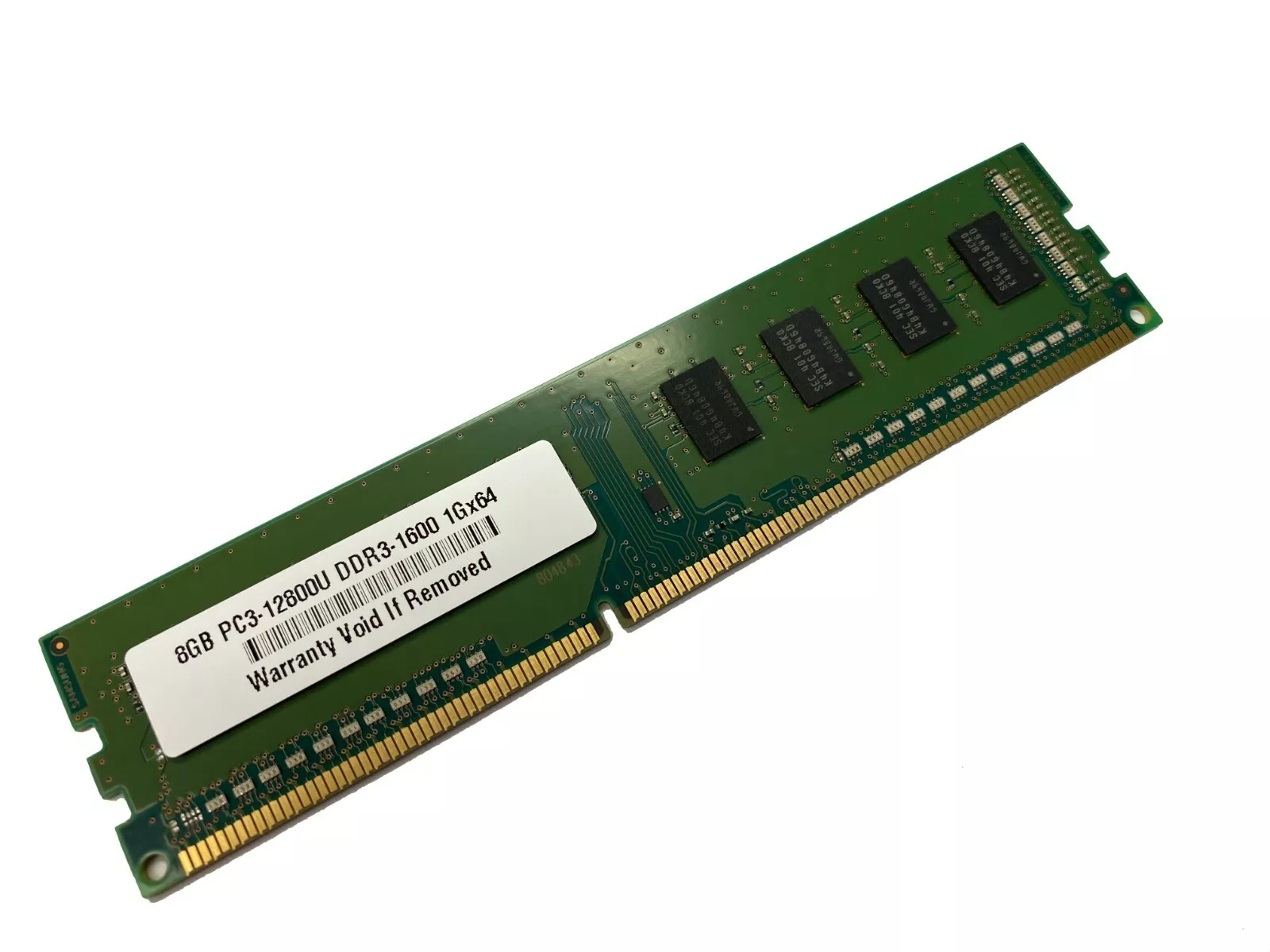
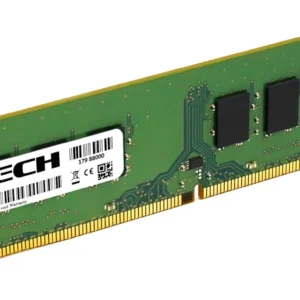
Dell OptiPlex 3040 Memory RAM Upgrade 8GB Stick
- Compatible Model: Dell OptiPlex 3040 (Mini Tower and Small Form Factor variants)
- Memory Capacity: 8 GB
- Module Layout: 1 x 8 GB
- Memory Technology: DDR3L SDRAM (Low Voltage DDR3)
- Form Factor: 240-Pin UDIMM (Standard Desktop Size)
- Frequency Speed: 1600 MHz (PC3L-12800)
- Data Integrity: Non-ECC Unbuffered
- Voltage Power: 1.35V Low Voltage (Dual-voltage capable at 1.5V)
- Rank Architecture: 1Rx8 or 2Rx8 single/dual rank execution
KSh3,800.00
Dell OptiPlex 3040 Memory RAM Upgrade 8GB Stick – DDR3L/DDR4 Compatibility
Upgrade your compatible Dell OptiPlex 3040 with an 8GB RAM memory stick and increase available system memory for office applications, web browsing, multitasking, business software, and everyday computing.
The Dell OptiPlex 3040 RAM upgrade is a practical option for businesses, offices, schools, home users, and professionals looking to replace existing memory or expand the RAM capacity of their desktop.
Important: The OptiPlex 3040 was produced in different configurations. Memory type and physical compatibility can vary by form factor. Please confirm your exact OptiPlex 3040 model and existing RAM specification before ordering.
Dell OptiPlex 3040 8GB RAM Upgrade
The Dell OptiPlex 3040 is a compact business desktop designed for everyday productivity and professional computing. Increasing the system’s RAM can provide additional memory capacity for running applications and handling multiple tasks.
An 8GB RAM upgrade for Dell OptiPlex 3040 is particularly useful for users running office applications, web browsers, email, spreadsheets, accounting software, communication tools, and other everyday programs.
Whether you’re maintaining an office computer, upgrading a home desktop, or replacing an existing memory module, choosing the correct 8GB RAM specification is essential.
8GB RAM for Dell OptiPlex 3040
If you are searching for Dell OptiPlex 3040 RAM 8GB, it is important to verify the exact configuration of your computer before purchasing.
Unlike newer OptiPlex generations, the 3040 family requires particular attention to the memory specification and form factor. Different OptiPlex 3040 configurations can use different memory arrangements.
Before ordering, check:
- RAM capacity: 8GB
- Memory technology: Confirm your system’s required memory type
- Module type: Verify the correct memory form factor
- OptiPlex 3040 chassis: Confirm your exact model
- Memory speed: Match the specification supported by your system
- Existing RAM: Check the currently installed memory
Why Upgrade Dell OptiPlex 3040 RAM?
Adding or replacing RAM can provide your OptiPlex 3040 with additional memory capacity for active applications and everyday workloads.
Improved Multitasking
Running a web browser, email, office applications, spreadsheets, and communication tools simultaneously can increase memory usage. An 8GB RAM upgrade provides a practical amount of memory for many everyday computing tasks.
Better Office Productivity
For business users, sufficient RAM is useful when working with documents, spreadsheets, accounting software, databases, email, and browser-based applications.
Practical Desktop Upgrade
If your OptiPlex 3040 is still suitable for your everyday requirements but has limited memory, an 8GB memory upgrade can be a practical way to increase available RAM without replacing the entire computer.
Dell OptiPlex 3040 Memory Compatibility
The Dell OptiPlex 3040 was available in multiple form factors, including Micro, Small Form Factor, and Mini Tower configurations. The physical memory requirements can differ depending on the specific model.
For this reason, customers should verify their exact computer before purchasing a Dell OptiPlex 3040 8GB RAM module.
Check the existing RAM information and system specifications to determine the correct memory technology and module type.
Do not purchase based on the OptiPlex 3040 model name alone. Confirm the exact configuration first.
Who Should Buy an 8GB OptiPlex 3040 RAM Upgrade?
An 8GB RAM upgrade for Dell OptiPlex 3040 can be suitable for:
- Office computers
- Small businesses
- Home users
- Students
- Schools
- Administrative workstations
- Remote workers
- Reception desks
- Business applications
- General-purpose desktop computing
It can also be used as a replacement for a compatible existing RAM module, subject to the computer’s specifications.
Dell OptiPlex 3040 RAM Upgrade for Business
The OptiPlex 3040 is commonly used for business and office workloads where computers handle documents, spreadsheets, email, web applications, and productivity software.
An 8GB memory upgrade can provide useful memory capacity for these everyday tasks.
For businesses maintaining multiple OptiPlex 3040 desktops, compatible RAM modules can also be useful when replacing faulty memory or upgrading systems with lower-capacity configurations.
How to Choose the Right Dell OptiPlex 3040 8GB RAM
When shopping for Dell OptiPlex 3040 8GB RAM, capacity is only one part of compatibility.
Before purchasing, confirm:
Memory type: Verify whether your exact configuration requires the applicable DDR3L or DDR4 memory specification.
Capacity: 8GB.
Form factor: Confirm the correct module type for your OptiPlex 3040 chassis.
Memory speed: Check the speed supported by your particular system.
Existing memory: If adding rather than replacing RAM, check the installed module specifications.
Chassis: Confirm whether you have the Micro, Small Form Factor, or Mini Tower version.
Taking a moment to verify these details helps ensure that you order the correct memory for your Dell OptiPlex 3040.
Buy Dell OptiPlex 3040 8GB RAM From Compvate
Looking for a Dell OptiPlex 3040 RAM upgrade 8GB stick? Compvate provides computer memory and hardware components for customers looking to upgrade, maintain, and extend the useful life of their existing desktops.
An 8GB RAM module for compatible Dell OptiPlex 3040 systems is a practical choice for office applications, business software, web browsing, email, productivity, multitasking, and everyday computing.
Before ordering, please verify your exact OptiPlex 3040 form factor, memory type, memory speed, and existing RAM configuration to ensure compatibility.
Give your compatible Dell OptiPlex 3040 additional memory capacity with this 8GB RAM upgrade module. It is a practical choice for office computers, business workstations, students, home users, and customers looking to replace or expand their existing system memory.
With 8GB of RAM, your compatible OptiPlex 3040 can have additional memory available for everyday applications such as web browsing, documents, spreadsheets, email, business software, and multitasking.
Technical Specifications
- Compatible Model: Dell OptiPlex 3040 (Mini Tower and Small Form Factor variants)
- Memory Capacity: 8 GB
- Module Layout: 1 x 8 GB
- Memory Technology: DDR3L SDRAM (Low Voltage DDR3)
- Form Factor: 240-Pin UDIMM (Standard Desktop Size)
- Frequency Speed: 1600 MHz (PC3L-12800)
- Data Integrity: Non-ECC Unbuffered
- Voltage Power: 1.35V Low Voltage (Dual-voltage capable at 1.5V)
- Rank Architecture: 1Rx8 or 2Rx8 single/dual rank executio
Important: Please check your exact Dell OptiPlex 3040 model, chassis, existing RAM type, memory speed, and system specifications before ordering. Memory requirements can vary between OptiPlex 3040 configurations.
Upgrade your compatible Dell OptiPlex 3040 with an 8GB RAM module from Compvate and get the additional memory capacity you need for everyday productivity and computing.
Based on 0 reviews
Be the first to review “Dell OptiPlex 3040 Memory RAM Upgrade 8GB Stick”
Related products
-
DDR4, Memory, RAM Memory
Dell optiplex 3050 memory ram upgrade 32GB stick
- : Dell OptiPlex 3050 (Mini Tower and Small Form Factor Tower variants)
- Total Kit Capacity: 32 GB
- Memory Technology: DDR4 SDRAM
- Form Factor: 288-Pin UDIMM (Standard Desktop Size)
- Frequency Speed: 2400 MHz (PC4-19200)
- Data Integrity: Non-ECC Unbuffered
- Voltage Power: 1.2V Low Voltage
- Rank Architecture: 1Rx8 or 2Rx8 fully compatible
SKU: n/a -
Desktops, RAM Memory
Mac Mini 2018 RAM Upgrade 16GB PC4 Module
Capacity: 16GB
Memory Type: DDR4 SDRAM
Form Factor: SO-DIMM
Speed: 2666MHz
PC Rating: PC4-21300
Application: Mac mini 2018
Upgrade Purpose: Increased system memory capacity
Memory Generation: DDR4
Ideal For: Multitasking, productivity, development and general computingSKU: n/a -
DDR4, Memory, RAM Memory
Dell XPS 8940 32GB RAM Memory
- Compatible Model: Dell XPS 8940 Special Edition & Standard Desktop Towers
- Memory Capacity: 32 GB (Single module configuration)
- Memory Technology: DDR4 SDRAM
- Form Factor: 288-Pin UDIMM (Standard Desktop Size)
- Frequency Speed: 3200 MHz (Downclocks naturally to 2933MHz or 2666MHz based on your Intel Core processor)
- Data Integrity: Non-ECC Unbuffered
- Voltage Power: 1.2V Low Voltage
- Rank Architecture: 2Rx8 Dual Rank layout
SKU: n/a -
DDR4, Memory, RAM Memory
Dell OptiPlex 3080 Memory RAM Upgrade 16GB Stick
- Compatible Model: Dell OptiPlex 3080 (Mini Tower and Small Form Factor variants)
- Memory Capacity: 16 GB
- Module Layout: 1 x 16 GB
- Memory Technology: DDR4 SDRAM
- Form Factor: 288-Pin UDIMM (Standard Desktop Size)
- Frequency Speed: 2666 MHz (PC4-21300)
- Data Integrity: Non-ECC Unbuffered
- Voltage Power: 1.2V Low Voltage
- Rank Architecture: 1Rx8 or 2Rx8 single/dual rank execution
SKU: n/a












There are no reviews yet.