
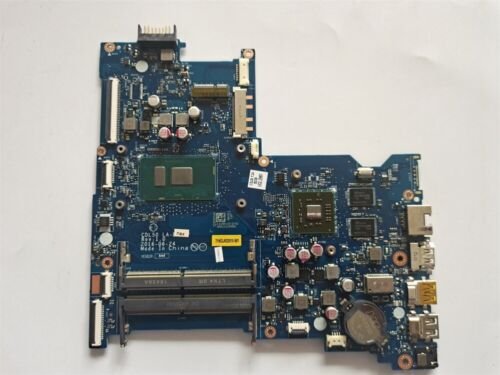
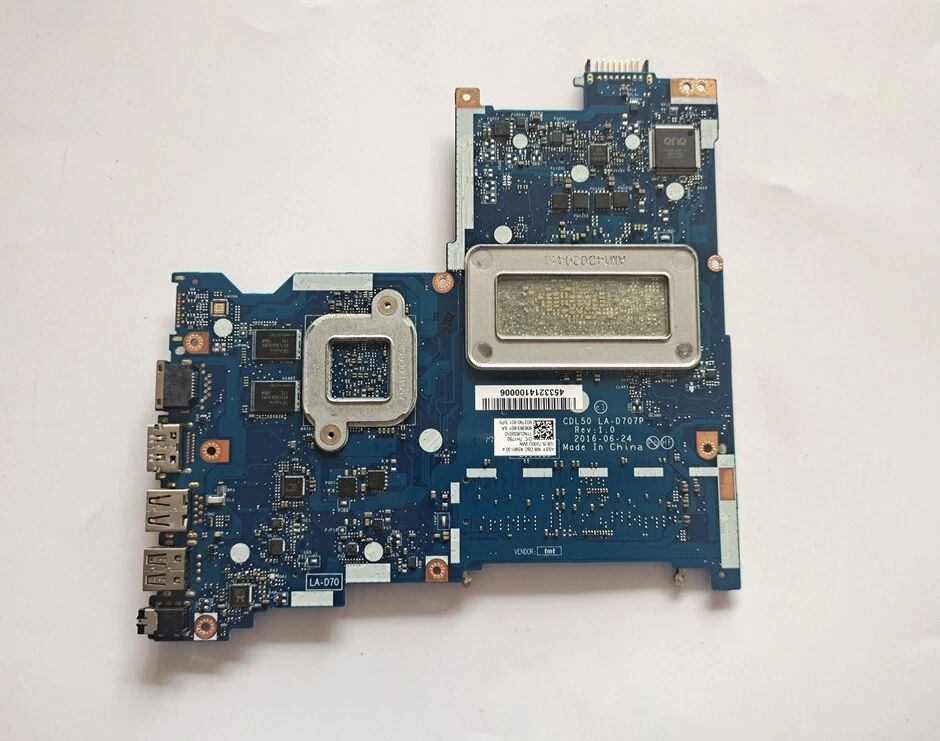
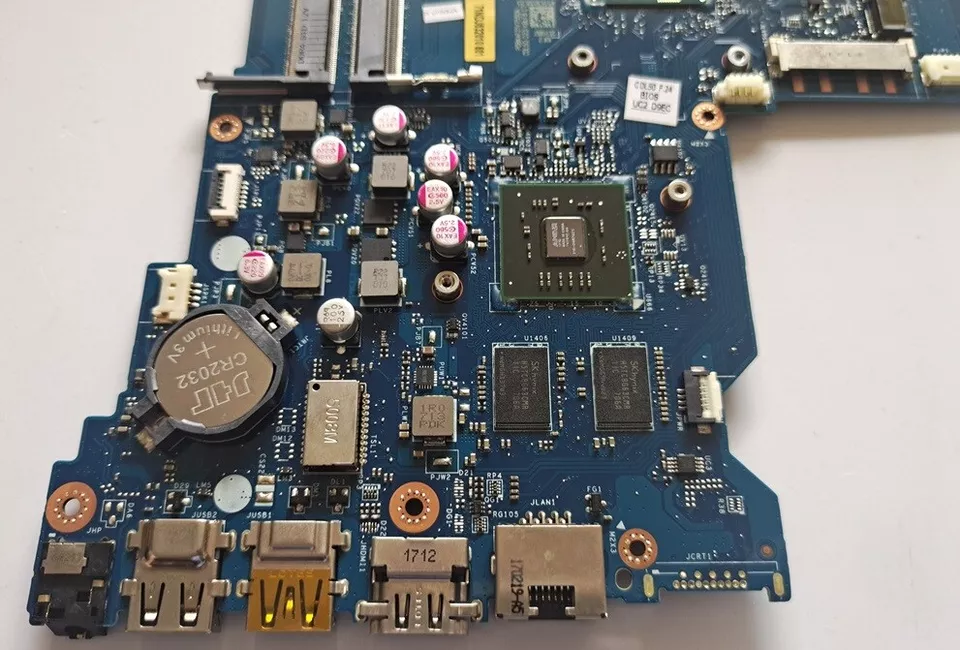
Hp 250 g5 15-ac 15-ay laptop motherboard core i5 replacement
A typical HP 250 G5 / 15-AC / 15-AY Core i5 motherboard includes:
-
Intel Core i5 CPU support
-
DDR4 memory slots
-
NVMe PCIe + SATA storage interfaces
-
USB 3.0 / USB 2.0 and Type-C ports
-
HDMI / audio / Ethernet connectivity
-
Integrated Intel UHD/HD graphics
-
HP BIOS firmware with hardware security features
-
Power delivery and voltage regulation circuitry
These features deliver balanced system performance, efficient power usage, and dependable daily computing.
KSh10,000.00
HP 250 G5 / 15-AC / 15-AY Laptop Motherboard Core i5 Replacement – Ultimate Guide
When searching for HP 250 G5 15-AC 15-AY laptop motherboard Core i5 replacement, you need clear, comprehensive, expert-level information to understand symptoms of failure, replacement options, technical specifications, and care tips — especially if you’re a technician, reseller or laptop owner in Nairobi, Kenya or other regions. This detailed guide covers everything you need to know about HP 250 G5, 15-AC, and 15-AY series motherboards with Intel Core i5 processors, written to help you make informed decisions and target high-ranking searches effectively.
At Compvate – Nairobi’s trusted laptop parts and repair specialists, we supply genuine motherboards, professionally tested replacements, expert installation services, and practical maintenance advice to ensure your laptop delivers reliable performance after replacement.
Understanding the HP 250 G5 / 15-AC / 15-AY Series
The HP 250 G5, 15-AC, and 15-AY laptops are mainstream notebooks designed for everyday computing, balancing performance with affordability. Many models in this family are powered by Intel Core i5 processors, providing:
-
Smooth multitasking
-
Efficient productivity performance
-
Improved battery life
-
Integrated Intel graphics
-
Reliable everyday usability
These laptops are popular among students, business professionals, and general users — but like all systems, the motherboard is a key component prone to failure over time. Understanding how to replace it correctly is critical for long-term reliability.
What the Motherboard Does in Your Laptop
The motherboard (also known as the system board) is the central circuit board that connects and coordinates all major components of your laptop:
-
Intel Core i5 CPU socket or solder point
-
RAM memory slots
-
Storage interfaces (NVMe / SATA)
-
Graphics and display subsystem
-
Power distribution and battery charging
-
USB, audio, network and video ports
-
BIOS firmware and system control circuitry
When serious motherboard issues arise, they often affect multiple subsystems simultaneously, making replacement the most effective solution.
Common Symptoms of Motherboard Failure
Before replacing the motherboard, ensure the problem truly lies at the system board level. Typical signs include:
1. No Power or No Display
-
No response when powering on
-
No lights, no beeps, no fan activity
2. Random Crashes or Shutdowns
-
The laptop reboots unexpectedly
-
Hangs during normal use
3. USB / Audio / Network Failure
-
Peripheral ports stop responding
-
Integrated components fail without driver issues
4. Failure to POST / BIOS Errors
-
No successful Power-On Self Test (POST)
-
BIOS errors or corruption messages
5. Overheating with Normal Use
-
Excess heat even with light tasks
-
Fan runs at high speed persistently
If your HP 250 G5, 15-AC, or 15-AY laptop exhibits these symptoms — especially multiple ones — your motherboard may need replacement.
HP 250 G5 / 15-AC / 15-AY Core i5 Motherboard – What You Need to Know
When seeking a replacement motherboard, here’s what’s important:
✔ Compatibility
Ensure the board matches your specific model number and CPU generation (e.g., Core i5 7th Gen, 8th Gen, etc.). Part numbers help ensure exact fit.
✔ Original HP vs Tested Alternatives
-
Genuine HP motherboard – OEM-manufactured, highest reliability
-
Tested compatible/refurbished board – Lower cost, verified operation
At Compvate, we supply both genuine HP motherboards and high-quality replacements, each bench-tested and verified for compatibility before installation.
Step-by-Step Replacement Overview
Replacing a laptop motherboard is a technical and precision-oriented task best performed by experienced technicians. Here’s the typical procedure:
1. Power Off and Data Backup
-
Turn off the laptop
-
Disconnect the charger and battery
-
Backup data if possible
2. Disassemble the Laptop
-
Remove the bottom cover screws
-
Detach storage and RAM modules
-
Remove keyboard and palm rest
-
Disconnect all ribbon and power cables
3. Remove the Faulty Motherboard
-
Unscrew all mounting screws
-
Detach cooling assembly (heat sink and fan)
-
Carefully extract the motherboard
4. Install the New or Tested Board
-
Place the new motherboard
-
Reconnect all cables and components
-
Reinstall the cooling system with fresh thermal paste
5. Reassemble and Test
-
Reattach bottom casing and screws
-
Power on and enter BIOS
-
Test display, ports, connectivity, and performance
Professional installation ensures BIOS configuration, thermal calibration, and hardware verification are properly handled for long-term stability.
Tips — How to Take Care of Your Laptop Motherboard
To help prolong the life of your motherboard and avoid future failures, follow these essential care tips:
✔ Avoid Liquid Contact
Liquid spills can cause short circuits and corrosion — keep drinks away from your laptop.
✔ Keep Air Vents Clean
Dust buildup restricts airflow, leading to overheating. Clean vents and fans regularly.
✔ Use a Cooling Pad
Cooling pads help reduce heat during heavy workloads.
✔ Protect from Power Surges
Use surge protectors or UPS devices to prevent electrical damage.
✔ Handle with Care During Upgrades
When adding RAM or storage, avoid bending connectors and work on a grounded surface.
Adopting these habits reduces stress on your motherboard and increases reliability over time.
Why Choose Compvate for Your Motherboard Replacement
At Compvate – Nairobi’s leading laptop parts and repair center, we offer:
-
Genuine HP 250 G5 / 15-AC / 15-AY motherboards
-
Quality-tested compatible replacements
-
Professional installation services
-
Post-installation performance diagnostics
-
Thermal and BIOS optimization
-
Warranty coverage and after-sales support
Our technicians are trained in HP systems and board-level repair, ensuring every replacement is executed with precision and reliability.
Conclusion
Replacing your HP 250 G5 / 15-AC / 15-AY laptop motherboard Core i5 is a critical repair that restores functionality when major failures occur. Choosing the right motherboard — especially a genuine HP part or a trusted quality alternative — and relying on expert technicians ensures your laptop performs like new for years to come.
| Feature | Specification | |
|---|---|---|
| Processor (Onboard) | Intel® Core™ i5 (5th Gen i5-5200U or 6th Gen i5-6200U) | |
| CPU Socket | BGA (Onboard, non-upgradable) | |
| Chipset | Intel® Integrated SoC or HM76/HM86/CM236 Express | |
| Memory Slots | 2 SODIMM slots | |
| Memory Type | DDR3L SDRAM or DDR4 SDRAM (varies by motherboard variant; DDR4 is more common in G5) | |
| Maximum Memory | Up to 16 GB total (using 2x 8GB modules) | |
| Graphics | Integrated Intel® HD Graphics 5500 (for 5th gen) or Intel® HD Graphics 520 (for 6th gen) |
Expansion and Interfaces
- Storage Interfaces: The motherboard supports a standard 2.5-inch SATA III hard drive or SSD interface. Some specific variants may also feature an M.2 slot for additional storage.
- Expansion Slots:
- Mini PCI slot for the wireless network (Wi-Fi) card.
- Multi-format SD media card reader slot.
- External Ports: Common ports include:
- USB ports (typically a mix of USB 3.0/3.1 and USB 2.0 ports).
- HDMI port.
- VGA port.
- RJ-45 (Ethernet) jack.
- Headphone/microphone combo jack.
- Optical Drive: Supports an integrated SuperMulti DVD burner optical drive via a SATA interface.
Based on 0 reviews
Be the first to review “Hp 250 g5 15-ac 15-ay laptop motherboard core i5 replacement”
Related products
-
Laptop Components, Motherboards
lenovo ideapad 130 15ikb motherboard core i5
-
Processor Support: Intel Core i5 (7th and 8th Gen, depending on board revision)
-
Chipset Architecture: Intel HM-series chipset optimized for mobile computing
-
Form Factor: Proprietary Lenovo Ideapad 130 15IKB design
-
Memory Support: DDR4 RAM slots supporting up to 16GB
-
Graphics: Integrated Intel UHD Graphics
-
Storage Interfaces: SATA connector for HDD/SSD, select variants with M.2 support
-
Connectivity: USB 2.0, USB 3.0, HDMI, LAN, audio ports
-
Power Management: Integrated voltage regulation and battery charging circuits
SKU: n/a -
-
Laptop Components, Motherboards
HP compaq cq62 motherboard
-
Model Compatibility: HP Compaq CQ62
-
Processor Support: Intel Celeron, Pentium Dual-Core, Core i3 (1st Generation)
-
CPU Socket: rPGA988A (Socket G1)
-
Chipset: Intel HM55 Express chipset
-
Memory Support: DDR3 RAM
-
Maximum Memory: Up to 8GB DDR3
-
Graphics: Integrated Intel HD Graphics
-
Storage Interface: SATA interface for HDD or SSD
-
Display Output: VGA and HDMI
-
Connectivity: USB 2.0, Ethernet LAN, audio ports
-
Power Management: Integrated voltage regulation and battery charging circuitry
-
Cooling Support: Fan and heat sink integration with thermal sensors
-
Form Factor: HP proprietary laptop motherboard
SKU: n/a -
-
Laptop Components, Motherboards
Dell xps 15 9570 motherboard replacement with I7-8750H CPU
- Processor: Integrated Intel Core i7-8750H (6 Cores, 12 Threads, 2.2 GHz base, up to 4.1 GHz Turbo).
- Graphics: Integrated Intel UHD Graphics 630 & dedicated NVIDIA GeForce GTX 1050 Ti (4GB GDDR5).
- Memory (RAM): 2 x DDR4 SO-DIMM slots, supporting up to 32GB at 2666MHz.
- Storage: Supports M.2 2280 PCIe NVMe SSDs.
- Chipset: Intel HM370.
- Wireless: Killer 1535 802.11ac WiFi.
- Ports: Thunderbolt 3 (4x PCIe Gen 3 lanes), USB 3.1, HDMI 2.0, SD Card Reader, Audio Jack.
- Motherboard Part Numbers: F3DC8 (LA-G341P) and CN-0YYW9X
- VRM (Voltage Regulator Module): Early boards used 3 VRMs; later revisions (like F3DC8) used 4 VRMs, both are interchangeable with corresponding heatsink swaps.
SKU: n/a -
Laptop Components, Motherboards
HP compaq cq56 motherboard
-
Model Compatibility: HP Compaq CQ56
-
Processor Support: Intel mobile processors (Celeron, Pentium, Core i3 – model dependent)
-
CPU Socket: Socket G1 (PGA988A)
-
Chipset: Intel HM55 Express chipset
-
Memory Support: DDR3 RAM
-
Maximum Memory: Up to 8GB DDR3 (configuration dependent)
-
Graphics: Integrated Intel HD Graphics
-
Storage Interface: SATA interface for HDD
-
Display Output: VGA (HDMI on select variants)
-
Connectivity: USB 2.0, Ethernet LAN, audio ports
-
Power Management: Integrated voltage regulation and battery charging circuitry
-
Cooling Support: Fan and heat sink integration with thermal sensors
-
Form Factor: HP proprietary laptop motherboard
SKU: n/a -












There are no reviews yet.