
HP EliteBook 745 G2 Screen Replacement in Nairobi, Kenya – How We Fix Your Screen at Compvate
At Compvate, we provide professional HP EliteBook 745 G2 screen replacement services in Nairobi, Kenya, restoring your laptop’s display to clear, sharp, and factory-grade performance. As experienced laptop technicians and one of the most trusted laptop sellers and repair specialists in Nairobi, we understand precisely how we fix your screen with expertise, quality parts, and meticulous workmanship.
The HP EliteBook 745 G2 is a robust business-class notebook known for reliability and performance. Despite its sturdy design, the display remains one of the most vulnerable components and can suffer damage from accidental drops, pressure marks, physical impacts, or internal failures. When the screen begins to crack, flicker, go black, or show distortion, a professional HP EliteBook 745 G2 screen replacement is the most effective way to restore full usability.
HP EliteBook 745 G2 Screen Specifications Overview
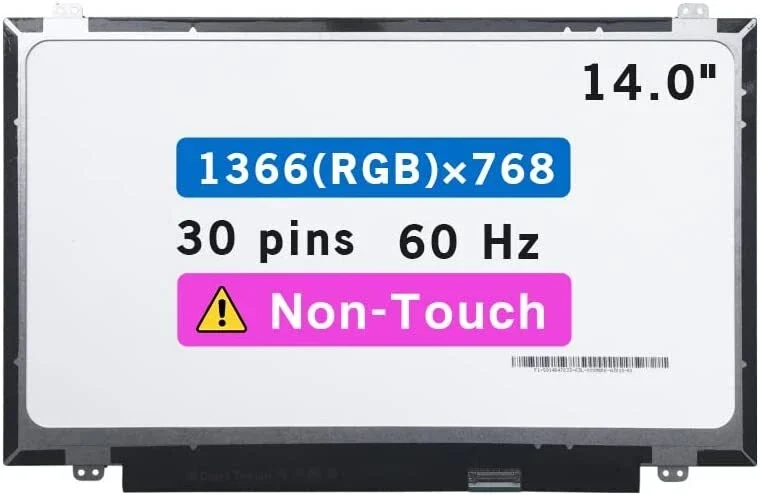
Accurate screen replacement begins with identifying the exact display specifications for your laptop. The HP EliteBook 745 G2 typically includes:
-
14-inch LED-backlit LCD display
-
HD resolution (1366 × 768) or optional Full HD (1920 × 1080)
-
eDP display connector (typically 30-pin)
-
Slim integrated panel design
-
Non-touch panel
Using the wrong screen panel can cause no display, flickering, resolution issues, dim backlight, or unstable visuals. A key part of how we fix your screen at Compvate is confirming the screen’s size, resolution, connector type, and fitment before installation.
Common HP EliteBook 745 G2 Screen Issues
Customers request HP EliteBook 745 G2 screen replacement for a range of display problems, including:
-
Cracked or shattered LCD glass
-
Black or blank screen while the laptop powers on
-
Vertical or horizontal lines
-
Faded colours or washed-out display
-
Dead pixels or dark spots
-
Backlight failure or dim visuals
-
Flickering or unstable brightness
-
Pressure marks from lid or keyboard impact
These issues degrade productivity, user comfort, and visual clarity — making prompt screen replacement essential.
How We Fix Your Screen – Our Professional Repair Process
Understanding how we fix your screen helps you trust the repair process. At Compvate, we follow a structured and technician-led workflow with precision and care:
1. Accurate Diagnosis
We begin by confirming the issue is display-related, not caused by the motherboard, GPU, or display cable. This prevents unnecessary part replacements.
2. Screen Verification
Part of how we fix your screen is matching the exact HP EliteBook 745 G2 screen specifications: physical size, resolution, connector type, and panel finish.
3. Safe Screen Removal
The damaged display panel is carefully removed to protect:
-
Display cable connectors
-
Webcam and microphone wiring
-
Bezel and hinge assemblies
4. New Screen Installation
A new, fully tested replacement screen is installed with precise alignment and secure mounting. We ensure all connections are firm before finalizing.
5. Comprehensive Quality Testing
Once installed, we test brightness, colour accuracy, resolution consistency, and backlight stability to ensure your display performs correctly.
This structured workflow is exactly how we fix your screen — with accuracy, premium parts, and professional care.
Why Professional HP EliteBook 745 G2 Screen Replacement Matters
Laptop screen replacement is a delicate technical service. Improper installation can result in:
-
Damage to display connector pins
-
Loose or broken hinge parts
-
Faulty webcam/microphone wiring
-
Backlight instability or flickering
-
Motherboard display connector faults
At Compvate Nairobi, our technicians use industry-standard tools, anti-static protection, and exact techniques so that how we fix your screen avoids additional damage and delivers a lasting repair.
Original vs Compatible HP EliteBook 745 G2 Screens
We offer both original HP screens and high-quality compatible replacement panels, based on availability and customer preference.
Original HP Screens
-
Factory-grade display quality
-
Accurate colours and brightness
-
Better longevity and reliability
-
Ideal for business and professional use
High-Quality Compatible Screens
-
Cost-effective alternative
-
Same size, resolution, and connector
-
Fully tested for reliability
-
Excellent performance for everyday use
Both options are installed with equal technical precision and care.
**effective alternative
-
Same size, resolution, and connector
-
Fully tested for reliability
-
Excellent performance for everyday use
Both options are installed with equal technical precision and care.
HP EliteBook 745 G2 Screen Replacement Cost in Nairobi
The cost of HP EliteBook 745 G2 screen replacement in Kenya depends on:
-
Screen resolution (HD vs Full HD)
-
Original vs compatible panel
-
Panel availability
At Compvate, we offer transparent and competitive pricing that includes diagnosis, replacement, and testing — with no hidden charges.
Same-Day HP EliteBook 745 G2 Screen Replacement Services
In many cases, we provide same-day HP EliteBook 745 G2 screen replacement, depending on screen stock availability. Fast and reliable service is part of how we fix your screen without compromising quality.
Post-Replacement Screen Care Tips
To keep your new display performing at its best:
-
Avoid closing the lid with objects on the keyboard
-
Use a padded or protective laptop bag
-
Open and close the lid gently
-
Keep liquids and food away from the display
-
Adjust brightness through system settings
Proper care ensures long-term screen performance and durability.
Additional HP Laptop Repair and Sales Services
At Compvate, we also provide:
-
New and refurbished laptop sales
-
HP keyboard replacement
-
Laptop hinge repair
-
Battery replacement
-
Motherboard repair and replacement
-
RAM and SSD upgrades
-
Operating system installation and optimization
We are a complete laptop solutions centre in Nairobi, Kenya.
Trusted HP Technician Services in Nairobi, Kenya
Our technicians combine hands-on experience with deep HP hardware knowledge, ensuring every repair meets professional standards. Clear communication, precise workmanship, and dependable results define how we fix your screen at Compvate.
If your HP EliteBook 745 G2 screen is cracked, flickering, black, or otherwise malfunctioning, our professional screen replacement service delivers dependable and lasting results.
Conclusion
A damaged laptop screen does not mean your device is beyond repair. With HP EliteBook 745 G2 screen replacement services from Compvate, your laptop regains clear visuals, reliable performance, and extended lifespan. Our expert repair process explains how we fix your screen — with accuracy, quality parts, and professional care. We remain committed to providing top-quality laptop repair and sales services in Nairobi, Kenya.

There are no reviews yet.