
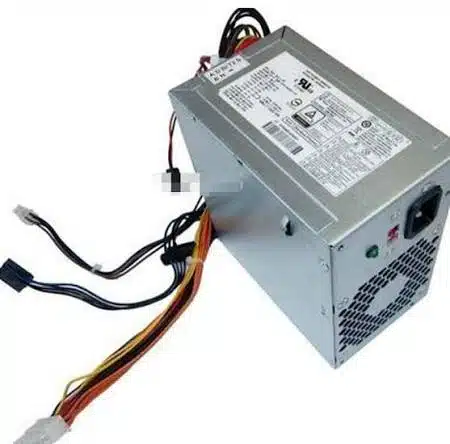
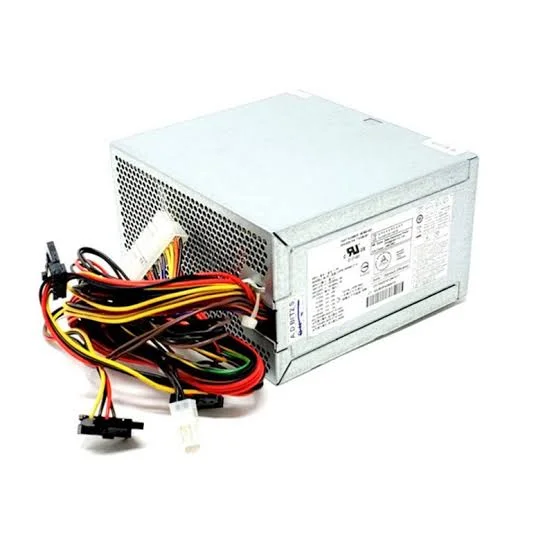
hp prodesk 400 g3 mt power supply
- Form Factor: Custom HP Proprietary MT Block
- Max Output Power: 180 Watts Max
- Efficiency Rating: 80 PLUS Certified
- AC Input Range: 100V–240V AC (Auto-Switching)
- Input Frequency Range: 50Hz–60Hz
- DC Output Ratings:
-
- +12Vmain === 12.0A
- +12Vcpu === 10.0A
- +12Vsb === 1.5A
-
- Motherboard Connectors:
-
- 1 x Proprietary HP 6-Pin Main Power Connector
- 1 x 4-Pin CPU +12V Power Connector
-
- Cooling System: 1 x Integrated Internal Cooling Fan
- Dimensions: 165mm x 150mm x 95mm
KSh2,500.00
HP ProDesk 400 G3 MT Power Supply – Replacement .
HP ProDesk 400 G3 MT Power Supply Replacement
A replacement HP ProDesk 400 G3 MT PSU can be a practical solution when an existing power supply has stopped working or has become unreliable.
The power supply converts AC electricity into the regulated DC power required by the computer’s internal components. A compatible replacement helps provide the appropriate power connections and capacity for the installed hardware.
Before purchasing, we recommend checking the original PSU label for its HP spare number, manufacturer model, wattage, and electrical specifications.
HP provides a dedicated support section for the ProDesk 400 G3 Microtower, including the maintenance and service documentation for the 400 G3 MT family.
HP ProDesk 400 G3 Microtower Power Supply
The HP ProDesk 400 G3 Microtower is a conventional tower-style business desktop and should not be confused with the smaller SFF or Mini versions.
HP maintains separate product documentation for the ProDesk 400 G3 Microtower and the ProDesk 400 G3 Small Form Factor PC.
This distinction matters when purchasing a replacement PSU because different chassis designs can use different power-supply form factors, mounting arrangements, connectors, and wattage specifications.
For this reason, the replacement should be identified specifically for the HP ProDesk 400 G3 MT.
HP ProDesk 400 G3 MT PSU Compatibility
Compatibility should be the first consideration when choosing an HP ProDesk 400 G3 MT power supply.
A replacement PSU should be checked against the original unit for:
- HP spare or part number
- Manufacturer and model
- Power rating
- Motherboard connectors
- Storage power connectors
- Expansion-card power connectors
- Physical dimensions
- Mounting points
- Input and output specifications
A PSU with the same wattage is not necessarily compatible. The connectors and physical design must also match the computer.
How to Identify an HP ProDesk 400 G3 MT PSU
The most reliable way to identify a replacement is to inspect the original power supply.
Look for the label attached to the PSU. It may include:
- HP spare number
- PSU model number
- Manufacturer
- Wattage
- Input voltage
- Output information
- Regulatory information
We recommend recording these details before ordering a replacement.
HP’s official ProDesk 400 G3 Microtower documentation also confirms that the model has dedicated service documentation, making the exact machine configuration important when identifying replacement hardware.
HP ProDesk 400 G3 MT Power Supply Wattage
The exact PSU wattage should be confirmed from the individual ProDesk 400 G3 MT configuration and original PSU label.
This is important because HP offered the ProDesk 400 G3 family in multiple form factors and configurations. The official HP specification page identifies the Microtower as its own product family and requires the product number or serial information to display configuration-specific specifications.
Rather than assuming that every ProDesk 400 G3 MT uses the same PSU, we recommend matching the replacement to the original unit.
This approach is especially important if the computer has been upgraded with additional storage, a dedicated graphics card, or other expansion hardware.
HP ProDesk 400 G3 MT PSU for Computer Repair
A failed power supply does not necessarily mean that the entire computer needs to be replaced.
If the motherboard, processor, memory, storage, and other components are still functional, replacing the PSU can be a practical repair option.
A compatible HP ProDesk 400 G3 MT replacement power supply can help restore a business desktop while allowing the existing hardware to remain in service.
This can be useful for:
- Business computer maintenance
- Computer refurbishment
- Office PC repairs
- IT equipment servicing
- Replacement of failed PSUs
- Maintaining existing HP systems
Common Signs of an HP ProDesk 400 G3 MT PSU Problem
A defective power supply can produce several symptoms, including:
- The computer does not turn on.
- The system shuts down unexpectedly.
- The computer loses power intermittently.
- Internal components do not receive power.
- The system becomes unstable during operation.
These symptoms can also be caused by other hardware faults. Therefore, a PSU should not automatically be considered defective simply because a computer will not start.
Proper diagnosis is recommended before replacing the power supply.
HP ProDesk 400 G3 MT Power Supply and Graphics Cards
If the ProDesk 400 G3 MT contains a dedicated graphics card, its power requirements should be considered when replacing the PSU.
The complete system configuration determines the required power capacity. Additional storage drives, expansion cards, and other peripherals can also contribute to the computer’s overall power requirements.
For an upgraded system, we recommend checking the specifications of the installed hardware against the original PSU before selecting a replacement.
Buy HP ProDesk 400 G3 MT Power Supply
The HP ProDesk 400 G3 MT Power Supply is an important replacement component for maintaining compatible HP ProDesk business desktops.
For the best results, we recommend matching the replacement against the original PSU’s HP part number, manufacturer model, wattage, connectors, physical dimensions, and electrical specifications.
HP’s official support documentation confirms the ProDesk 400 G3 Microtower as a distinct product and provides dedicated maintenance documentation for the 400 G3 MT family.
At Compvate, we provide computer hardware and replacement components for customers maintaining, repairing, and refurbishing desktop computer systems. Visit Compvate to explore available computer hardware and replacement components.
- Product Type: Internal Desktop Power Supply Unit (PSU)
- Form Factor: Custom HP Proprietary MT Block
- Max Output Power: 180 Watts Max
- Efficiency Rating: 80 PLUS Certified
- AC Input Range: 100V–240V AC (Auto-Switching)
- Input Frequency Range: 50Hz–60Hz
- DC Output Ratings:
-
- +12Vmain === 12.0A
- +12Vcpu === 10.0A
- +12Vsb === 1.5A
-
- Motherboard Connectors:
-
- 1 x Proprietary HP 6-Pin Main Power Connector
- 1 x 4-Pin CPU +12V Power Connector
-
- Cooling System: 1 x Integrated Internal Cooling Fan
- Dimensions: 165mm x 150mm x 95mm
- Compatible HP Spare / Part Numbers: 796349-001, 759767-001, 848050-002, 848053-002
- Compatible Manufacturer Model Numbers: D13-180P1A, PCD009, HK280-11FP, DPS-180AB-16B, DPS-180AB-23A
- System Compatibility: HP ProDesk 400 G3 MT, HP ProDesk 405 G2 MT, HP 280 G2 MT, HP 280 G1 MT, HP 285 G2 MT, HP Pavilion 510 Series, HP Pavilion 550 Series
Based on 0 reviews
Be the first to review “hp prodesk 400 g3 mt power supply”
Related products
-
Apple Mackbook Chargers, Computer Accessories, Laptop Chargers
Macbook pro 2012 charger 60w
Technical Specifications
-
Input Voltage: 100–240V AC
-
Output Voltage: 16.5V / 3.65A
-
Power Output: 60W
-
Connector Type: MagSafe (magnetic)
-
LED Indicator: Amber = Charging, Green = Fully Charged
-
Cable Length: Standard Apple design (approx. 2 meters)
-
Safety Features: Over-voltage, over-current, short-circuit protection
-
Compatibility: MacBook Pro 13-inch (2012)
These specifications ensure safe, efficient, and reliable charging.
SKU: n/a -
-
Computer Accessories
hp monitor power cord
-
Type: AC Power Cable
-
Connector Type (Monitor Side): C5 (3-prong Mickey Mouse) or C13 (kettle-type) depending on HP model
-
Connector Type (Wall Side): Standard 3-pin plug (UK/Kenya type G plug)
-
Cable Length: Typically 1.2m – 1.8m
-
Voltage Support: 100–240V AC, 50/60Hz
-
Compatibility: HP monitors, desktops, printers, and other devices with matching power input
-
Safety: Complies with global safety standards
SKU: n/a -
-
Apple Mackbook Chargers, Computer Accessories, Laptop Chargers
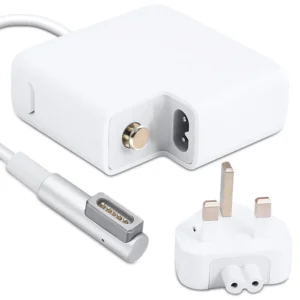
MacBook Pro 2011 85W MagSafe 1 Power Adapter
 Apple Mackbook Chargers, Computer Accessories, Laptop Chargers
MacBook Pro 2011 85W MagSafe 1 Power Adapter
-
Product Type: Power Adapter
-
Output Power: 85W
-
Connector Type: MagSafe 1 (L-Tip)
-
Input Voltage: 100–240V AC
-
Indicator: LED charging status light
-
Compatibility: MacBook Pro 15-inch & 17-inch (2011)
-
Condition: Tested and verified
This charger meets Apple’s original design standards for safe and consistent charging.
SKU: n/a -
-
Apple Mackbook Chargers, Computer Accessories, Laptop Chargers
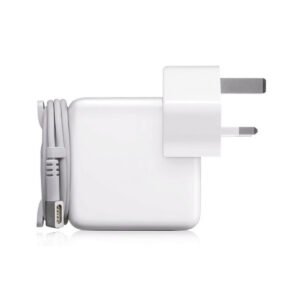
Macbook pro 2013 charger(Retina, 13-inch) 60W MagSafe 2 power adapter.
 Apple Mackbook Chargers, Computer Accessories, Laptop Chargers
Macbook pro 2013 charger(Retina, 13-inch) 60W MagSafe 2 power adapter.
-
Product Type: Power Adapter
-
Output Power: 60W
-
Connector Type: MagSafe 2
-
Input Voltage: 100–240V AC
-
Output Voltage: 16.5V
-
Compatibility: MacBook Pro Retina 13-inch (2012–2015)
-
LED Indicator: Yes
-
Condition: Tested and verified
This adapter meets the required specifications for stable and efficient MacBook charging.
SKU: n/a -












There are no reviews yet.