
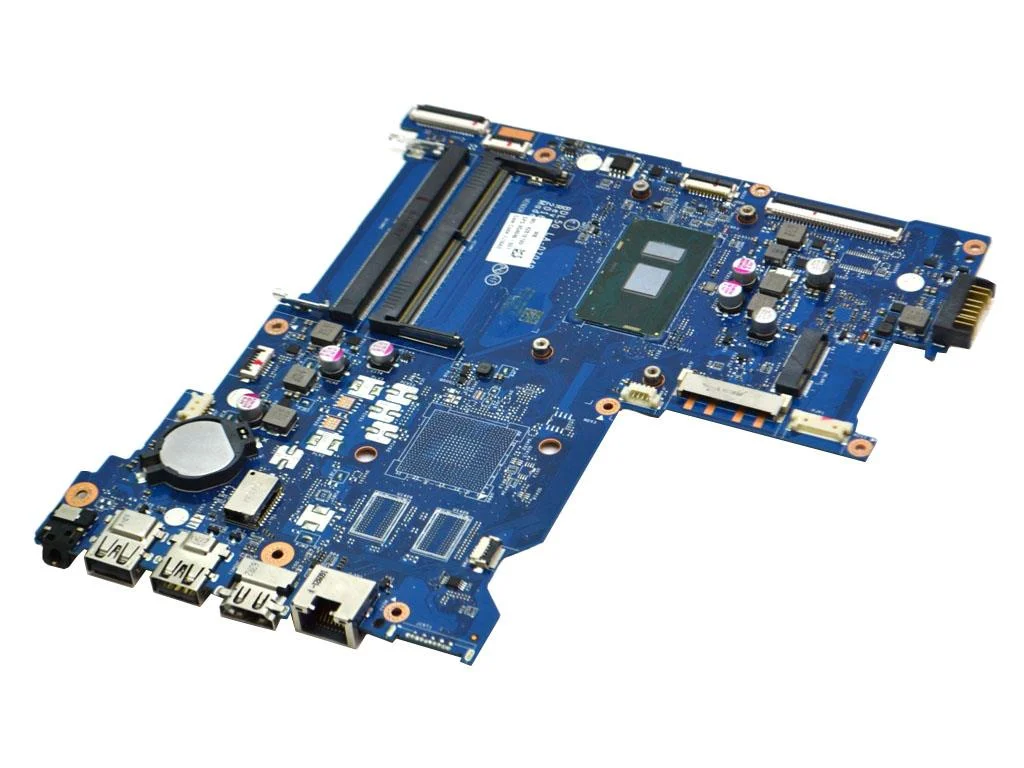
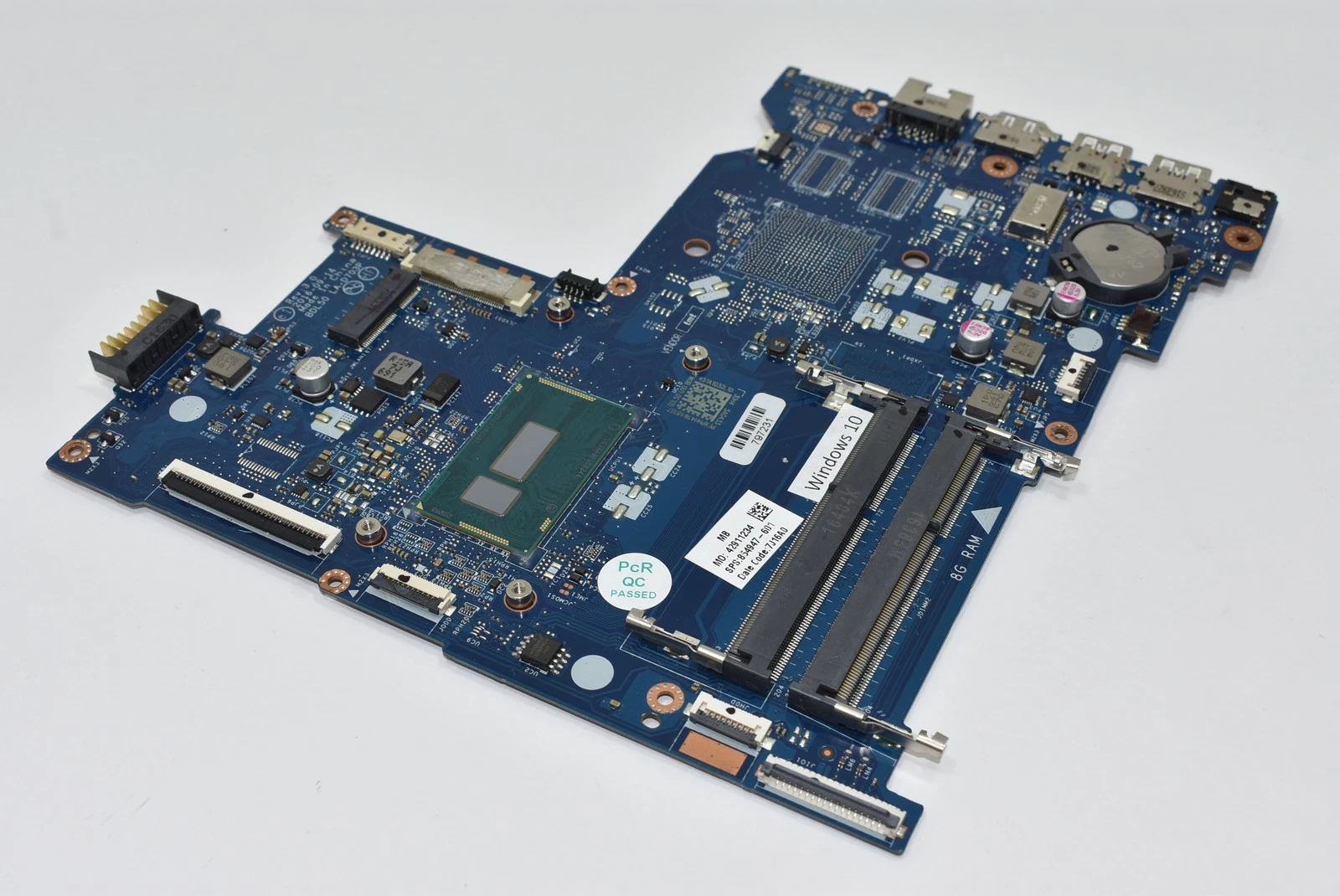
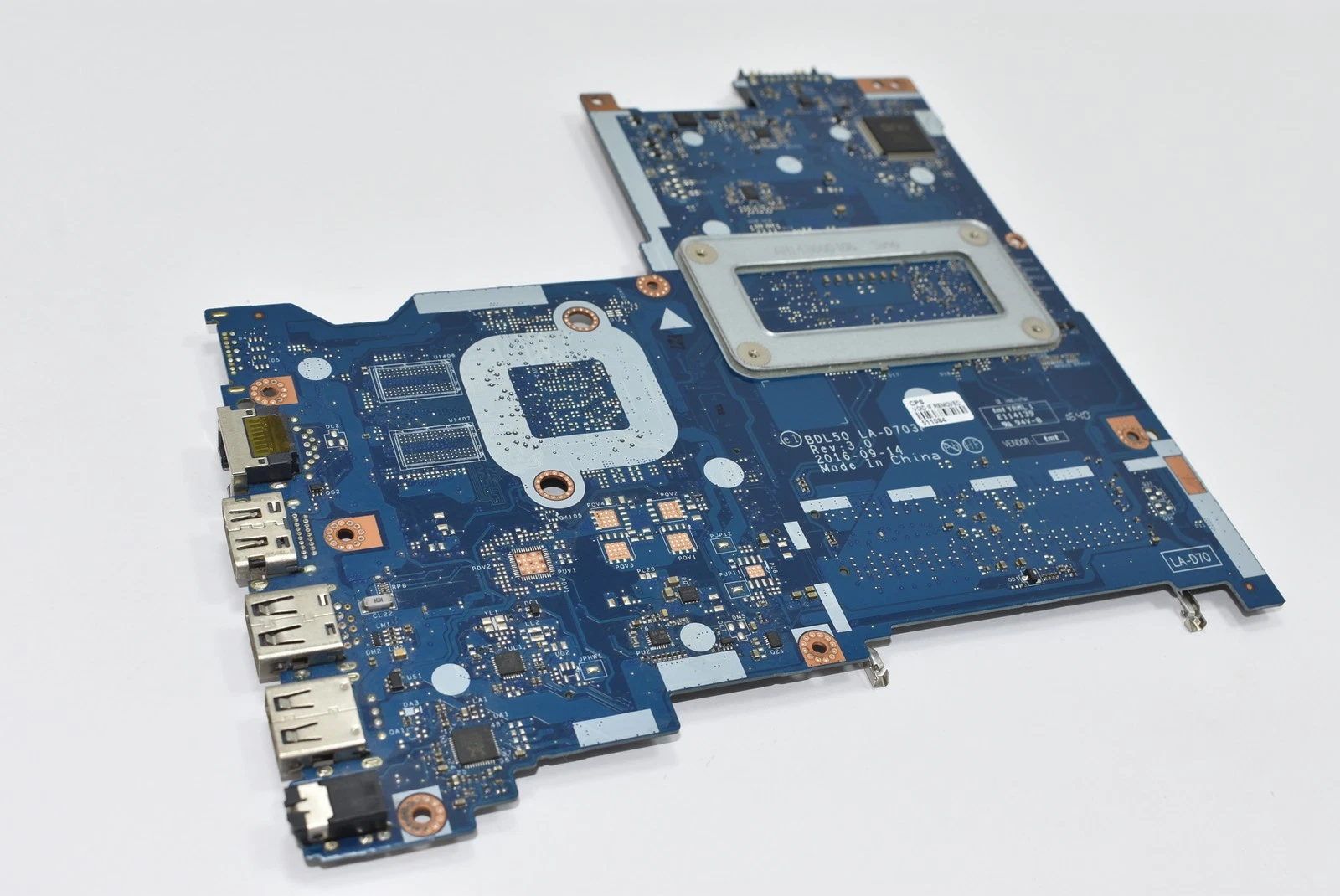
HP 15 ay laptop motherboard core i3
The HP 15 AY motherboard designed for Intel Core i3 processors features:
-
Intel Core i3 socket or onboard CPU architecture
-
DDR3/DDR4 RAM support
-
Integrated Intel HD Graphics
-
USB 2.0 and USB 3.0 ports
-
HDMI and VGA video outputs (model dependent)
-
SATA III storage interface
-
Audio and network controllers
-
Secure BIOS with customization options
-
Efficient power regulation and thermal zones
These boards deliver balanced performance, responsive boot times, and long-term reliability when properly installed and tested.
KSh6,000.00
HP 15 AY Laptop Motherboard Core i3 Replacement – Complete Guide
When it comes to HP 15 AY laptop motherboard Core i3 replacement, accurate information is vital for technicians, laptop owners, and anyone looking for dependable repair solutions. Whether you are in Nairobi, Kenya, or anywhere in the world, understanding the intricacies of motherboard replacement ensures your device returns to peak performance, reliability, and long-term stability.
At Compvate – Nairobi’s trusted laptop specialists, we provide expert guidance and professional services for HP laptops. This article offers a deep dive into HP 15 AY series Core i3 motherboard issues, replacement options, diagnostics, and best practices — designed to be the most comprehensive, SEO-rich resource available online.
Understanding the HP 15 AY Series and Core i3 Motherboards
The HP 15 AY laptop series encompasses several configurations, most commonly paired with Intel Core i3 processors. These machines are popular for everyday computing tasks such as:
-
Web browsing and email
-
Office productivity
-
Media playback
-
Light multitasking
-
Academic and business use
At the heart of these laptops lies the motherboard — the central circuit board that connects critical components including:
-
Intel Core i3 CPU
-
RAM modules
-
Storage devices (HDD/SSD)
-
Graphics interfaces
-
Power distribution
-
Peripheral ports (USB, HDMI, audio, network)
When the motherboard fails, the symptoms are often clear — the laptop fails to boot, exhibits hardware irregularities, or loses critical functionality.
Common Signs of Motherboard Failure in HP 15 AY Laptops
Before initiating a replacement, it’s important to diagnose with precision. Common signals that the motherboard has issues include:
1. No Power or Zero Display
If the device shows no signs of startup — no lights, no fan spin, and no display — the motherboard is one of the first components to inspect.
2. Frequent Unexpected Shutdowns
Laptop randomly powering off, especially during light tasks, suggests power circuitry or controller failure on the motherboard.
3. Unresponsive USB or Peripheral Ports
When ports such as USB, network, or audio stop working without driver corruption, it indicates faulty motherboard pathways or controllers.
4. BIOS Errors or Failure to POST
Failing the Power-On Self Test (POST) or encountering repeated BIOS errors points to chipset or firmware-level issues on the motherboard.
5. Overheating and Erratic Power Behavior
Excessive heat or unstable battery charging behavior often correlates to motherboard power delivery faults.
Understanding these signs helps technicians and users determine if a motherboard replacement is truly warranted.
Why Motherboard Replacement Is Sometimes Necessary
Unlike simple components such as RAM or storage drives, the motherboard integrates core chipsets and power management circuits. When these fail:
-
Component-level repair becomes impractical
-
Errors propagate throughout the system
-
Performance becomes unpredictable
-
Long-term reliability is compromised
At this stage, replacing the motherboard with a genuine or compatible component becomes the most secure solution.
Types of HP 15 AY Core i3 Motherboards
HP 15 AY Core i3 laptops may come equipped with a range of motherboard revisions and formats, depending on the exact model subcode (for example AY010, AY011, AY015, AY020, etc.). Regardless of sub-model, all share:
-
Socketed or soldered Intel Core i3 support
-
Dual-channel DDR3/DDR4 memory paths
-
Integrated graphics output
-
PCIe and SATA device connectivity
-
USB, audio, display, and network interfaces
When seeking a replacement, it’s essential to match the exact motherboard part number and configuration to ensure perfect compatibility.
Genuine vs Compatible Motherboards – What to Choose
When replacing your HP 15 AY motherboard Core i3, you typically have two options:
1. Genuine HP Replacement Boards
-
Manufactured or authorized by HP
-
Highest compatibility
-
Long-term durability
-
Recommended for business and daily use
2. Tested Compatible or Refurbished Boards
-
Cost-effective solutions
-
Bench-tested for stability
-
Often come with limited warranty
-
Suitable when budget is a key factor
At Compvate Nairobi, we provide both genuine and quality-tested replacement boards, each backed by verification and warranty support.
Step-by-Step Motherboard Replacement Overview
Replacing a laptop motherboard is a technical process best undertaken by trained professionals. Here’s an overview of the key stages:
1. Data Backup and Power Down
Always backup data if the laptop still powers on. Remove the battery and power adapter.
2. Disassembly
-
Remove bottom panel
-
Detach storage, optical drives (if any)
-
Remove keyboard and palm rest
-
Disconnect cables (display, power, USB, audio, network)
3. Extract the Faulty Motherboard
-
Unscrew the mounting points
-
Detach thermal assembly
-
Remove the motherboard carefully
4. Install the New Board
-
Place the replacement motherboard
-
Reconnect all flex cables and connectors
-
Secure with screws in correct sequence
5. Reassemble and Test
-
Reconnect cooling systems
-
Replace battery and power
-
Power on and enter BIOS
-
Test all hardware interfaces (USB, display, audio, network)
Professional replacement includes BIOS configuration reset, thermal paste reapplication, and stress testing to ensure full operational stability.
How We Ensure Quality at Compvate
At Compvate, we commit to:
✅ Thorough Bench Testing
Each motherboard is tested with:
-
Verified power rails
-
Functional port checks
-
Memory and CPU stability
-
Display and I/O testing
Warranty Backed Replacements
We stand behind our products with wallet-friendly warranties, ensuring peace of mind after purchase.
Expert Installation
Our certified technicians are trained in board-level repair, replacement, and diagnostics – preserving the integrity of your notebook.
Kenya-Centric Support
From Nairobi laptop users to businesses nationwide, our services are tailored to local needs and expectations.
Tips for a Successful Motherboard Replacement
To ensure your HP 15 AY Core i3 motherboard replacement goes smoothly:
-
Match the exact part number of your original board
-
Work with certified technicians
-
Verify BIOS and driver compatibility
-
Perform extensive hardware testing post-replacement
-
Keep warranty documentation safe
Following these guidelines significantly extends the life of your laptop and prevents future hardware malfunctions.
Conclusion
Replacing a motherboard in an HP 15 AY laptop with an Intel Core i3 processor is a significant but necessary step when hardware failures occur. Whether due to power issues, peripheral failures, or BIOS corruption, understanding the process and choosing the right replacement board determines the success of the repair.
| Feature | ||
|---|---|---|
| Chipset | Intel® H170 (or integrated SoC/System on Chip) | |
| Processor | Onboard Intel® Core™ i3 (typically 5th Gen Core i3-5005U or 6th Gen Core i3-6006U) | |
| Socket Type | BGA (Ball Grid Array), meaning the CPU is soldered to the motherboard and is not user-upgradable | |
| Memory Slots | 2 SODIMM slots | |
| Memory Type | DDR3L SDRAM or DDR4 SDRAM (varies by specific motherboard part number/variant) | |
| Maximum Memory | Up to 16 GB total (using 2x 8GB modules) | |
| Graphics | Integrated Intel® HD Graphics (e.g., HD Graphics 5500/520/620 depending on CPU generation) |
Expansion and Ports
- Storage Interface: Supports internal SATA III (6 Gb/s) drives (for 2.5-inch HDD or SSDs) and may include an M.2 slot on some specific variants for NVMe or SATA SSDs.
- Expansion Slots:
- Mini PCI expansion slot (for Wi-Fi card)
- Multi-format SD media card reader
- External Ports:
- USB ports (mix of USB 3.0/3.1 and USB 2.0)
- HDMI port
- VGA port
- RJ-45 (Ethernet) jack
- Headphone/microphone combo jack
- AC power connector
Based on 0 reviews
Be the first to review “HP 15 ay laptop motherboard core i3”
Related products
-
Laptop Components, Motherboards
Acer aspire 5733 motherboard
-
Model Compatibility: Acer Aspire 5733
-
Processor Support: Intel mobile processors (Socket G1 / PGA988A, model dependent)
-
Chipset: Intel HM55 Express chipset
-
Memory Support: DDR3 RAM, dual-slot support
-
Graphics: Integrated Intel HD Graphics (processor dependent)
-
Storage Interface: SATA interface for HDD
-
Connectivity: USB 2.0, VGA, HDMI (model dependent), LAN, audio ports
-
Power Management: Integrated voltage regulation and charging circuitry
-
Cooling Support: Fan and heat sink integration with thermal sensors
-
Form Factor: Acer proprietary laptop motherboard
SKU: n/a -
-
Laptop Components, Motherboards
Dell latitude 5420 motherboard replacement core i5
-
Model Compatibility: Dell Latitude 5420
-
Processor Support: Intel Core i5 (11th Generation, Tiger Lake)
-
Chipset: Integrated Intel mobile chipset
-
Memory Support: DDR4 RAM, dual-channel support
-
Graphics: Integrated Intel Iris Xe Graphics (model dependent)
-
Storage Interface: M.2 NVMe SSD support
-
Connectivity: USB-C, Thunderbolt, USB 3.x, HDMI, LAN, audio
-
Security Integration: TPM module, BIOS-level enterprise security
-
Power Management: Advanced VRM with intelligent power scaling
-
Form Factor: Dell proprietary business-class motherboard
SKU: n/a -
-
Laptop Components, Motherboards
Asus x453m mainboard
-
Model Compatibility: Asus X453M
-
Processor Support: Intel Celeron / Pentium / Core i3 (depending on configuration)
-
CPU Socket: PGA or BGA (model dependent)
-
Chipset: Intel HM76 / NM70 Express (model dependent)
-
Memory Support: DDR3 RAM, dual-channel, single or dual slots
-
Maximum Memory: Up to 8GB (model dependent)
-
Graphics: Integrated Intel HD Graphics
-
Storage Interface: SATA 2.5″ HDD/SSD
-
Connectivity: USB 2.0/3.0, HDMI, VGA, LAN, audio ports, Wi-Fi/Bluetooth module interface
-
Power Management: Integrated VRM and battery charging circuits
-
Cooling Support: Fan and heat sink integration with thermal sensors
-
Form Factor: Asus proprietary laptop motherboard design
SKU: n/a -
-
Laptop Components, Motherboards
MacBook Air A1466 Motherboard 2014 core i5 8gb ram
-
Model Compatibility: MacBook Air 13-inch A1466 (2014)
-
Processor: Intel Core i5 (4th Generation, dual-core, low-power architecture)
-
Installed Memory: 8GB LPDDR3 RAM (soldered on-board)
-
Graphics: Integrated Intel HD Graphics 5000
-
Storage Interface: Apple proprietary SSD connector
-
Chipset: Integrated Intel mobile chipset
-
Power Management: On-board PMIC with Apple-specific charging architecture
-
Operating System Support: macOS compatible with supported versions for 2014 hardware
-
Form Factor: Ultra-compact Apple logic board design
-
Connectivity Integration: USB, Thunderbolt, audio, Wi-Fi, and Bluetooth controllers integrated
SKU: n/a -













There are no reviews yet.