
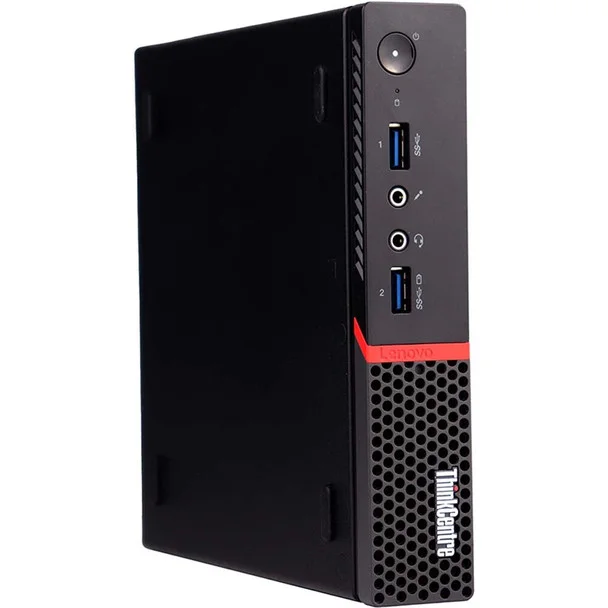
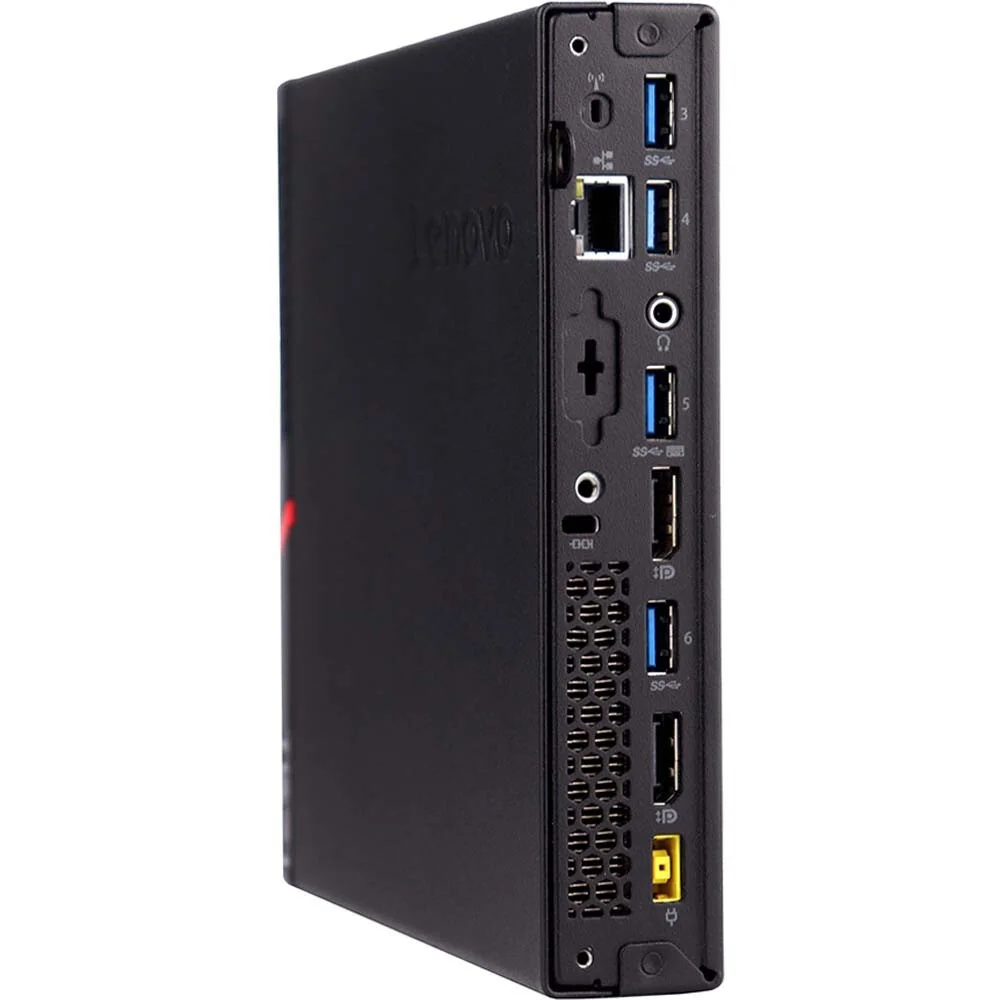
Lenovo M700 Core i5 6th Gen Tiny PC RAM 8 GB RAM 256GB PCIe Gen4 SSD
- Processor: Intel Core i5-6500T (6th Gen, 4 Cores, 4 Threads, 2.50 GHz base clock, up to 3.10 GHz Turbo, 35W TDP).
- Memory: 8GB DDR4-2133 SO-DIMM RAM (Upgradable to 32GB across 2 slots).
- Storage Interface: 1x 2.5-inch SATA bay (for standard SSDs/HDDs) and 1x M.2 slot restricted natively to M.2 SATA SSDs.
- Graphics: Integrated Intel HD Graphics 530.
- Motherboard Chipset: Intel B150.
- Power Supply: External 65W AC adapter.
- Dimensions: 179 mm x 182.9 mm x 34.5 mm; Weight: ~1.3 kg.
- Front Ports: 2x USB 3.0 (one with Always-On fast charging), 1x microphone jack, and 1x headphone/microphone combo jack.
- Rear Ports: 4x USB 3.0, 2x DisplayPort, Gigabit Ethernet (RJ-45), and 1x optional punch-out port (often configured for VGA, HDMI, or Serial).
- Internal Expansion: 1x M.2 Wi-Fi/Bluetooth card slot, 1x M.2 SATA SSD slot, and 1x 2.5″ drive caddy
KSh15,000.00
Lenovo ThinkCentre M700 Tiny PC – Core i5, 8GB RAM, 256GB SSD
The Lenovo ThinkCentre M700 Tiny PC is a compact desktop computer designed for everyday office work, home computing, education, and business productivity. Featuring a sixth-generation Intel Core i5 processor, 8GB RAM, and a 256GB solid-state drive (SSD), this small-form-factor desktop offers a practical solution for users who need dependable computing without a bulky computer tower.
Whether you are setting up a home office, equipping a business workstation, or looking for a desktop for everyday tasks, the Lenovo ThinkCentre M700 Tiny combines a space-saving design with useful performance for common productivity applications. Its compact enclosure helps keep your workspace organized while providing the essential computing capabilities needed for document editing, email, web browsing, spreadsheets, and other routine tasks.
Why Choose the Lenovo ThinkCentre M700 Tiny PC?
The Lenovo ThinkCentre M700 Tiny PC is designed for users who value compact equipment and practical desktop functionality. Its small footprint makes it suitable for offices, reception areas, study desks, and workstations where space is limited.
Unlike a traditional desktop tower, this tiny computer can fit into smaller working environments and can be paired with a compatible monitor, keyboard, and mouse to create a complete desktop setup. The exact accessories supplied depend on the product package, so check the listing before purchasing.
Key benefits include:
- Intel Core i5 processing: Suitable for everyday computing and common productivity workloads.
- 8GB RAM: Supports routine multitasking across compatible applications.
- 256GB SSD storage: Provides responsive access to files and applications.
- Tiny desktop design: Helps reduce clutter and save desk space.
- Business-oriented functionality: Suitable for many administrative and office environments.
- Flexible connectivity: Supports compatible monitors and peripherals through the ports available on the specific configuration.
Together, these features make the M700 Tiny a practical option for users seeking a compact desktop for daily work.
Intel Core i5 6th Generation Processor
The Lenovo ThinkCentre M700 Tiny is available with several sixth-generation Intel processors. The exact CPU should be confirmed for the unit being sold; some configurations feature the Intel Core i5-6500T, a four-core, four-thread processor with a base frequency of 2.5GHz and a maximum turbo frequency of 3.1GHz.
This processor is designed for standard desktop workloads, including document preparation, spreadsheet management, internet browsing, email, and compatible business software. It provides a useful foundation for everyday computing, particularly for users whose primary needs involve office productivity rather than demanding graphics or advanced workstation applications.
For small businesses, the processor can support routine administrative duties such as preparing invoices, updating records, managing customer information, and working with everyday office documents. Students and home users can also use a compatible system for research, assignments, presentations, and online learning.
Performance depends on the exact processor configuration, operating system, software, and workload. For modern games, advanced video editing, intensive 3D work, or other demanding applications, a newer computer may be a more suitable choice.
8GB RAM for Everyday Multitasking
With 8GB RAM, the Lenovo ThinkCentre M700 Tiny can handle many everyday computing activities. Memory allows the computer to keep applications and active information available while you work, helping you switch between common tasks.
This configuration is suitable for activities such as:
- Creating documents and presentations.
- Managing spreadsheets and business records.
- Browsing websites and conducting online research.
- Sending and receiving emails.
- Using compatible accounting and administrative software.
- Accessing educational platforms and online resources.
- Running standard productivity applications.
The 8GB memory configuration is a practical starting point for general office use. If your workload involves large files, many simultaneous applications, or memory-intensive software, you may want to investigate a memory upgrade.
Lenovo’s platform specifications list two memory slots and support for up to 32GB of DDR4-2133 memory on the M700 Tiny platform. Confirm the exact model and installed configuration before purchasing additional RAM.
256GB SSD Storage for Responsive Performance
The 256GB SSD provides storage for the operating system, installed applications, documents, and frequently used files. Solid-state storage generally offers faster access to data than a traditional mechanical hard drive, which can help improve startup times and application loading.
For everyday users, SSD storage makes routine tasks more convenient. Opening work documents, launching applications, and searching stored files can feel more responsive than on a system using an older mechanical hard drive.
A 256GB drive can be suitable for office documents, educational materials, business software, and essential personal files. Available space will be lower after the operating system and installed applications have occupied part of the drive.
If you regularly work with large video files, extensive photo libraries, or substantial business archives, consider using compatible external storage or another suitable storage solution.
Important storage note: The Lenovo ThinkCentre M700 Tiny platform documentation lists SATA storage options, including SATA-based M.2 SSD configurations. Do not advertise the installed drive as a PCIe Gen4 SSD unless the exact drive and system configuration have been verified. A 256GB SSD capacity alone does not establish its interface or generation.
Compact Tiny Desktop Design
One of the main advantages of the Lenovo ThinkCentre M700 Tiny is its small physical footprint. The Tiny form factor is designed to deliver desktop computing in a compact enclosure, making it useful in environments where desk space is at a premium.
It can be a good fit for:
Home offices: Create a tidy workstation without a large tower computer taking up valuable space.
Business offices: Equip administrative staff with compact computers for routine work.
Reception desks: Keep the computer setup organized while handling appointments, email, and other compatible office applications.
Schools and training rooms: Support basic computing activities in shared workspaces.
Small workstations: Pair the system with a compatible monitor and peripherals for a practical desktop arrangement.
The M700 Tiny platform is approximately 179mm wide, 182.9mm deep, and 34.5mm high in its standard Tiny enclosure. Dimensions and weight may vary with mounting accessories and the particular configuration.
Connectivity for Your Desktop Setup
The Lenovo ThinkCentre M700 Tiny provides connections for common desktop peripherals. Lenovo’s platform specifications list USB 3.0 ports, Ethernet networking, two DisplayPort outputs, audio connections, and an optional additional rear port that varies by configuration.
This can allow users to connect compatible monitors, keyboards, mice, USB accessories, wired network connections, and audio devices. The available display outputs may also support multiple monitors when the configuration and connected displays are compatible.
Before ordering, check the specific unit for:
- Available monitor outputs and supported display connections.
- USB port availability.
- Ethernet connectivity and any included wireless options.
- Audio connections.
- The power adapter included with the computer.
- Whether a monitor, keyboard, mouse, or mounting bracket is supplied.
Checking these details helps you choose the appropriate cables and accessories for your workspace.
A Practical Computer for Business and Office Productivity
The Lenovo ThinkCentre M700 Tiny is suitable for many standard business applications when paired with compatible software. Its compact design can be especially helpful for organizations that need multiple desktop computers without filling work areas with large towers.
Typical uses include document creation, spreadsheet work, email communication, invoicing, customer records, inventory applications, and web-based business tools. Actual suitability depends on each application’s system requirements and the operating system installed.
For a small business, the system can provide a practical platform for everyday administrative tasks. It can also suit a home office where the main requirements are reliable access to productivity software, online services, and stored documents.
Organizations planning to deploy several units should check software licensing, security requirements, operating system support, and compatibility with existing IT systems before purchasing.
Lenovo ThinkCentre M700 Tiny for Home and Education
The M700 Tiny can also serve as a general-purpose desktop for home users and students. It can be used for preparing assignments, researching topics, creating presentations, organizing documents, and accessing compatible educational websites.
For a shared family computer or study desk, its small enclosure helps keep the workspace uncluttered. With a suitable monitor and peripherals, it can provide a conventional desktop experience for everyday activities.
The integrated graphics available with supported processor configurations are intended for standard display and multimedia tasks rather than demanding modern gaming. Users who require high-end graphics performance should consider a computer designed specifically for those workloads.
Operating System and Security Considerations
Before purchasing the Lenovo ThinkCentre M700 Tiny, confirm which operating system is installed and whether it meets your needs.
The sixth-generation Intel Core processors available for this model are not on Microsoft’s supported processor list for standard Windows 11 installations. Buyers should therefore not assume that the computer qualifies for an officially supported Windows 11 upgrade.
Windows 10 standard support ended on 14 October 2025. If you intend to use Windows, review Microsoft’s current support options and confirm that the installed operating system is appropriate for your security and software requirements.
For business use, operating system support is particularly important when handling customer information, business documents, or other sensitive data. Consider compatibility, security updates, and long-term support before choosing an older desktop computer.
Lenovo ThinkCentre M700 Tiny PC: A Practical Buying Choice
The Lenovo ThinkCentre M700 Tiny PC combines a compact design with specifications suitable for many everyday computing needs. Its sixth-generation Intel Core i5 processor, 8GB RAM, and 256GB SSD provide a useful starting point for office productivity, study, home computing, and routine administrative tasks.
Its tiny enclosure is a major advantage for workspaces where desk area is limited, while SSD storage helps keep everyday file access and application loading responsive.
Before buying, confirm the exact processor model, SSD interface, operating system, physical condition, available ports, and included accessories. These details help ensure the computer matches your requirements and avoids unexpected setup costs.
If you need a compact desktop for common productivity tasks rather than demanding graphics workloads, the Lenovo ThinkCentre M700 Tiny is worth considering.
Frequently Asked Questions
What processor does the Lenovo ThinkCentre M700 Tiny use?
The M700 Tiny is available with several sixth-generation Intel processors. Some configurations use the Intel Core i5-6500T. Confirm the exact processor installed in the unit you are purchasing.
Is 8GB RAM enough for office work?
For many everyday office tasks, 8GB RAM is sufficient. Workloads involving demanding applications, large datasets, or extensive multitasking may benefit from additional memory.
Is the 256GB SSD suitable for everyday use?
Yes. A 256GB SSD can hold an operating system, productivity applications, and essential files. Users with large storage requirements may need additional compatible storage.
Does the Lenovo ThinkCentre M700 Tiny support PCIe Gen4 SSDs?
The platform documentation lists SATA storage options, including M.2 SATA. PCIe Gen4 compatibility should not be assumed. Verify the exact motherboard and installed drive before listing the product as Gen4.
Can the M700 Tiny run Windows 11?
Its sixth-generation Intel Core processors are not on the supported processor list for standard Windows 11 installations. Check the current operating system requirements before purchasing.
Does the computer come with a monitor and keyboard?
Included accessories depend on the seller’s package. Confirm whether the listing includes a monitor, keyboard, mouse, power adapter, and any necessary cables.
Is the Lenovo ThinkCentre M700 Tiny suitable for gaming?
It is primarily intended for general computing and office productivity. It may run some lightweight or older games, but it is not designed for demanding modern games.
-
- Micro Form Factor Deployment: The ultra-small footprint (1-liter volume) allows seamless installation behind VESA-compatible monitors, inside specialized retail kiosks, or on highly dense desktop surfaces.
- 6th Gen Computing Intel Core i5: Outfitted with an Intel Core i5 quad-core processor to efficiently execute standard business applications, web browser multitasking, and localized terminal tasks.
- High-Velocity Storage Interface: Features a 256GB PCIe Solid State Drive (SSD), optimizing operating system responsiveness, eliminating data retrieval bottlenecks, and maximizing drive longevity over mechanical alternatives.
- DDR4 Memory Performance: Integrated with 8GB of high-efficiency DDR4 system memory to sustain reliable processing workflows, featuring easy expansion pathways via modular SO-DIMM sockets.
- Thermal and Dust Defense: Includes Lenovo’s integrated chassis design that maintains lower acoustic output under workload while reducing standard environmental dust intake by up to 40%.
-
- Processor: Intel Core i5-6500T (6th Generation, Quad-Core, 4 Threads, 2.50 GHz Base Clock, up to 3.10 GHz Intel Turbo Boost, 6MB Smart Cache, 35W low-power TDP)
- System Memory: 8GB DDR4 SDRAM (Configured via SO-DIMM architecture, expandable up to 32GB maximum across 2 available slots)
- Primary Storage: 256GB PCIe Gen4 NVMe Solid State Drive (Operates at system-supported PCIe Gen3 bandwidth)
- Graphics Hardware: Integrated Intel HD Graphics 530
- Chassis Architecture: Ultra-Small Form Factor (1L Tiny PC)
- Network Controller: Integrated Intel I219-V Gigabit Ethernet LAN (RJ-45)
- Operating System Compatibility: Windows 10 Pro 64-bit Architecture
- Power Provision: External AC-to-DC power adapter (65W, efficiency up to 88%)
-
- Front Accessible I/O:
-
- 2 x USB 3.0 Ports (1 Always-On fast charging port)
- 1 x 3.5mm Microphone Input
- 1 x 3.5mm Headphone / Microphone Combo Jack
-
- Rear Panel I/O:
-
- 4 x USB 3.0 Ports
- 2 x DisplayPort Outputs (Supports native dual-independent display configurations)
- 1 x RJ-45 Gigabit Ethernet Port
- 1 x 3.5mm Headphone Output
- 1 x Optional Punch-out I/O Port (VGA / HDMI / Serial – configuration dependent)
-
- Front Accessible I/O:
-
- 1 x Lenovo ThinkCentre M700 Tiny Personal Computer
- 1 x External 65W AC Power Adapter with Regional Power Cord
Based on 0 reviews
Be the first to review “Lenovo M700 Core i5 6th Gen Tiny PC RAM 8 GB RAM 256GB PCIe Gen4 SSD”
Related products
-
Desktops, Lenovo Desktops
Lenovo ThinkCentre M70q Gen 4, Intel Core i5-13400T, 16GB DDR4 RAM, 512GB SSD.
 Desktops, Lenovo Desktops
Lenovo ThinkCentre M70q Gen 4, Intel Core i5-13400T, 16GB DDR4 RAM, 512GB SSD.
Feature Detail Processor Intel Core i5-13400T (10 Cores, 16 Threads, up to 4.4 GHz Max Turbo Frequency) Memory 16GB DDR4-3200MHz SO-DIMM RAM (upgradable to 64GB) Storage 512GB PCIe NVMe M.2 SSD Graphics Integrated Intel UHD Graphics 730 Operating System Windows 11 , 11 Pro Form Factor Tiny (1L), dimensions of 179 x 183 x 34.5 mm (7.05 x 7.2 x 1.36 inches) Connectivity Wi-Fi 6 or 6E, Bluetooth, Ethernet (RJ-45) Ports USB-C 3.2 Gen 1, multiple USB-A 3.2 Gen 2 and Gen 1 ports, USB 2.0, HDMI 2.1, DisplayPort 1.4, headphone/microphone combo jack SKU: n/a -
Dell Desktops, Desktops
Dell OptiPlex 7050 SSF Core i5 3.2GHz 6th Gen 8GB RAM 500GB HDD
- Form Factor: Small Form Factor (SFF) – space-saving design.
- Processor: Intel Core i5-6500, 6th Gen.
- Memory: 8GB DDR4 RAM.
- Storage: 500GB SATA Hard Disk Drive (HDD).
- Graphics: Integrated Intel HD Graphics 530.
- Operating System: Windows 11 .
- Connectivity: USB-C, USB 3.1, DisplayPort, HDMI, Ethernet.
Performance & Use Cases:- Good For: Microsoft Office, Google Workspace, email, web browsing, multitasking in office environments, basic photo editing.
- Limitations: The HDD leads to slower boot/load times; not designed for heavy gaming or high-end video editing.
SKU: n/a -
Dell Desktops, Desktops
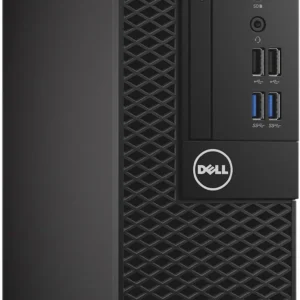
Dell OptiPlex 3050 SSF Intel Core i5 7th Gen 8GB RAM 1TB HDD
- Processor: Intel Core i5-7500 (7th Gen), Quad-Core, 3.8 GHz.
- Memory (RAM): 8GB DDR4.
- Storage: 1TB SATA Hard Drive (HDD).
- Graphics: Integrated Intel HD Graphics 630.
- Form Factor: Small Form Factor (SFF) – compact for limited spaces.
- Operating System: Typically Windows 10 Pro.
- Ports: USB 3.1 Gen 1, USB 2.0, HDMI, DisplayPort, Ethernet, Audio, (optional Serial/VGA).
- Connectivity: Wired Ethernet; optional Wi-Fi via M.2 card.
SKU: n/a -
Dell Desktops, Desktops
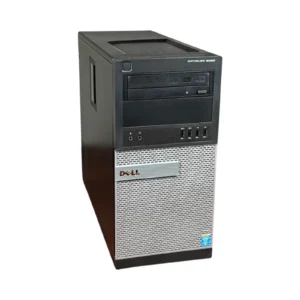
Dell Optiplex 9020 Mini-Tower Desktop, i5 3.4Ghz, 8GB DDR3 RAM, 500GB HDD
-
Model: Dell OptiPlex 9020 Mini-Tower
-
Processor: Intel Core i5, 3.4GHz Quad-Core
-
Memory: 8GB DDR3 RAM (Upgradeable)
-
Storage: 500GB Hard Disk Drive
-
Graphics: Intel Integrated Graphics
-
Networking: Gigabit Ethernet
-
Ports: USB 3.0, DisplayPort, VGA, Ethernet, Audio In/Out
-
Form Factor: Mini-Tower
-
Operating System: Windows-ready
SKU: n/a -












There are no reviews yet.