
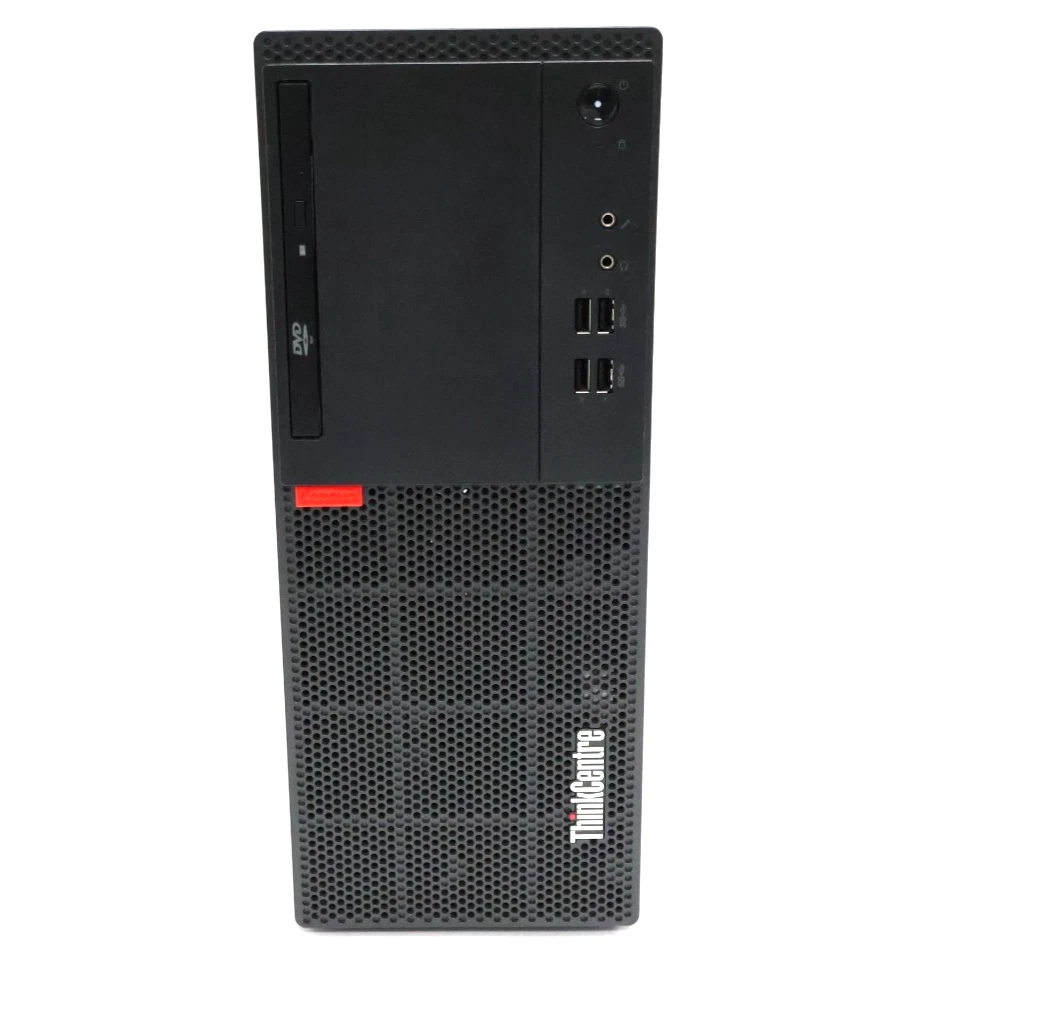
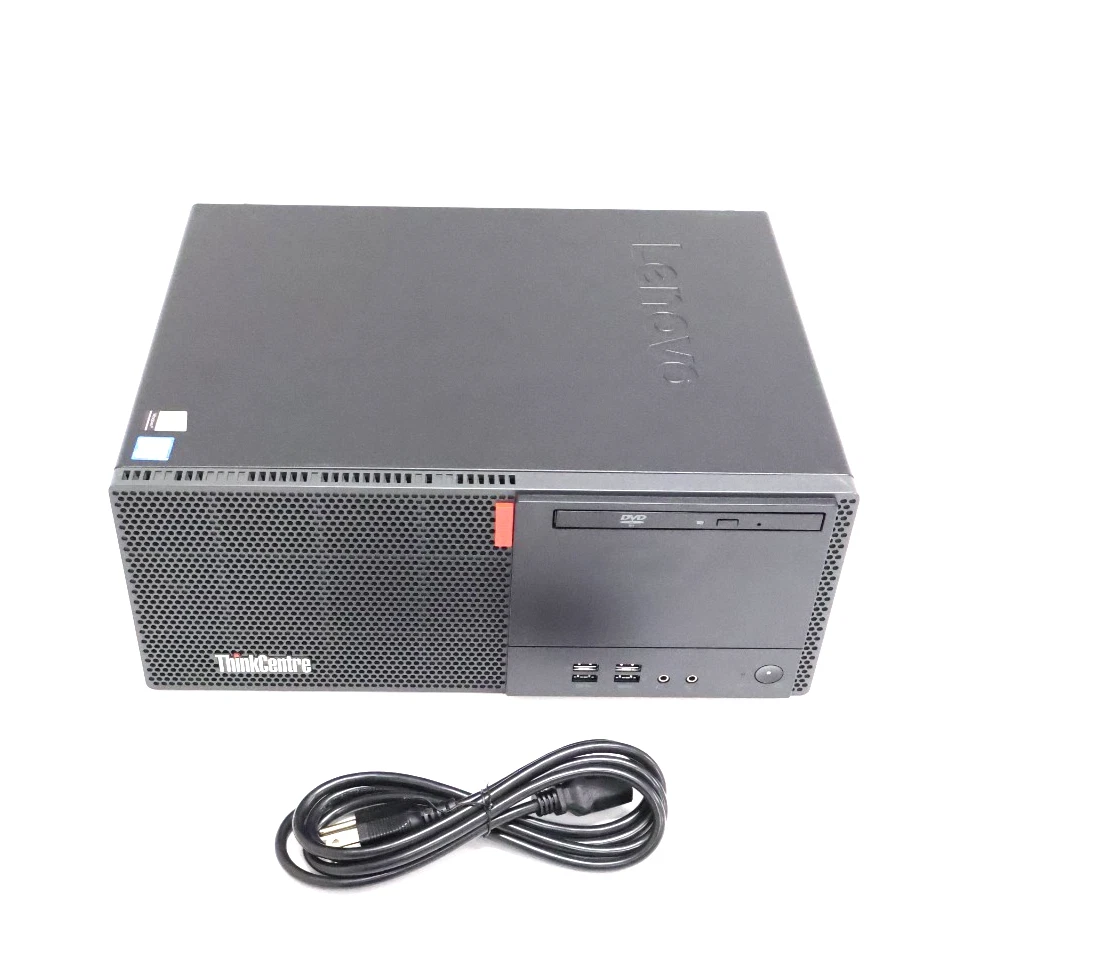
Lenovo ThinkCentre M710 Tower Desktop Computer Core i5-7400 Quad-Core, 8GB DDR4 RAM 500 HDD
- Processor: Intel Core i5-7400 (7th Gen, 4 Cores, 4 Threads, 3.00 GHz base clock, up to 3.50 GHz Intel Turbo Boost, 6MB Cache).
- Memory: 8GB DDR4-2400 RAM (Upgradable up to 64GB via 4x 288-pin DIMM slots).
- Storage: 500GB 3.5″ Mechanical Hard Disk Drive (HDD, 7200 RPM).
- Graphics: Integrated Intel HD Graphics 630.
- Motherboard Chipset: Intel B250.
- Power Supply: 210W fixed power supply unit (85% efficiency).
- Dimensions: 145 mm x 292.7 mm x 366 mm; Weight: ~6.5 kg.
- Front Ports: 4x USB 3.1 Gen 1, 1x microphone jack (3.5mm), 1x headphone/microphone combo jack (3.5mm), and an optional slim optical drive bay.
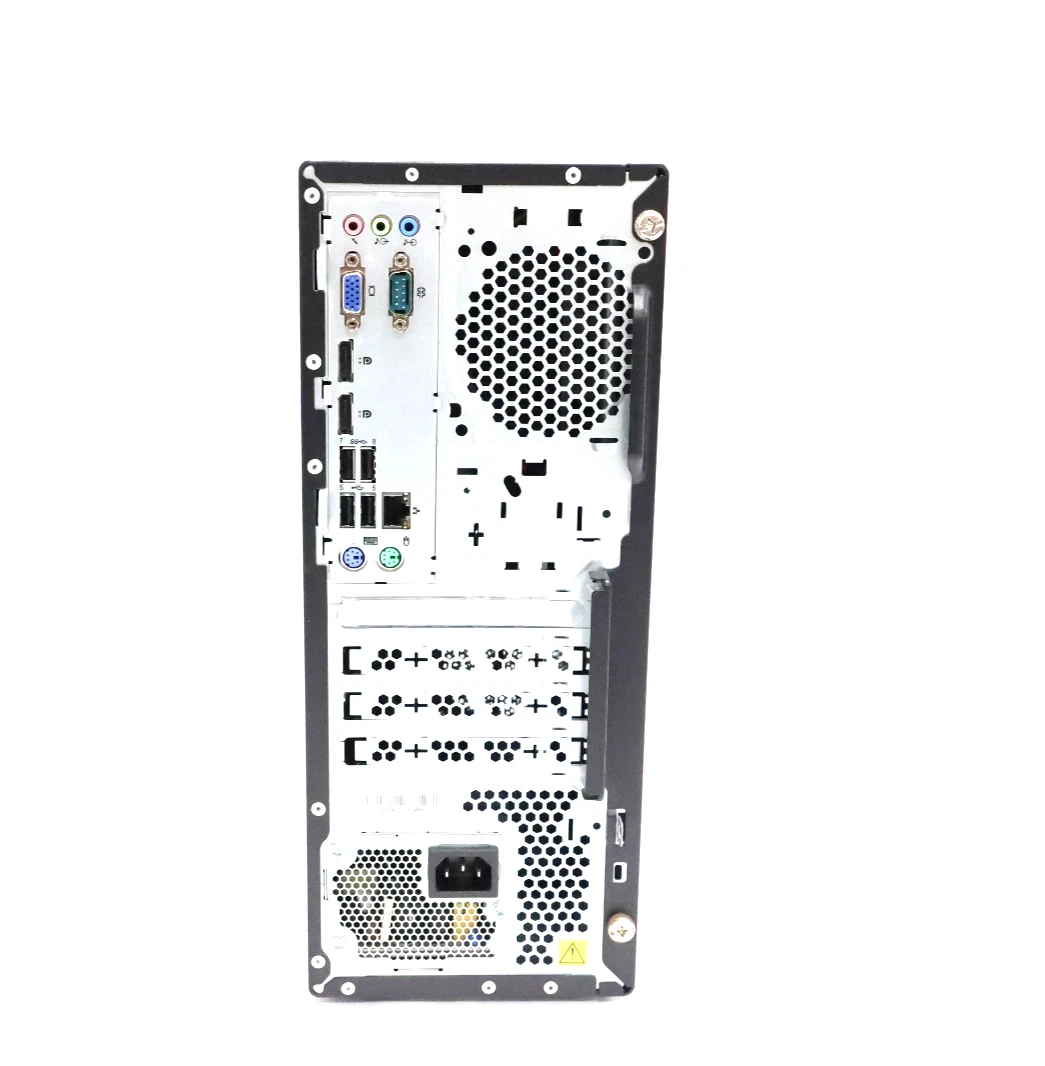
- Rear Ports: 2x USB 3.1 Gen 1, 2x USB 2.0, 2x DisplayPort, 1x VGA, 1x Serial port (9-pin), Gigabit Ethernet (RJ-45), and audio line-in/line-out/microphone ports.
- Internal Expansion: 1x PCIe 3.0 x16 slot (full-height), 2x PCIe 3.0 x1 slots (full-height), 1x M.2 slot for Wi-Fi, and 1x M.2 slot for NVMe SSD storage.
KSh16,000.00
Lenovo ThinkCentre M710 Tower Desktop PC – Core i5, 8GB RAM, 500GB HDD
The Lenovo ThinkCentre M710 Tower Desktop Computer is a practical desktop solution for businesses, offices, students, and home users who need a reliable computer for everyday productivity. Powered by an Intel Core i5-7400 quad-core processor, equipped with 8GB DDR4 RAM, and featuring a 500GB hard disk drive (HDD), this desktop computer is designed to support common computing tasks, including office applications, internet browsing, email, document creation, and business administration.
With its tower design, the Lenovo ThinkCentre M710 provides a traditional desktop setup suitable for workstations where functionality, connectivity, and potential hardware expansion are important. Whether you are equipping an office, setting up a home workspace, or looking for a computer for school and everyday use, this Lenovo desktop offers a practical starting point for routine computing needs.
Why Choose the Lenovo ThinkCentre M710 Tower Desktop?
The Lenovo ThinkCentre M710 Tower is designed for business and general-purpose computing. Its combination of an Intel Core i5 processor, 8GB DDR4 memory, and 500GB HDD provides the essential components for many everyday tasks.
This desktop computer is suitable for users who need a conventional tower PC for productivity applications, digital records, web-based services, and standard office workloads.
Key features include:
- Intel Core i5-7400 quad-core processor: Supports everyday computing and compatible productivity software.
- 8GB DDR4 RAM: Provides memory for routine multitasking and standard applications.
- 500GB HDD storage: Offers space for documents, applications, media, and business files.
- Tower desktop design: Provides a traditional desktop configuration with room for supported hardware upgrades.
- Business-focused functionality: Suitable for offices, small businesses, educational environments, and home workstations.
- Peripheral connectivity: Supports compatible monitors, keyboards, mice, and other accessories through available ports.
For users who need a straightforward desktop for everyday work, the ThinkCentre M710 Tower combines established desktop hardware with practical functionality.
Intel Core i5-7400 Quad-Core Processor
At the heart of the Lenovo ThinkCentre M710 Tower is the Intel Core i5-7400 processor, a seventh-generation Intel Core CPU with four cores and four threads. It operates at a base frequency of 3.0GHz and can reach a maximum turbo frequency of 3.5GHz under suitable conditions.
The processor is designed to handle common desktop workloads, including document editing, spreadsheet management, internet browsing, email communication, and compatible business applications.
For office users, this means the computer can provide a practical platform for preparing reports, updating business records, managing invoices, and working with standard productivity software. Students can also use it for research, assignments, presentations, and other everyday educational tasks.
The processor includes Intel HD Graphics 630, which supports standard display functions and everyday multimedia use. It is not intended to replace a modern dedicated graphics card for demanding gaming, advanced 3D work, or professional graphics applications.
Overall performance depends on the installed software, memory configuration, storage condition, and operating system. For routine computing, the Core i5-7400 offers a useful foundation, although users with demanding modern workloads may prefer a newer system.
8GB DDR4 RAM for Everyday Multitasking
The 8GB DDR4 RAM configuration gives the Lenovo ThinkCentre M710 Tower a practical amount of memory for common computing activities. RAM allows the system to keep active applications and data readily available while you work.
With 8GB of memory, the computer can support tasks such as:
- Creating documents and presentations.
- Working with spreadsheets and digital records.
- Browsing websites and researching information.
- Managing email and business communication.
- Running compatible accounting and office applications.
- Accessing educational platforms and online resources.
- Organizing files and performing routine administrative tasks.
For standard office work and home computing, 8GB RAM can be sufficient. Users who frequently work with large datasets, demanding applications, or many programs simultaneously may benefit from additional memory.
The ThinkCentre M710 Tower platform supports memory expansion, but the maximum capacity and compatible memory configuration should be checked against the exact model and motherboard before purchasing an upgrade.
500GB HDD Storage for Documents and Files
The Lenovo ThinkCentre M710 Tower includes a 500GB hard disk drive (HDD), providing storage space for the operating system, applications, work documents, photos, and other digital files.
A 500GB HDD can be useful for users who need to store a collection of office documents, educational materials, presentations, spreadsheets, and personal files. It offers a practical capacity for everyday storage needs, although the usable space will be lower after the operating system and installed applications occupy part of the drive.
Unlike solid-state storage, a traditional HDD uses mechanical components to read and write data. As a result, file access, startup, and application loading can be slower than on an SSD.
Users who want a more responsive experience may consider installing a compatible SSD, subject to the system’s available connections and supported configuration. An SSD upgrade can improve startup times and application responsiveness while the HDD may remain useful for additional file storage if the configuration permits.
Before purchasing or upgrading storage, confirm the installed drive type, physical condition, available connectors, and any required mounting accessories.
Tower Design for a Practical Desktop Workspace
The Lenovo ThinkCentre M710 Tower features a conventional desktop tower enclosure. Unlike tiny desktop computers, a tower system provides a larger chassis that can accommodate supported internal components and may offer more flexibility for certain hardware upgrades.
This design can be useful in business offices, administrative departments, classrooms, and home workstations where the computer does not need to be mounted behind a monitor or placed in a particularly small space.
The tower form factor can also make the system convenient for users who want access to compatible internal components for maintenance or future upgrades. Actual upgrade options depend on the installed motherboard, power supply, available drive bays, and other configuration details.
For buyers planning to add storage, memory, or expansion cards, it is important to confirm compatibility before ordering additional components.
A Suitable Desktop Computer for Office Work
The Lenovo ThinkCentre M710 Tower can support many routine business activities when paired with compatible software. Its Intel Core i5 processor and 8GB RAM configuration make it a practical choice for standard productivity workloads.
Typical office uses include:
Document preparation: Create letters, reports, proposals, and other business documents.
Spreadsheet management: Work with budgets, records, inventory lists, and routine calculations.
Email and communication: Manage correspondence and access compatible web-based communication tools.
Administrative operations: Maintain digital records, prepare invoices, and organize business information.
Customer service: Access supported business applications and online services.
Small-business productivity: Run compatible accounting, inventory, and office management software.
The 500GB HDD provides storage for everyday documents and files, while the tower design may allow supported hardware upgrades as business requirements change.
Organizations purchasing computers for multiple employees should also assess operating system support, security policies, software licensing, and compatibility with existing IT systems.
Lenovo ThinkCentre M710 for Home and Education
The Lenovo ThinkCentre M710 Tower can also be used as a general-purpose computer for home users and students. It supports common activities such as internet research, writing assignments, preparing presentations, managing personal documents, and accessing educational websites.
For a home office, the system can provide a traditional desktop environment for email, word processing, spreadsheets, and other routine productivity tasks. Students can use it for research and coursework, provided that their required software is compatible with the installed operating system.
The integrated Intel HD Graphics 630 is suitable for standard display output and many everyday multimedia tasks. However, this configuration is not designed for demanding modern games or advanced graphics production.
If you intend to use the computer for specialized applications, check the software’s minimum and recommended requirements before buying.
Connectivity for Monitors and Accessories
A desktop computer needs suitable connections for monitors, input devices, networking, and other accessories. The Lenovo ThinkCentre M710 Tower platform provides connectivity options that can vary by configuration.
Depending on the specific unit, ports may include USB connections, video outputs, Ethernet networking, and audio connections. Check the actual ports on the computer being sold to ensure compatibility with your existing equipment.
Before ordering, consider the following:
- Monitor compatibility: Confirm the available video outputs and whether an adapter is needed.
- Keyboard and mouse: Check whether these accessories are included in the package.
- Networking: Verify Ethernet availability and any wireless connectivity requirements.
- USB accessories: Confirm there are sufficient ports for your peripherals.
- Power cable: Check whether the required power cable is included.
- Expansion requirements: Verify available slots and power requirements before planning upgrades.
Checking these details can help you create a complete workstation without unexpected accessory costs.
Storage Upgrade Options for Better Responsiveness
One potential advantage of a tower desktop is the ability to investigate supported hardware upgrades. If your ThinkCentre M710 Tower has a compatible storage connection and mounting arrangement, replacing the HDD with an SSD or adding a supported drive may improve the overall user experience.
An SSD can reduce operating system startup times and improve application loading compared with a traditional mechanical hard drive. This can be particularly useful for users who regularly start programs, switch between applications, or access files throughout the day.
An HDD can still be useful for storing larger collections of documents and other files. The best storage arrangement depends on the exact configuration, available connections, budget, and storage requirements.
Before upgrading, check the system’s service documentation and confirm the drive interface, form factor, and compatibility.
Operating System and Security Considerations
Before purchasing the Lenovo ThinkCentre M710 Tower, confirm the installed operating system and review its ongoing support status.
The Intel Core i5-7400 is not on Microsoft’s supported processor list for standard Windows 11 installations. Buyers should therefore not assume that this desktop qualifies for an officially supported Windows 11 upgrade.
Windows 10 standard support ended on 14 October 2025. If you plan to use Windows, review Microsoft’s current support options and verify that the operating system installed on the computer meets your security and software requirements.
For business use, supported operating systems and current security updates are important when working with customer information, business records, and other sensitive files. Check compatibility with your essential applications before deploying this system.
Why Consider the Lenovo ThinkCentre M710 Tower?
The Lenovo ThinkCentre M710 Tower offers a practical combination of standard desktop components for everyday productivity.
Its key advantages include:
- Intel Core i5-7400 quad-core processing.
- 8GB DDR4 RAM for routine computing and multitasking.
- 500GB HDD storage for documents and applications.
- A tower enclosure with potential for supported hardware upgrades.
- Compatibility with common office and home computing tasks.
- Support for compatible monitors and desktop accessories.
- A practical platform for administrative work, education, and general productivity.
Its suitability depends on the condition of the unit, installed operating system, software requirements, and whether the existing HDD meets your performance expectations.
For buyers who need a computer for everyday office applications rather than intensive modern workloads, the Lenovo ThinkCentre M710 Tower is worth considering.
Frequently Asked Questions
Is the Lenovo ThinkCentre M710 Tower good for office work?
Yes. The Intel Core i5-7400, 8GB RAM, and 500GB HDD configuration can support many routine office activities, including document editing, spreadsheets, email, browsing, and compatible business software.
Is 8GB DDR4 RAM enough for everyday use?
For many standard computing tasks, 8GB RAM is sufficient. More memory may be useful for demanding applications or extensive multitasking, provided the system supports the upgrade.
Is 500GB HDD storage enough?
A 500GB HDD offers useful space for operating system files, applications, documents, and personal data. Users with large storage requirements may need additional or external storage.
Can I upgrade the Lenovo ThinkCentre M710 Tower to an SSD?
A compatible SSD upgrade may be possible. Confirm the available drive connections, supported drive types, and mounting arrangements for the exact system before purchasing an SSD.
Can the Intel Core i5-7400 run Windows 11?
The Intel Core i5-7400 is not on Microsoft’s supported processor list for standard Windows 11 installations. Check the current system requirements and supported operating system options before purchasing.
Does the Lenovo ThinkCentre M710 Tower include a monitor?
The monitor, keyboard, mouse, and power cable depend on the seller’s package. Review the product listing to confirm exactly which accessories are included.
-
- Quad-Core Processing: Powered by an Intel Core i5-7400 processor featuring four physical cores, providing efficient handling of standard office automation software, multi-tab web browsing, and daily database tasks.
- Scalable Memory Architecture: Configured with 8GB of DDR4 SDRAM, offering a reliable baseline for everyday business operations with a modular design that allows for straightforward scaling as workload demands increase.
- High-Capacity Storage: Equipped with a 500GB mechanical Hard Disk Drive (HDD) to deliver ample on-premise storage capacity for large local data sets, corporate documents, and software installations.
- Full-Size Expansion Potential: The robust tower form factor features a spacious interior designed to accommodate secondary internal storage drives, additional system memory, and low-profile or full-height PCIe expansion cards.
- Enterprise Security Integration: Built with dedicated hardware-level protections, including an integrated Trusted Platform Module (TPM 2.0) chip and comprehensive physical chassis lock infrastructure to safeguard corporate data.
-
- Processor: Intel Core i5-7400 (7th Generation, Quad-Core, 4 Threads, 3.0 GHz Base Clock, up to 3.5 GHz Intel Turbo Boost, 6MB Smart Cache, 65W TDP)
- System Memory: 8GB DDR4 SDRAM (Configured across DIMM slots, expandable up to 64GB across 4 available slots)
- Primary Storage: 500GB 3.5-inch SATA III Hard Disk Drive (HDD, 7200 RPM)
- Graphics Hardware: Integrated Intel HD Graphics 630
- Chassis Architecture: Traditional Desktop Tower
- Network Controller: Integrated Intel I219-V Gigabit Ethernet LAN (RJ-45)
- Operating System Compatibility: Windows 10 Pro 64-bit Architecture
- Optical Drive: Integrated DVD-RW Drive (Configuration dependent)
-
- Front Accessible I/O:
-
- 4 x USB 3.1 Gen 1 Ports
- 1 x 3.5mm Microphone Input
- 1 x 3.5mm Headphone / Microphone Combo Jack
-
- Rear Panel I/O:
-
- 2 x USB 3.1 Gen 1 Ports
- 2 x USB 2.0 Ports
- 2 x DisplayPort Outputs
- 1 x VGA Output
- 1 x RJ-45 Gigabit Ethernet Port
- 1 x Serial Port (9-pin)
- 3 x 3.5mm Audio Jacks (Line-In, Line-Out, Microphone)
- 2 x PS/2 Ports (Legacy Keyboard and Mouse)
-
- Front Accessible I/O:
Based on 0 reviews
Be the first to review “Lenovo ThinkCentre M710 Tower Desktop Computer Core i5-7400 Quad-Core, 8GB DDR4 RAM 500 HDD”
Related products
-
Desktops, HP Desktops
HP EliteDesk 800 G4 SFF Desktop Core i5 8500 8GB 500GB HDD
HP EliteDesk 800 G4 SFF Desktop Core i5 8500 8GB 500GB HDD
-
Processor: Intel Core i5-8500 (6 Cores)
-
Memory: 8GB DDR4 RAM
-
Storage: 500GB HDD
-
Graphics: Integrated Intel UHD Graphics
-
Ports: USB, DisplayPort, VGA, Ethernet, Audio Jacks
-
Form Factor: Small Form Factor (SFF)
-
Operating System: Windows 11.
SKU: n/a -
-
Dell Desktops, Desktops
Dell OptiPlex 3050 SSF Intel Core i5 7th Gen 8GB RAM 1TB HDD
- Processor: Intel Core i5-7500 (7th Gen), Quad-Core, 3.8 GHz.
- Memory (RAM): 8GB DDR4.
- Storage: 1TB SATA Hard Drive (HDD).
- Graphics: Integrated Intel HD Graphics 630.
- Form Factor: Small Form Factor (SFF) – compact for limited spaces.
- Operating System: Typically Windows 10 Pro.
- Ports: USB 3.1 Gen 1, USB 2.0, HDMI, DisplayPort, Ethernet, Audio, (optional Serial/VGA).
- Connectivity: Wired Ethernet; optional Wi-Fi via M.2 card.
SKU: n/a -
Desktops, Lenovo Desktops
Lenovo ThinkCentre M93 Desktop Core I3 4th gen 3.4ghz, 4 GB RAM, 500gb HDD, Win 11 Pro
 Desktops, Lenovo Desktops
Lenovo ThinkCentre M93 Desktop Core I3 4th gen 3.4ghz, 4 GB RAM, 500gb HDD, Win 11 Pro
Lenovo ThinkCentre M93 Desktop Core I3 4th gen 3.4ghz, 4 GB RAM, 500gb HDD, Win 11 Pro
-
Processor: Intel Core i3 (4th Gen) 3.4GHz
-
Memory: 4GB DDR3 RAM
-
Storage: 500GB HDD
-
Operating System: Windows 11 Pro (Pre-installed)
-
Ports: USB, VGA, DisplayPort, Ethernet, Audio Jacks
-
Form Factor: Tower/Desktop
SKU: n/a -
-
Desktops, HP Desktops
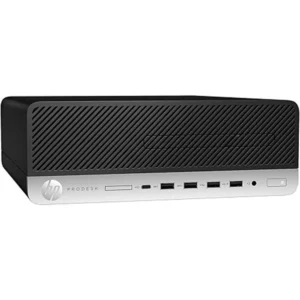
HP ProDesk 600 G6 Small Form Factor (SFF), i5-10500, 16GB RAM, 256GB SSD, Windows 11 Pro
 Desktops, HP Desktops
HP ProDesk 600 G6 Small Form Factor (SFF), i5-10500, 16GB RAM, 256GB SSD, Windows 11 Pro
-
Brand: HP
-
Model: ProDesk 600 G6
-
Form Factor: Small Form Factor (SFF)
-
Processor: Intel Core i5-10500 (10th Generation, 6 Cores, 12 Threads)
-
Base Clock Speed: 3.1GHz (Turbo Boost supported)
-
Memory: 16GB DDR4 RAM
-
Storage: 256GB SSD
-
Graphics: Integrated Intel UHD Graphics
-
Operating System: Windows 11 Pro
-
Networking: Gigabit Ethernet (LAN)
-
Ports: USB ports, DisplayPort, HDMI, audio ports
-
Security: TPM 2.0, BIOS-level security, physical lock support
-
Use Case: Business, office, institutional, and professional environments
SKU: n/a -












There are no reviews yet.